Share via

Windows 10 in Asus laptop firmware update or hyper-v causes automatic repair loop everytime

Anonymous
2019-08-11T17:28:30+00:00

I have an Asus FX705DX laptop (Ryzen 3550H) and i've been having the same issue since i bought it several months ago.

Everytime a new Firmware (BIOS) update from Asus is installed automatically by Windows Update my system runs into an Automatic Repair Loop and nothing i do (startup repair, system restore, uninstall updates) but reinstalling Windows solves the problem.

I also get to this situation with a new windows install and enabling Hyper-V.

This last time i made a clean new installations of Windows 10 1903 Education, installed all updates and then, when i enabled Hyper-V i got into reboot loop again. I ran automatic startup repair and SrtTrail.txt said:

**Root cause found:

---------------------------

A recently serviced boot binary is corrupt.

Repair action: Uninstall latest LCU

Result: Failed. Error code =  0x3713**

So i entered command prompt from rescue environment and did a:

    **DISM /Image:D:\ /ScratchDir:D:\Scratch /Cleanup-Image /RevertPendingActions**

which completed successfully and i could restart and, to my surprise, Hyper-V is enabled.

The problem is i tried to enable Hypervisor Platform and shows error "Changes cannot be completed".

I went again to recovery command line and tried to install if from there with:

    **dism /image:c:\ /scratchdir:c:\scratch /enable-feature /featurename:hypervisorplatform**

which gave me error:
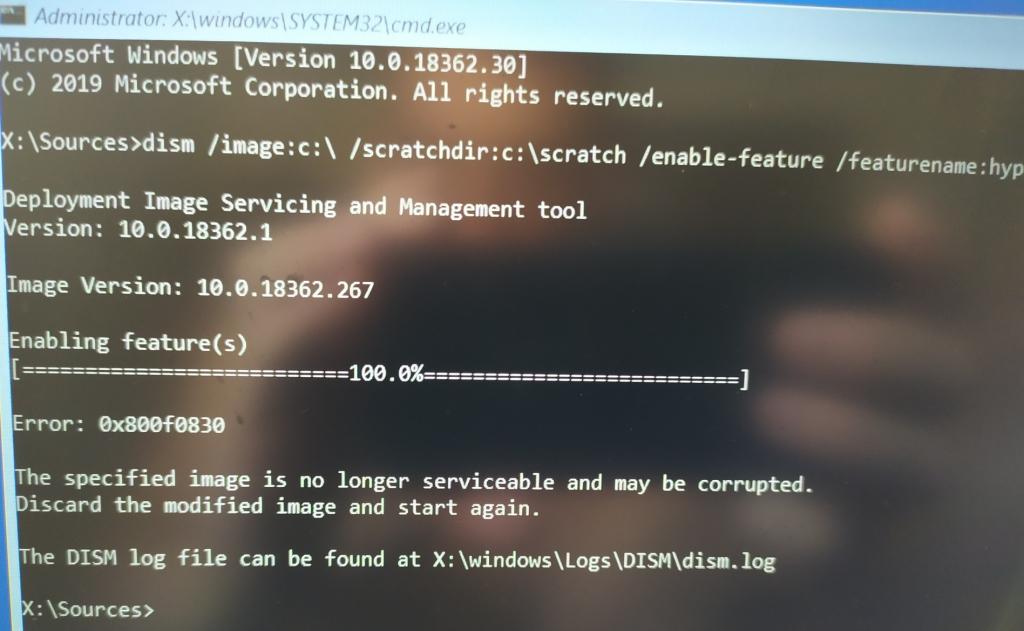
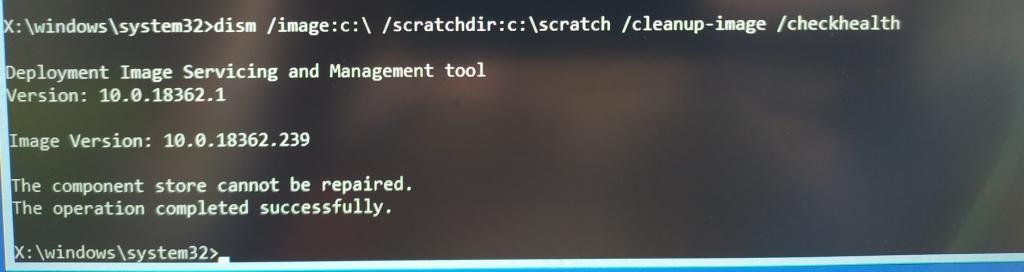
Then i did a dism checkhealth and i have:
Also, installing VisualStudio i got a warning saying:

    **Package 'Microsoft.VisualStudio.AspNet45.Feature,version=16.0.28315.86' failed to install.

Search URL

https://aka.ms/VSSetupErrorReports?q=PackageId=Microsoft.VisualStudio.AspNet45.Feature;PackageAction=Install;ReturnCode=-2146498512

Details

Command executed: "C:\Windows\system32\dism.exe" /online /quiet /norestart /Enable-Feature /FeatureName:"netfx4extended-aspnet45" /All /logPath:"C:\Users\mike\AppData\Local\Temp\dd_setup_20190811143007_359_Microsoft.VisualStudio.AspNet45.Feature.log"

Return code: -2146498512

Return code details: Unknown error (0x800f0830)**

So i can work with the system but it seems a bit corrupted.

Some apps like Boxcryptor are failing to install now.

Thanks in advance. Any help would be much appreciated.

I attach links to dism logfiles.

  https://drive.google.com/file/d/1MGO9qt5lbVAqu5p6LI7jOAMTDLn2RG69/view?usp=sharing

  https://drive.google.com/file/d/1wEnwJhk5v3Xgc5cv-9FjDzpudjBp_RWz/view?usp=sharing

Windows for home | Windows 10 | Windows update

Locked Question. This question was migrated from the Microsoft Support Community. You can vote on whether it's helpful, but you can't add comments or replies or follow the question.

0 comments No comments

8 answers

Sort by: Most helpful
  1. Anonymous
    2019-08-11T17:37:45+00:00

    Hi Mike

    My name is Andre Da Costa; an Independent Consultant, Windows Insider MVP and Windows & Devices for IT MVP. I'm here to help you with your problem.

    How often are you getting BIOS updates though? I would also not install them from Windows Update, but rather do so from ASUS websites.

    You really should only apply BIOS updates unless there is a problem.

    I noticed you had posted this on tenforums, did you try the recommendations there?

    https://www.tenforums.com/windows-updates-activ...

    I would start by not installing the BIOS updates from Microsoft and do those only if there is an actual problem and install them from ASUS website.

    Press Windows key + R

    Type: winver

    Hit Enter

    What is the build number listed?

    Was this answer helpful?

    3 people found this answer helpful.
    0 comments No comments
  2. Anonymous
    2019-08-12T02:25:24+00:00

    I am looking on ASUS website, but I am not finding this particular model: sus FX705DX

    Press Windows key + R

    Type: msinfo32

    Hit Enter

    Click on System summary

    Take a screenshot then post in a reply here.

    Was this answer helpful?

    0 comments No comments
  3. Anonymous
    2019-08-11T21:58:42+00:00

    But i had the same issues with 1809.

    Was this answer helpful?

    0 comments No comments
  4. Anonymous
    2019-08-11T21:58:08+00:00

    Sorry, winver is 1903 (build 18362.267)

    Was this answer helpful?

    0 comments No comments
  5. Anonymous
    2019-08-11T21:46:39+00:00

    Hi André,

    There has been 2 BIOS updates in 4 months. Yeah now i know i must not trust MS and ASUS to update my BIOS but Microsoft haven't been making this easy last times. Now i've already disabled from gpedit.msc automatic updates and update drivers, for the next time. But still i have the problem with BIOS updated with EZ flash utility and ASUS BIOS file.

    Enabled secure boot in BIOS, still the same (can't enable Hypervisor platform).

    Tried to run a sfc scan and got a "Theres a system repair pending..." message.

    Deleted WinSXS\pending.xml and tried again. It run but said:

    "Windows Resource Protection found corrupt files but was unable to fix some of them."

    Here's the log file for that operation.

    Any hint?

    Was this answer helpful?

    0 comments No comments
