' cx='32' cy='32' r='32' /%3E%3Ctext x='50%25' y='55%25' dominant-baseline='middle' text-anchor='middle' fill='%23FFF' %3EBS%3C/text%3E%3C/svg%3E)


' cx='32' cy='32' r='32' /%3E%3Ctext x='50%25' y='55%25' dominant-baseline='middle' text-anchor='middle' fill='%23FFF' %3EHR%3C/text%3E%3C/svg%3E)
' cx='32' cy='32' r='32' /%3E%3Ctext x='50%25' y='55%25' dominant-baseline='middle' text-anchor='middle' fill='%23FFF' %3ESL%3C/text%3E%3C/svg%3E)
' cx='32' cy='32' r='32' /%3E%3Ctext x='50%25' y='55%25' dominant-baseline='middle' text-anchor='middle' fill='%23FFF' %3EAN%3C/text%3E%3C/svg%3E)

Hi @Boopathi S
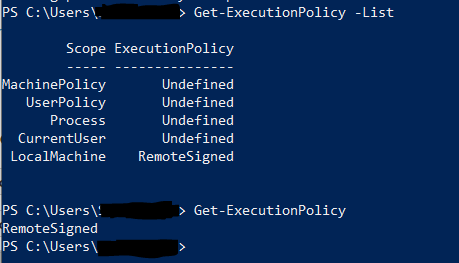
You must set the PowerShell Execution Policy from Restricted to RemoteSigned or Unrestricted to allow local PowerShell scripts to run.
For more information about PowerShell Execution Policy, type help about_signing or help Set-ExecutionPolicy at the PowerShell command prompt.
Procedure
- Select Start > All Programs > Windows PowerShell version > Windows PowerShell.
- Type
Set-ExecutionPolicy RemoteSignedto set the policy to RemoteSigned. - Type
Set-ExecutionPolicy Unrestrictedto set the policy to Unrestricted. - Type
Get-ExecutionPolicyto verify the current settings for the execution policy. - Type Exit.
If the Answer is helpful, please click Accept Answer and up-vote, this can be beneficial to other community members.
' cx='32' cy='32' r='32' /%3E%3Ctext x='50%25' y='55%25' dominant-baseline='middle' text-anchor='middle' fill='%23FFF' %3ERM%3C/text%3E%3C/svg%3E)
' cx='32' cy='32' r='32' /%3E%3Ctext x='50%25' y='55%25' dominant-baseline='middle' text-anchor='middle' fill='%23FFF' %3EZM%3C/text%3E%3C/svg%3E)
' cx='32' cy='32' r='32' /%3E%3Ctext x='50%25' y='55%25' dominant-baseline='middle' text-anchor='middle' fill='%23FFF' %3ELC%3C/text%3E%3C/svg%3E)