
i have forgotten my bitlocker password for my external hard disc how can i solve it?
This browser is no longer supported.
Upgrade to Microsoft Edge to take advantage of the latest features, security updates, and technical support.
' cx='32' cy='32' r='32' /%3E%3Ctext x='50%25' y='55%25' dominant-baseline='middle' text-anchor='middle' fill='%23FFF' %3EA%3C/text%3E%3C/svg%3E)
Hello All,
After trying to search for a good article on how to fix my BitLocker situation, I found the following article the most useful from Lenovo. https://pcsupport.lenovo.com/us/en/solutions/HT502684
I am sharing this knowledge because after thoroughly searching, all the other Windows Microsoft Community Articles that I was looking for answers from, did not provide me with adequate information. I hope this helps you, too:
How to find BitLocker recovery key on Windows 8.1/10
Description
When you update your device’s BIOS or do recovery action, you might need to input BitLocker recovery key. You can find recovery key for your device following below steps.
For Windows 7, per Microsoft design, there is no online digital backup. When you initially set up BitLocker, a Recovery Key will be created and The BitLocker setup wizard prompts you to choose how to store the recovery key. You can choose from the following options:
For Windows 8 onwards, please read the solutions below to get the BitLocker recovery key. Affected Brands
Operating Systems
Solution
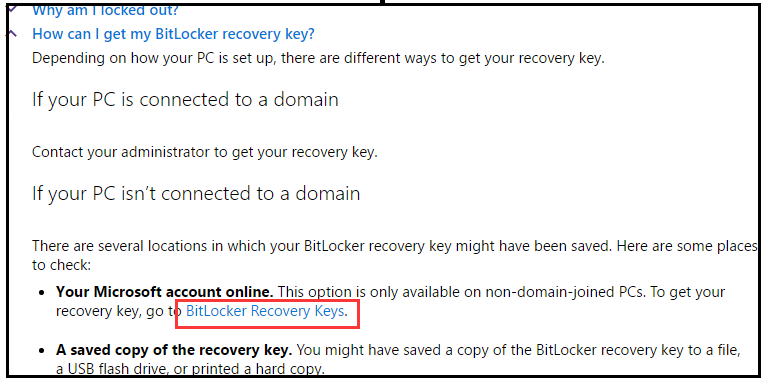
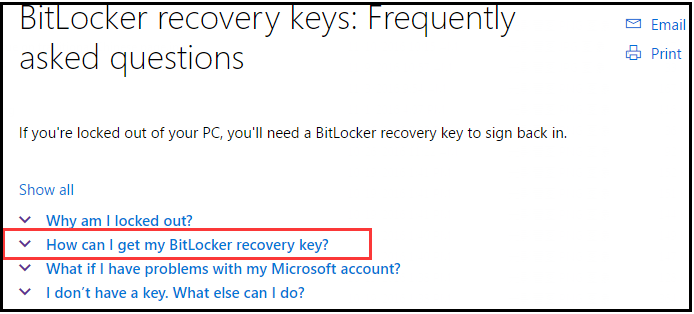 3. Click “BitLocker Recovery Keys”
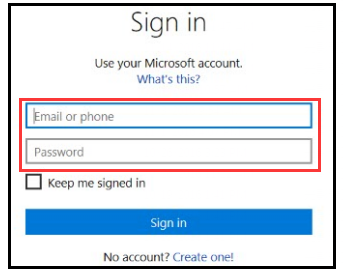
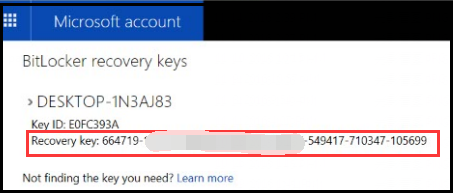
 4. On the popped screen input your account and password, then click “signs in” to get your recovery key. Of course if you had login in your Microsoft account, you can get your recovery key directly.
Additional Information
If you're having problems with your Microsoft account, here are a few tips.
I have a Microsoft account, but I can’t sign in
Go to the Reset your password page to resolve problems with your account.
I’m signed in with my Microsoft account, but I don’t see my recovery key
The recovery key might not have been saved to your Microsoft account online. In this case, look for any copies of the recovery key you might have printed or saved to a file.
If you accidentally deleted the recovery key from your Microsoft account online and want to save it again, you need to force Windows to back up the recovery key automatically. The only way to do this is to switch to a local account, and then switch back to a Microsoft account.
(If you're using a mouse, point to the upper-right corner of the screen, move the mouse pointer down, click Settings, and then click Change PC settings.) 2. Tap or click Users, tap or click Switch to a local account, and follow the instructions. 3. Repeat step 1, tap or click Users, tap or click Switch to a Microsoft account, and follow the instructions.
Related Articles
Locked Question. This question was migrated from the Microsoft Support Community. You can vote on whether it's helpful, but you can't add comments or replies or follow the question.
This answer has been deleted due to a violation of our Code of Conduct. The answer was manually reported or identified through automated detection before action was taken. Please refer to our Code of Conduct for more information.
Comments have been turned off. Learn more
i have forgotten my bitlocker password for my external hard disc how can i solve it?
This answer has been deleted due to a violation of our Code of Conduct. The answer was manually reported or identified through automated detection before action was taken. Please refer to our Code of Conduct for more information.
Comments have been turned off. Learn more

Thanks for article . This post will helps to other users for finding bitlocker.
But I already known this , I read from docs.microsoft.com
Keep posting useful articles > wish you all the best for your work
This answer has been deleted due to a violation of our Code of Conduct. The answer was manually reported or identified through automated detection before action was taken. Please refer to our Code of Conduct for more information.
Comments have been turned off. Learn more