hi, guys, I know this already very old but I was playing with my friends cod1 for chilling then I just upgraded to Windows 10 last day, I was very happy by that but when I tried
COD1 they giving something about OpenGL , IDK , anyway it was working perfectly in windows 7 like very ultra (graphics-details-shaders......) , when I read that Microsoft will leave Windows7 with no security then I upgraded , I already
checked everything about opengl.file or compatibility . id like from you to help. her what it gave me
COD MP 1.1 build win-x86 Oct 8 2003
----- FS_Startup -----
Current language: English
Current search path:
E:\Outils\GG\Call.of.Duty.1.Thepcgames.net\Call of Duty 1 Thepcgames.net\Game/main
File Handles:
0 files in pk3 files
ERROR: No languages available because no localized assets were found
execing default_mp.cfg
couldn't exec language.cfg
execing config_mp.cfg
couldn't exec autoexec_mp.cfg
execing safemode_mp.cfg
fs_basepath is write protected.
fs_homepath is write protected.
ERROR: No languages available because no localized assets were found
Hunk_Clear: reset the hunk ok
...detecting CPU, found Intel Pentium III
Measured CPU speed is 2.33 GHz
System memory is 1024 MB (capped at 1 GB)
Video card memory is 256 MB
Streaming SIMD Extensions (SSE) supported
Winsock Initialized
Opening IP socket: localhost:28960
Hostname: Ladjouas-PC
IP: 192.168.1.14
----- Client Initialization -----
Resolving codmotd.activision.com
Couldn't resolve address
----- Initializing Renderer ----
----- Client Initialization Complete -----
----- R_Init -----
Initializing OpenGL subsystem
...initializing QGL
...calling LoadLibrary( 'C:\WINDOWS\system32\opengl32.dll' ): succeeded
...setting mode 3: 640 480 FS
...using colorbits of 32
...calling CDS: ok
...registered window class
...created window@0,0 (640x480)
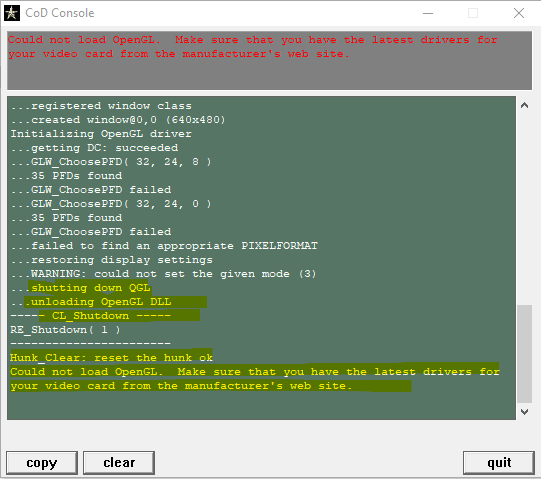
Initializing OpenGL driver
...getting DC: succeeded
...GLW_ChoosePFD( 32, 24, 8 )
...35 PFDs found
...GLW_ChoosePFD failed
...GLW_ChoosePFD( 32, 24, 0 )
...35 PFDs found
...GLW_ChoosePFD failed
...failed to find an appropriate PIXELFORMAT
...restoring display settings
...WARNING: could not set the given mode (3)
...shutting down QGL
...unloading OpenGL DLL
----- CL_Shutdown -----
RE_Shutdown( 1 )
Hunk_Clear: reset the hunk ok
Could not load OpenGL. Make sure that you have the latest drivers for your video card from the manufacturer's web site.
' cx='32' cy='32' r='32' /%3E%3Ctext x='50%25' y='55%25' dominant-baseline='middle' text-anchor='middle' fill='%23FFF' %3EA%3C/text%3E%3C/svg%3E)
