Share via

Windows 10 Pro /hardware performance issue

Anonymous
2019-10-01T06:22:49+00:00

Hello Community  ,

Since I upgraded from windows 7 to windows 10 and I'm facing performance issues on my Laptop , it's an old one but good quality 

it's toshiba satellite L505 / intel core2 duo T6400 processor with 3 GB RAM , I did all the steps existed in that blog about enhancing the performance of the laptop but everything is still the same .

the option of buy new laptop is not available right now , so I'm thinking about upgrade the hardware  , starting by RAM i read that windows 32 bits doesn't read more that 3.* GB of ram and to get use of more ram I need 64x OS , so checking the compatibility of my processor this is what I found >>>>>
so Thinking that adding more RAM can improve the performance or not , I'm not sure and looking for help about that .

SOME OTHER SYSTEM INFORMATION WOULD HELP

OS Name                     Microsoft Windows 10 Pro

Version 10.0.18362 Build 18362

Other OS Description  Not Available

OS Manufacturer          Microsoft Corporation

System Manufacturer TOSHIBA

System Model                 Satellite L505

System Type                 X86-based PC

System SKU                 Montevina_Fab

Processor                 Intel(R) Core(TM)2 Duo CPU     T6400  @ 2.00GHz, 2000 Mhz, 2 Core(s), 2 Logical Processor(s)

BIOS Version/Date         INSYDE 1.10, 5/5/2009

SMBIOS Version         2.4

Embedded Controller Version      255.255

Installed Physical Memory (RAM)       3.00 GB

Total Physical Memory                       2.87 GB

Available Physical Memory               607 MB

Total Virtual Memory                       7.37 GB

Available Virtual Memory              3.92 GB

Page File Space                             4.50 GB

_____________________________________________________________

another option to improve the performance I think is changing my HDD to SSD which i read it can improve , not sure and need your help ( related to that option , I have the OS with a license connected to my Microsoft account  , so my question if i installed a new 64 bit OS I can use the same license ?? )

finally , do you think doing both options would improve a lot the pc performance ( Total of New RAM would be 6 GB , and new SSD 2.5 M2 sata ) ??? 

Do you need any system information to assist on this  ?? 

thanks for your patience and your help in advance  

BEST REGARDS

Windows for home | Windows 10 | Performance and system failures

Locked Question. This question was migrated from the Microsoft Support Community. You can vote on whether it's helpful, but you can't add comments or replies or follow the question.

0 comments No comments

6 answers

Sort by: Most helpful
  1. DaveM121 881.8K Reputation points Independent Advisor
    2019-10-01T07:27:08+00:00

    Hi Mokhtar

    Yes, you are running the 32bit version, which is best for your system, if you do want to keep running Windows 10, then upgrading your RAM to 4GB would help, the best possible upgrade you could do is to install an SSD drive then clean install the 32bit version of Windows 10 . . .

    Was this answer helpful?

    0 comments No comments
  2. Anonymous
    2019-10-01T07:21:22+00:00

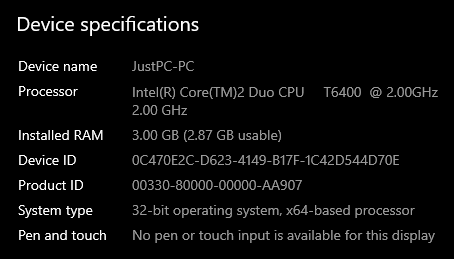
    it's 32 bit as shown at the  photo 

    Windows 10 pro , version  1903 

    OS build 18362.356

    I imagine if it was running with 64 bit the laptop would be dead by now :)

    Was this answer helpful?

    0 comments No comments
  3. DaveM121 881.8K Reputation points Independent Advisor
    2019-10-01T07:09:36+00:00

    Hi Mokhtar

    Open the Settings App (gear icon on your Start Menu)

    Go to System - About

    Under System Type, do you have the 64bit or 32bit version of Windows 10 installed on your system?

    Was this answer helpful?

    0 comments No comments
  4. Anonymous
    2019-10-01T07:05:37+00:00

    Actually I know by fact that windows 7 is the much better for me than windows 10 , the problem I can't go back to  7  , even I can't find online any good version of windows 7 even if it's patched with Fake key , the reality is I got stuck with Windows 10 so I'm looking for any light in that tunnel 

    Thanks for your reply :)

    Was this answer helpful?

    0 comments No comments
  5. DaveM121 881.8K Reputation points Independent Advisor
    2019-10-01T06:34:35+00:00

    Hi Mokhtar

    To be honest, your system is barely strong enough to run the 32bit version of Windows 10 and will never run the 64bit version . . .

    You should upgrade you RAM to 4GB, that may see a slight improvement in performance, but your processor and other components are also holding back your system performance

    Most likely there are also some device drivers missing from your system, open Device Manager (accessible by right clicking your Start Button) do any of the devices listed there have an exclamation mark beside them?

    Honestly, Windows 7 is the best operating system for that device, it will be responsive and reliable, you will always have trouble running Windows 10 on that device, sorry . . .

    Was this answer helpful?

    0 comments No comments
