Hi Elder and Frank,
1. The system was updated to have a 250gb SSD as the C drive 9 moths ago. This is the 1st safe mode usage since then. There are 3 other 500gb each HDD attached for programs and data.
2. The keyboards I tested with the tower are both USB attached units. PS2 connected keyboards became unavailable as a dodo years ago, which is why the the ones I have are now USB. I am reasonably certain I have used F8 for a safe mode boot using them
since then. See also 3.
3. I have another win7 64bit PC, this one an Hp laptop - and it also does not respond to an F8 safe mode start. No separate keyboard involved there.
4. Before I resorted to holding the F8 key down, I tried the tap the key approach several times, each one starting earlier in the cycle, until the tapping started when the BIOS access key advice appeared. Did not work, so I went to holding the key down.
5. The timeout mentioned was checked - screenshot attached. It was set for 30 sec and I haven't changed it - the failed F8 safe mode boots were with this setting
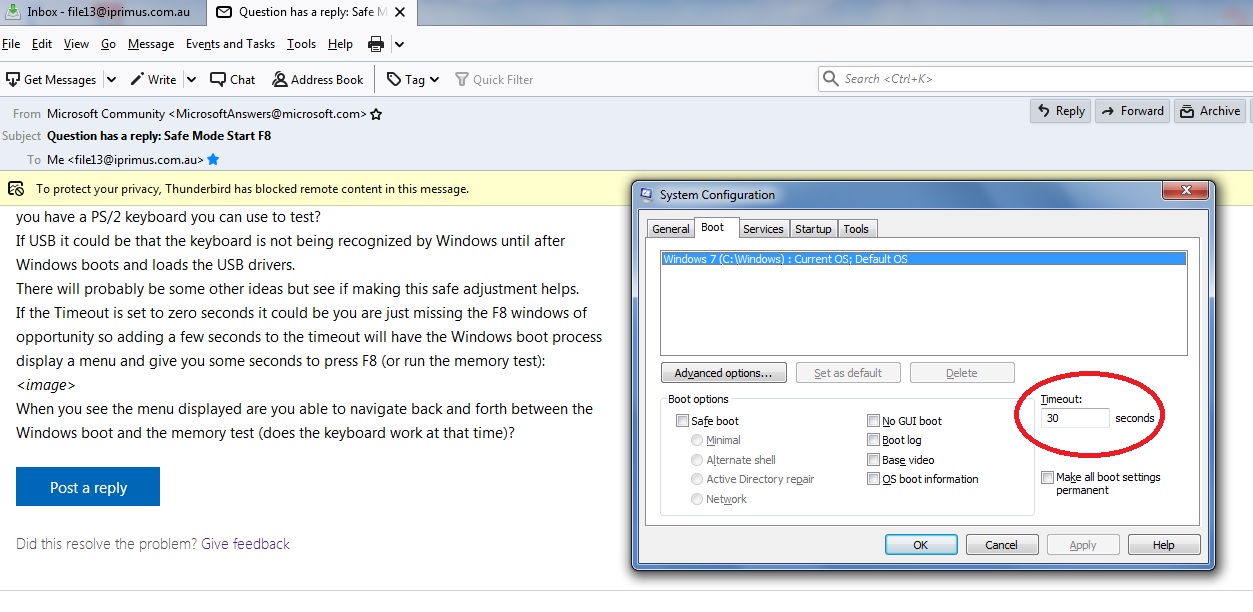
5. Colleague previously mentioned (whom theorised a timeout) has checked all his machines, some new laptops (and all but one are windows 10, the odd-one out is win 7, like mine) since I raised this with him, and none of his PC's will do an F8 safe mode
boot.
6. This really does look like a fairly serious multi-version windows issue. If you are right about the keyboard USB drivers, then in a modern scenario a safe mode boot using F8 from such a keyboard would be impossible, as the means to recognise such a
key sequence is absent in the time period when it must be applied.
If windows is not properly shut down, a black-and-white old style text menu including safe boot options is displayed at the next start, so it does not seem impossible to do. A change to the windows that program that resides at MBR and starts the whole process
off?
Alternatively, other means of fix are...?
' cx='32' cy='32' r='32' /%3E%3Ctext x='50%25' y='55%25' dominant-baseline='middle' text-anchor='middle' fill='%23FFF' %3EA%3C/text%3E%3C/svg%3E)
