I am HP pavilion x360 running windows 10 1903 and network driver Realtek RTL8822BE ac pci with everything up to date.
When I try to enable hosted network it says group or resource is not in correct state.
Hosted Network mode is set to allow but hosted network support is no when running netsh wlan show drivers .
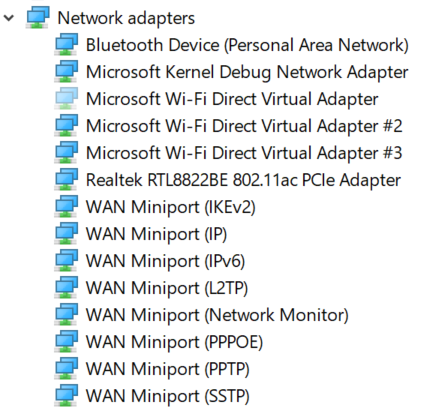
There is no hosted network driver in device manager even under hidden devices. There are several wifi direct drivers and I tried to replace it with hosted network driver through manually selecting from a list update option but it did'nt help.
Here's the cmd summary
C:\WINDOWS\system32>netsh wlan set hostednetwork mode=allow
The hosted network mode has been set to allow.
C:\WINDOWS\system32>netsh wlan start hostednetwork
The hosted network couldn't be started.
The group or resource is not in the correct state to perform the requested operation.
C:\WINDOWS\system32>netsh wlan show drivers
Interface name: Wi-Fi
Driver : Realtek RTL8822BE 802.11ac PCIe Adapter
Vendor : Realtek Semiconductor Corp.
Provider : Microsoft
Date : 6/5/2019
Version : 2024.0.8.108
INF file : netrtwlane.inf
Type : Native Wi-Fi Driver
Radio types supported : 802.11n 802.11g 802.11b 802.11ac 802.11n 802.11a
FIPS 140-2 mode supported : Yes
802.11w Management Frame Protection supported : Yes
Hosted network supported : No
Authentication and cipher supported in infrastructure mode:
Open None
WPA2-Personal CCMP
Open WEP-40bit
Open WEP-104bit
Open WEP
WPA-Enterprise TKIP
WPA-Personal TKIP
WPA2-Enterprise TKIP
WPA2-Personal TKIP
WPA-Enterprise CCMP
WPA-Personal CCMP
WPA2-Enterprise CCMP
Vendor defined TKIP
Vendor defined CCMP
Vendor defined Vendor defined
Vendor defined Vendor defined
WPA2-Enterprise Vendor defined
WPA2-Enterprise Vendor defined
Vendor defined Vendor defined
Vendor defined Vendor defined
IHV service present : Yes
IHV adapter OUI : [00 e0 4c], type: [00]
IHV extensibility DLL path: C:\WINDOWS\system32\Rtlihvs.dll
IHV UI extensibility ClSID: {6c2a8cca-b2a2-4d81-a3b2-4e15f445c312}
IHV diagnostics CLSID : {00000000-0000-0000-0000-000000000000}
Wireless Display Supported: Yes (Graphics Driver: Yes, Wi-Fi Driver: Yes)
Here's all network adapter drivers
' cx='32' cy='32' r='32' /%3E%3Ctext x='50%25' y='55%25' dominant-baseline='middle' text-anchor='middle' fill='%23FFF' %3EA%3C/text%3E%3C/svg%3E)

' cx='32' cy='32' r='32' /%3E%3Ctext x='50%25' y='55%25' dominant-baseline='middle' text-anchor='middle' fill='%23FFF' %3EFD%3C/text%3E%3C/svg%3E)