Share via

Window 10 computer can't reach a webserver on my local network

Anonymous
2019-12-10T02:19:02+00:00

I've got a device running a webserver application of sorts on my local network. The device has a reserved address so it is always at the same local ip address on port 8080. The application is actually used for streaming data, but the only really relevant bit about it is that it can server a web page so that you can see that its there. The device is running android, but is presumably irrelevant.

My Windows 10 computer could reach this web server earlier today, and now its saying that it can't. This is true for Edge, Chrome, and my own application. Other computers on my network can still reach the device. Windows Defender is turned off (for all three categories of networks). Rebooting the Windows does not help. Doing a clean boot (aka, turn off all sorts of services) did not help.

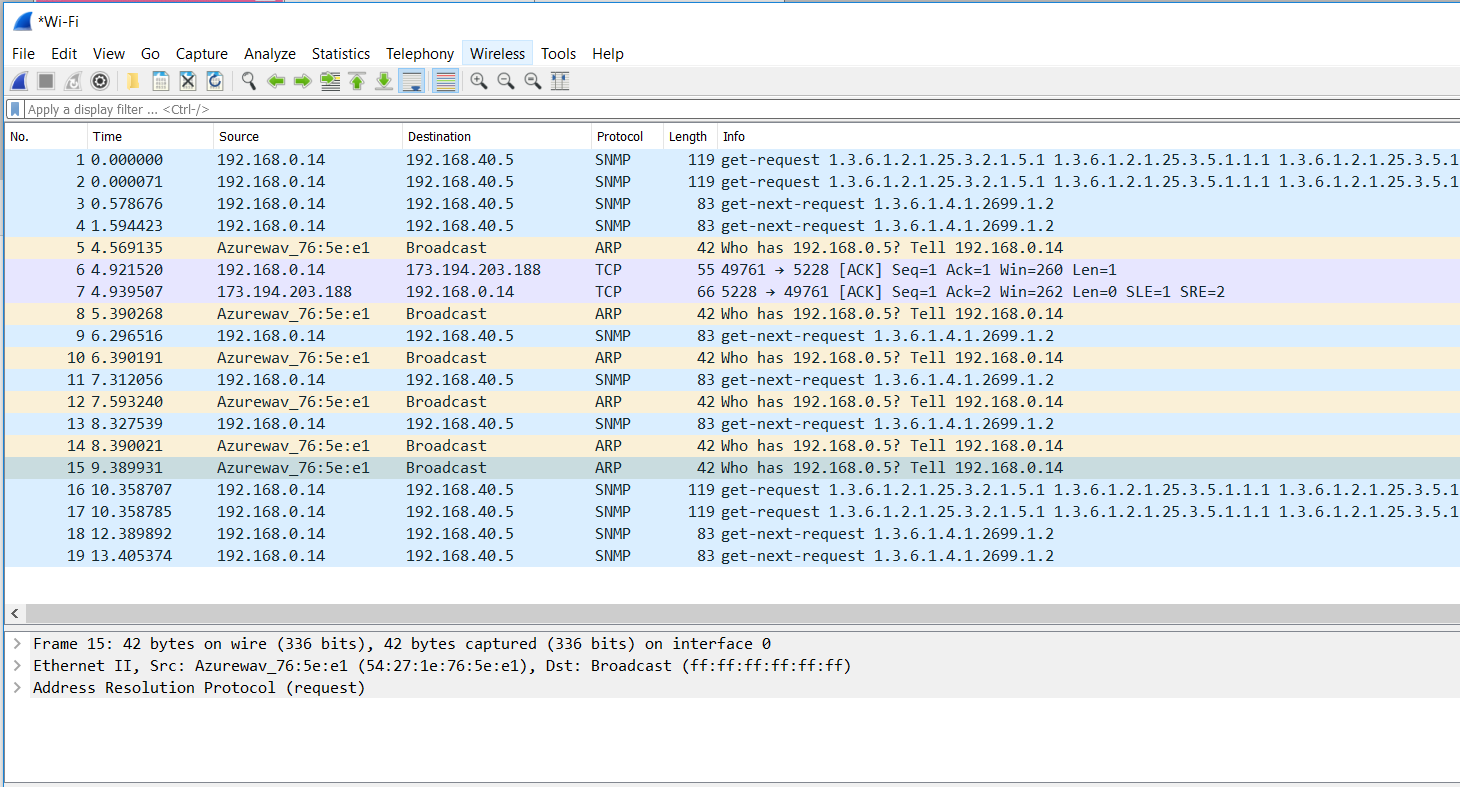
Running wireshark in promiscuous mode on another computer on the network, I couldn't see any packets to the webserver from the Windows laptop. I've attached a screenshot of wireshark running on the Windows computer itself . The ip address of the Windows 10 computer is 192.168.0.14. The address of the device with the webserver is 192.168.0.5 . I have no idea what 192.168.40.5 is

I have run into this problem before. I don't know what is triggering it, but the only way I could get the Windows computer to see the webserver again was to have the device that is running the webserver use a different IP address. What ever is blocking the the Windows applications is ip address specific.

I hope I've supplied enough information for the problem to be obvious to a Windows Wizard, which I am certainly not. If you have ideas, or some tests I could try applying, I'm all ears.

Thank you.
Windows for home | Windows 10 | Internet and connectivity

Locked Question. This question was migrated from the Microsoft Support Community. You can vote on whether it's helpful, but you can't add comments or replies or follow the question.

0 comments No comments

3 answers

Sort by: Most helpful
  1. Anonymous
    2019-12-13T18:36:34+00:00

    thank you Ashton!

    Unfortunately, when I tried pinging the android device the next morning, the problem had already reverted itself (there is nothing more frustrating than an inconsistent problem).

    I hadn't observed the line in the wireshark listing where the pc was trying to send a packet out to the device;; my powers of observation suck at the end of the day. So it looks like the problem is possibly outside the Windows domain.

    It looks like android devices may run a firewall called iptables (common in linux). I'll have to check if it is running and what its rules are. 

    Your input may lead to a solution, if I can get the problem to reoccur :-).

    1 person found this answer helpful.
    0 comments No comments
  2. Anonymous
    2019-12-13T19:36:40+00:00

    Iptables isn't a firewall, its a user space utility that is used for IP routing similar to an arptable within Windows.  It connects the IP's to the ethernet frames.  It is not visible to the usual retail user.  It allows an admin to setup chains of rules about how to handle packets.  Iptables, arptables, and etables are all under xtables which has 4 layers that make up it's protocol.  It is very similar to TCP/IP.

    0 comments No comments
  3. Anonymous
    2019-12-10T02:32:14+00:00

    Hi ericdavies1,

    I am an independent advisor and a Microsoft user like you, and I am hoping to help you out with this.

    Have you tried to give the Windows 10 computer a different IP address to see if that restores communication?

    Are you able to ping 192.168.0.5 from the Windows 10 computer? What about vice versa? (If you are able to open a command prompt on the Android device)

    This can be done through a Windows command prompt, using the command: ping 192.168.0.5

    Is it possible the Android device has a firewall or other security software that is blocking the traffic from the Windows 10 computer?

    In review of the Wireshark capture, I also do not see any traffic between the two hosts that you mentioned.

    I hope this has helped you. If this is not what you are looking for, please reply and let us know and we would be happy to look into providing some different suggestions!

    Regards,

    -Ashton

    0 comments No comments
