Share via

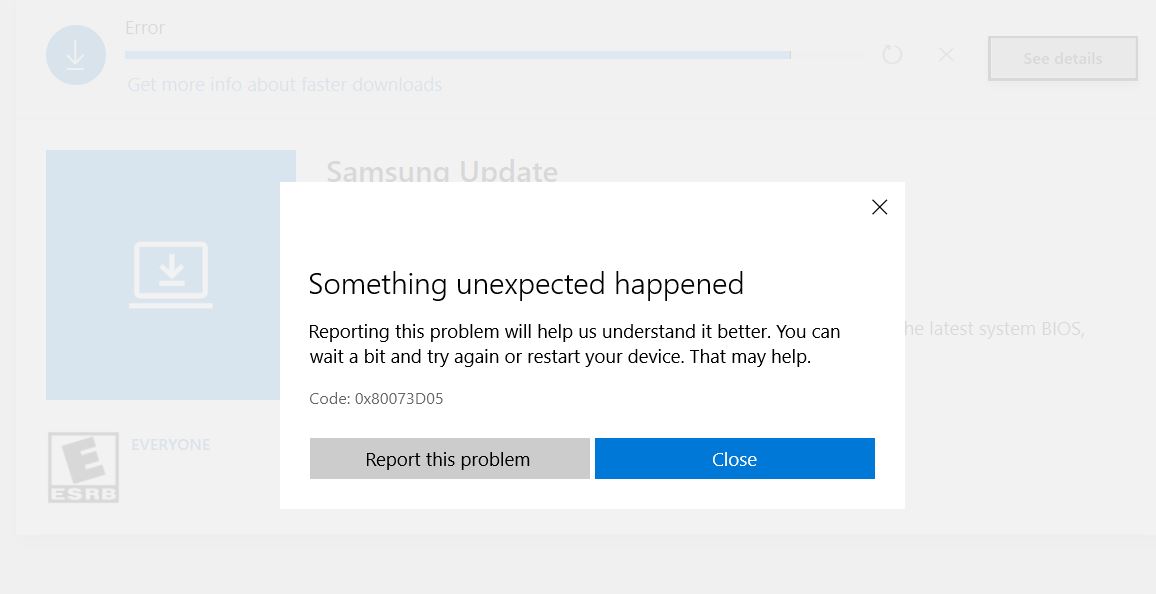
On Microsoft Store, the Samsung Update app won't download, error Code 0x80073D05

Anonymous
2019-12-06T02:56:05+00:00

I have a Samsung Series 9 Notebook and have been using the Samsung Update app from the Microsoft Store to download Samsung software / BIOS updates since I purchased the computer in 12/17. The app has been occasionally glitchy, but no insurmountable issues -- until now.

When I tried to run the Samsung Update app to update the software today, I got a message that the app itself needed to restart because of an update. No problem, I clicked restart. So the computer restarted, and I ran the app again ... but the same message came up. So I clicked restart again. But the same thing happened over and over again.

So I went to the Add/Remove program feature and uninstalled the Samsung Update app and then tried reinstalling from the Microsoft Store. 

The Microsoft Store says "you own this app" even though I clearly deleted it and then tries immediately to reinstall, but always comes fails and comes up with the same error message Code 0x80073D05.

I already tried terminating the Microsoft Store processes, restarting Microsoft Store, and uninstalling / reinstalling Microsoft Store. Still the same result when I tried to download the Samsung Update app -- error message Code 0x80073D05. (And just to be certain, I tried installing other apps from the Microsoft store, with absolutely no problems.)

So, I need help with one or all of the following:

  1. Another way to download the app from the Microsoft Store that I haven't tried / don't know about.
  2. Elevating this to the tech department at Microsoft so they can fix the Samsung Update app so it's downloadable.
  3. A link to download the Samsung Update app for my that exists outside of the Microsoft Store (on the Microsoft website, perhaps).

Thank you in advance for any help you can provide! An FYI, below is a screenshot of the error message.
Windows for home | Windows 10 | Microsoft Store

Locked Question. This question was migrated from the Microsoft Support Community. You can vote on whether it's helpful, but you can't add comments or replies or follow the question.

0 comments No comments

6 answers

Sort by: Most helpful
  1. Anonymous
    2019-12-17T02:55:10+00:00

    Samsung Tech customer service provided a usable alternative: a standalone Samsung Update app -- from the Samsung download center itself, not the Microsoft Store -- that you can install from a zip file. And it works, too -- I just installed it on my notebook and ran it, successfully updating Samsung systemware.

    Here is the URL for the zip in case anyone needs it: http://downloadcenter.samsung.

    Was this answer helpful?

    10+ people found this answer helpful.
    0 comments No comments
  2. Anonymous
    2019-12-07T09:38:18+00:00

    Samsung no longer maintains software / BIOS updates on its Support Download webpage. They haven't since 2018; in fact, for my particular Series 9 Notebook, the last update on the Samsung website (the link to which you provided above) is dated 2018.

    Samsung EXCLUSIVELY updates software / BIOS through the Samsung Update app, which I have used multiple times since 2018; the lastest update I installed was in October 2019. There is literally no other mechanism available through which to obtain Samsung computer software / BIOS updates.

    So. I will go ahead and report the app as you suggest above. But if there is ANY other way that I can access / download the Samsung Update app other than the Microsoft Store, that would be greatly appreciated. Thank you.

    Was this answer helpful?

    4 people found this answer helpful.
    0 comments No comments
  3. Anonymous
    2019-12-06T03:09:46+00:00

    Have you clicked on the 3 dots to the right of your picture, Updates and downloads, My Library, set the scan to Scan by name, scroll down to the app.  There if you own it ti should say Install or Launch.

    Was this answer helpful?

    2 people found this answer helpful.
    0 comments No comments
  4. Anonymous
    2019-12-07T23:01:02+00:00

    Thanks for your reply. However, I already tried looking through the software for an updater and there is none. Mine is a Series 9 Notebook NP940X5N ( NP940X5N-X01US ). And on my model's page there are none of the numerous updates that appear on the page for the Ultrabook you shared ... there's just the one from 2018, check it out: https://www.samsung.com/us/support/owners/product/np940x5n

    This is why I was using the Samsung Update app.

    Was this answer helpful?

    1 person found this answer helpful.
    0 comments No comments
  5. Anonymous
    2019-12-06T03:27:48+00:00

    Hi PE. I'm Greg, an installation specialist, 10 year Windows MVP, and Volunteer Moderator here to help you.

    I've not found many utility apps like this or printer apps that work that well yet. Much better to use the downloads from the PC or Printer maker's Support Downloads webpage to get the fullest functionality and immediate access to the latest drivers, for example.

    The Samsung Downloads for PC's are here:

    https://www.samsung.com/us/support/computing/wi...

    The most basic thing we need to learn to maintain a PC is how to keep the latest manufacturer's drivers current. Windows Update drivers are never enough.

    If you want to report an App use the link to Report App to Microsoft at the bottom of the App's page, which comes up when you search it or find it in the Store Settings > My Library. Often at the bottom of the page will also be a way to contact the app Publisher; if not then the app also isn't worthy because a good app's developers will always want feedback to keep it operating smoothly.

    So I hope this gives you some other perspectives and options to deal with the issue. Keep me posted on your progress as I will be here to help until the case is resolved.

    Was this answer helpful?

    1 person found this answer helpful.
    0 comments No comments
