I've been using Windows 10 for close to three years, never had any issues with it. Recently I noticed that my windows defender (Virus and threat protection) is no longer visible in the Windows security, and when I try to scan a file it shows the my "IT admin
does not have access to certain areas". I've checked other posts related to this, the "Disableantispyware" Registry key is not there, the securityhealthservice key is also at automatic start (2). The security center itself shows no issue, but it also doesnt
show "Virus and threat protection". I've done an Sfc scan (showed no issues), done a safe mode scan with malwarebytes (again showed no issues) and I even did an upgrade from Media creation tool (I have yet to do a reset, I am unaware of the difference between
the two and I have some important data that I wish to keep, currently I have no means of taking an external backup). I am not sure what exactly caused this sudden change in behavior, but I do have some doubts.
- I recently installed Office 365, which was authenticated by my organization's account. I am not signed into my system with that account, and even others in my organization (who actually use the organization's account to sign in) can still use windows defender.
- When I boot into safe mode Virus and threat protection is still missing from Security center, but when I search for it and open it directly it works (in normal startup doing the same will result in the "IT admin..." dialog box), however the scan options
are still unresponsive - nothing happens even when I try a windows defender offline scan.
- I was able to execute a windows defender offline scan using the elevated command prompt, and that returned no issues.
I have never used an Anti virus software in this system, I installed malware bytes and ESET only after this issue arose ( I later uninstalled ESET as the "Scan with windows defender" option was replaced by "Scan with ESET"). I'm not sure how to proceed further,
any help is very much appreciated. I've attached screenshots of the missing "Virus and threat protection" below.
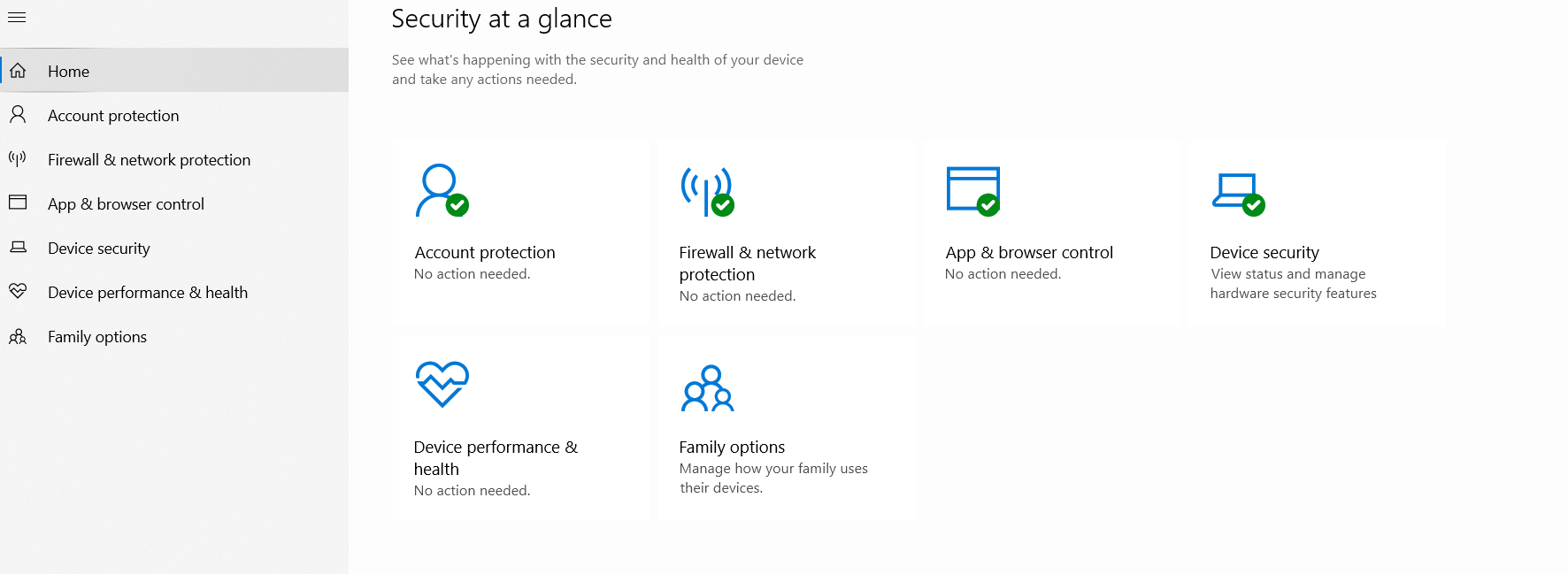
and the "IT admin error" message
*' cx='32' cy='32' r='32' /%3E%3Ctext x='50%25' y='55%25' dominant-baseline='middle' text-anchor='middle' fill='%23FFF' %3EA%3C/text%3E%3C/svg%3E)

