Microsoft Security | Microsoft Graph
An API that connects multiple Microsoft services, enabling data access and automation across platforms

This browser is no longer supported.
Upgrade to Microsoft Edge to take advantage of the latest features, security updates, and technical support.
' cx='32' cy='32' r='32' /%3E%3Ctext x='50%25' y='55%25' dominant-baseline='middle' text-anchor='middle' fill='%23FFF' %3EMM%3C/text%3E%3C/svg%3E)
Hi,
We have a job that searches the users created between two dates. It was working fine until the last week. Suddenly, Microsoft decided to not support filters by "createdDateTime" for Users anymore, despite the documentation says it is supported (https://learn.microsoft.com/en-us/graph/api/resources/user?view=graph-rest-1.0).
Now, our job is broken and I need to find a walkaround to search the users created daily. I am not sure if the delta link will help me, because the job is stateless.
Regards,
Cristian.
An API that connects multiple Microsoft services, enabling data access and automation across platforms
Answer accepted by question author
Microsoft fixes this issue, but it doesn't support just the date. It is necessary to include the time.
Here is an example:
https://graph.microsoft.com/v1.0/users?$filter=(createdDateTime ge 2021-07-01T00:00:00Z AND createdDateTime le 2021-08-01T00:00:00Z)
It is not necessary to use any advanced query parameters!
' cx='32' cy='32' r='32' /%3E%3Ctext x='50%25' y='55%25' dominant-baseline='middle' text-anchor='middle' fill='%23FFF' %3EP%3C/text%3E%3C/svg%3E)
Hi,
I can confirm that my use case is now working again.
Thanks!
Patrik Rosquist
' cx='32' cy='32' r='32' /%3E%3Ctext x='50%25' y='55%25' dominant-baseline='middle' text-anchor='middle' fill='%23FFF' %3EDO%3C/text%3E%3C/svg%3E)
The filter requires the Advanced Query Options.
To get it to work you need to add the count operator and the ConsistencyLevel=eventual. Example
GET https://graph.microsoft.com/v1.0/users?$filter=createdDateTime eq 2021-04-06T08:03:07Z&$count=true
ConsistencyLevel: eventual
Thanks, Danstan for your answer.
I tried to use the advance query option, as you suggested, but I got the same error:
"Unsupported or invalid query filter clause specified for property 'createdDateTime' of resource 'User'."
Something that I don't understand is, I am using the operators "ge" and "le" and the documentation says those operators are supported by default.
Summary, my filter "(createdDateTime ge 2021-07-28 AND createdDateTime le 2021-07-29)" doesn't work using the default or advance query parameter.
@Maluenda Miranda, Cristian G Try the query above on Graph Explorer and ensure you add the header ConsistencyLevel: eventual and count=true query option then share the error if you get one. This query works on my end.
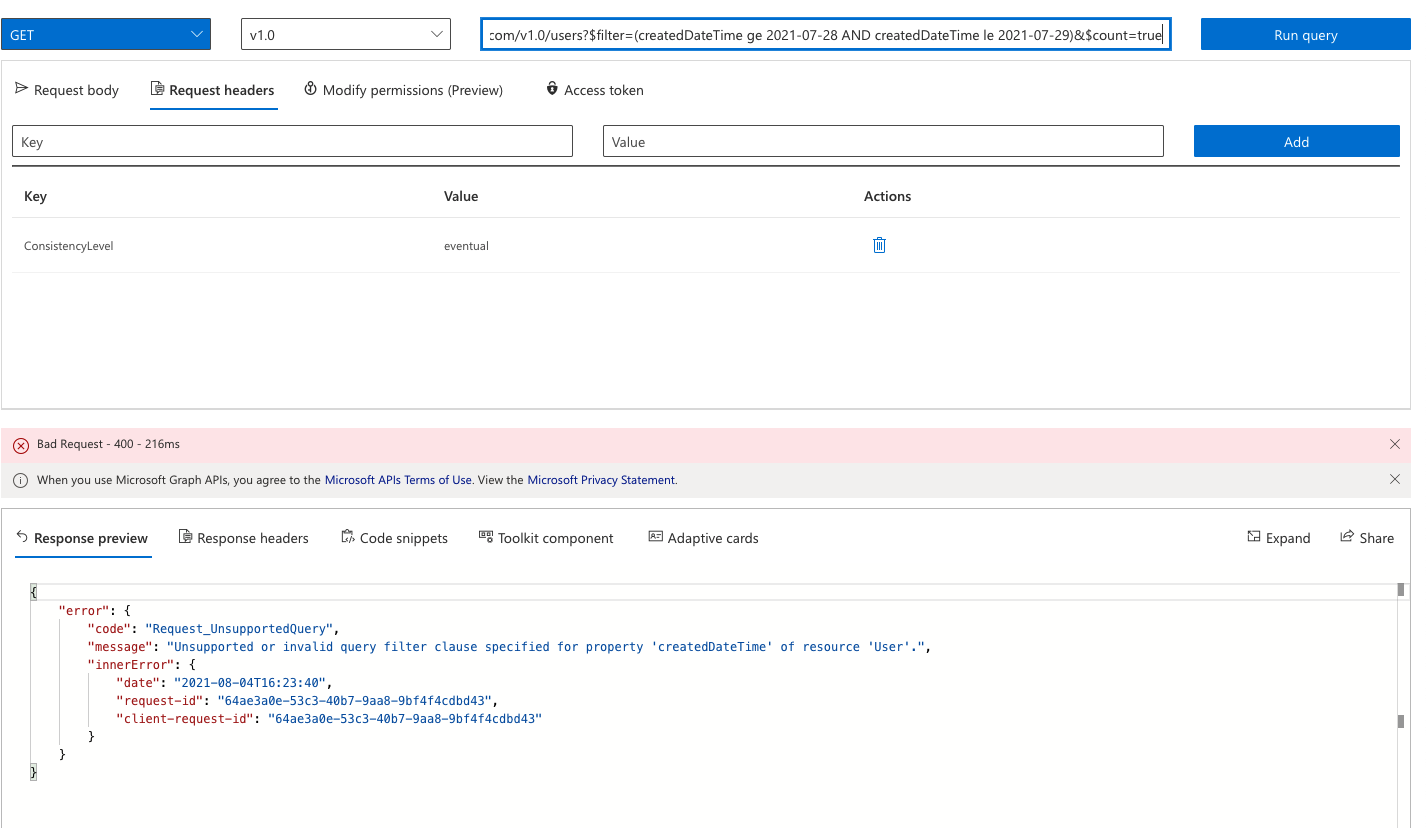
I got the same error.
Can you try the query with full DateTime value like: The query below works on my end with the header
GET /users?$filter=(createdDateTime ge 2021-04-06T08:03:07Z AND createdDateTime le 2021-04-06T08:03:07Z)&$count=true
I am having the exact same problem. Our service stopped working 2021-07-30 20:50. Also tried the above suggestions and still no luck.
Then I found that the "Advanced Query Options" are not supported for Azure AD B2C tenants from link above.
So how to get around this?
Regards,
Patrik
It didn't work. I got the same error. I am in the same situation as @Patrik , I am using Azure AD B2C.
Let me have a look at this again from a B2C perspective.
In this case as per the docs on Azure AD Advanced Queries , B2C tenants don't support this query because quoting Azure AD Advanced Queries
These advanced query capabilities are not available in Azure AD B2C tenants.
Hi. We are also using Azure AD B2C and we also have a job that gets users filtered on createdDateTime and it has been working until 2021-07-30. Now it does not and as the OP says, it HAS been supported and it's in the docs. The only option now seems be to loop over all users and do the filtering on the client side. Given that the page size of retrieved records is 999 it will take a long time to get all users and require so many wasted calls. I have no idea of how to solve this. The support for the delta-api, Advanced Query Options and the notification-api is not for Azure AD B2C so there's really no viable solution to this. Is there?
I am curious of why the support for filtering on createdDateTime was removed with no heads up at all. Or at least I cannot find any thing about it when googling.
Regards,
Patrik
I am so disappointed with Azure. How is it possible that they changed the "stable" API?? I understand if they change beta, but a broken change for v1.0 is unacceptable.
The worst part is, the documentation says "createdDateTime" support by default the operators: "eq", "gq", and "le".
https://learn.microsoft.com/en-us/graph/aad-advanced-queries
So, we shouldn't need any advanced query option. Like Patrik, I couldn't find any document or post talking about this breaking change.
' cx='32' cy='32' r='32' /%3E%3Ctext x='50%25' y='55%25' dominant-baseline='middle' text-anchor='middle' fill='%23FFF' %3EMJ%3C/text%3E%3C/svg%3E)
Yep same situation here. We had a WORKING Power Automate flow using this query and now it doesn't work all of the sudden:
https://graph.microsoft.com/v1.0/applications?$filter=createdDateTime ge 2021-04-15&$select=id
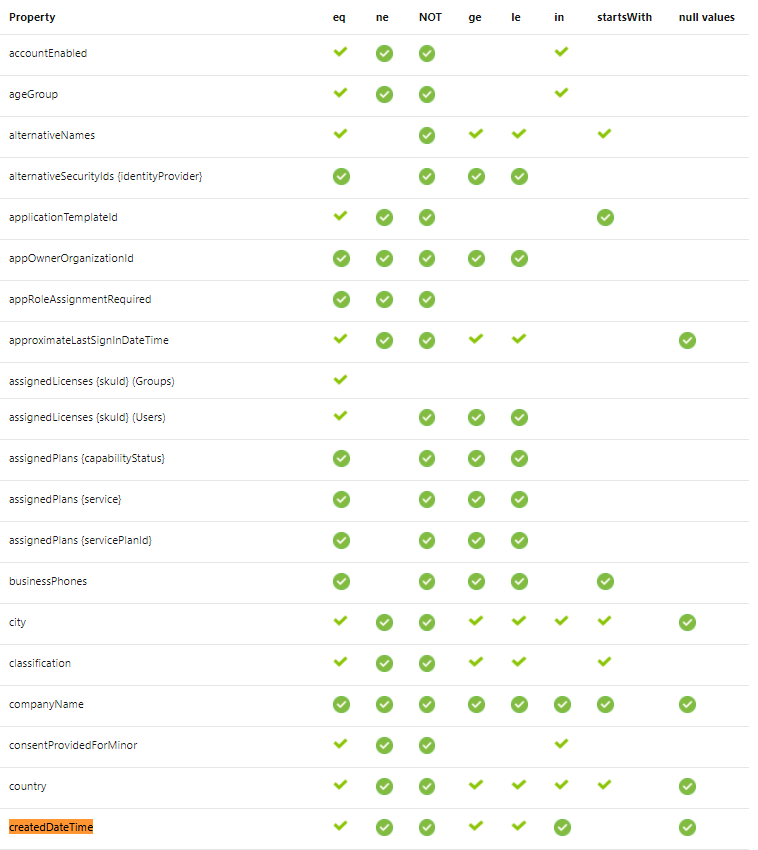
https://learn.microsoft.com/en-us/graph/aad-advanced-queries
"the createdDateTime property is available in application, group, organization, and user resources. It supports the eq, ge, and le operators by default and the in, ne, and NOT operators only in advanced queries."
This is supposed to work with ge without an advanced query
This is getting worst!
I tried to loop over the users and filter them out in my code.
When we are iterating over all the users using paging (https://learn.microsoft.com/en-us/graph/paging), we get this error:
   status: 414,
    statusText: 'URI Too Long',
In summary, there is not any way to get the users between two dates!
-------------
The problem was I added to the request the query parameter select in each call, and Azure Graph API was appending the same values to the query parameter all the time. So, the URI grew until Azure threw the error.
I believe this wasn't the behavior before the change, but I can't prove it.
' cx='32' cy='32' r='32' /%3E%3Ctext x='50%25' y='55%25' dominant-baseline='middle' text-anchor='middle' fill='%23FFF' %3EP%3C/text%3E%3C/svg%3E)
Please try this, I used your command and modified it a bit. It worked for me.
https://graph.microsoft.com/v1.0/users?$filter=(createdDateTime ge 2021-07-01T00:00:00Z AND createdDateTime le 2021-08-01T00:00:00Z)&$count=true
Make sure you're passing the header (ConsistencyLevel) as well.
Thanks Pras for your answer. My problem is Azure AD B2C does not support advanced query parameters. So, this will not work for me :(

even with advanced query and ConsistencyLevel=eventual I'm getting
Status Code 400 BadRequest
The entity property 'createdDateTime' and operationKind 'GreaterThan' is not allowed in $filter query.
I'm requesting /users/id/chats/getAllMessages endpoint
' cx='32' cy='32' r='32' /%3E%3Ctext x='50%25' y='55%25' dominant-baseline='middle' text-anchor='middle' fill='%23FFF' %3ES%3C/text%3E%3C/svg%3E)