Azure Data Factory
An Azure service for ingesting, preparing, and transforming data at scale.
This browser is no longer supported.
Upgrade to Microsoft Edge to take advantage of the latest features, security updates, and technical support.
' cx='32' cy='32' r='32' /%3E%3Ctext x='50%25' y='55%25' dominant-baseline='middle' text-anchor='middle' fill='%23FFF' %3EFL%3C/text%3E%3C/svg%3E)
I would like to filter the Sharepoint Online List based on the Modified date, to get only the last modified records. I am using the ADF Lookup component.
I was trying different queries, however non of them work and I am getting all elements in the list (or an error).
Modified ge '@{formatDateTime(addDays(utcNow(),-1),'yyyy-MM-ddTHH:MM:ssZ')}'
Modified ge '@{formatDateTime(addDays(utcNow(),-1),'yyyy-MM-dd')}'
Modified ge DateTime'@{addDays(utcNow(),-1)}'
$filter=Modified ge '@{formatDateTime(addDays(utcNow(),-1),'yyyy-MM-ddTHH:MM:ssZ')}'
ADF code:
"typeProperties": {
                "source": {
                    "type": "SharePointOnlineListSource",
                    "query": {
                        "value": "Modified ge '@{formatDateTime(addDays(utcNow(),-1),'yyyy-MM-dd')}'",
                        "type": "Expression"
                    },
                    "httpRequestTimeout": "00:05:00"
                },
                "dataset": {
                    "referenceName": "sp_dataset",
                    "type": "DatasetReference",
                    "parameters": {
                        "list_name": "sp_list"
                    }
                },
                "firstRowOnly": false
            }
How it's possible to filter the Sharepoint List from the ADF?
An Azure service for ingesting, preparing, and transforming data at scale.

Hi @Filip Lisiecki ,
Welcome to Q&A Forum!
According to your description, your problem is not much related to SharePoint Online. Therefore, we will remove the "office-sharepoint-online" tag.
If you have any concerns, please feel free to reply.
Thanks
Answer accepted by question author
' cx='32' cy='32' r='32' /%3E%3Ctext x='50%25' y='55%25' dominant-baseline='middle' text-anchor='middle' fill='%23FFF' %3ESS%3C/text%3E%3C/svg%3E)
Hi @Filip Lisiecki ,
Thanks for using Microsoft Q&A !!
You need to use $filter in the query to filter the records out of the list based on your condition. Also, you need to pass filter as a text, which you can achieve by using @concat in the dynamic expression. So, you need to create filter like below -
@concat('$filter=Modified ge datetime''',formatDateTime(addDays(utcNow(),-1),'yyyy-MM-dd'),'''')
I have tried this in my environment and it worked as expected and fetched only records satisfying the filter condition. Please find below the gif for your reference.
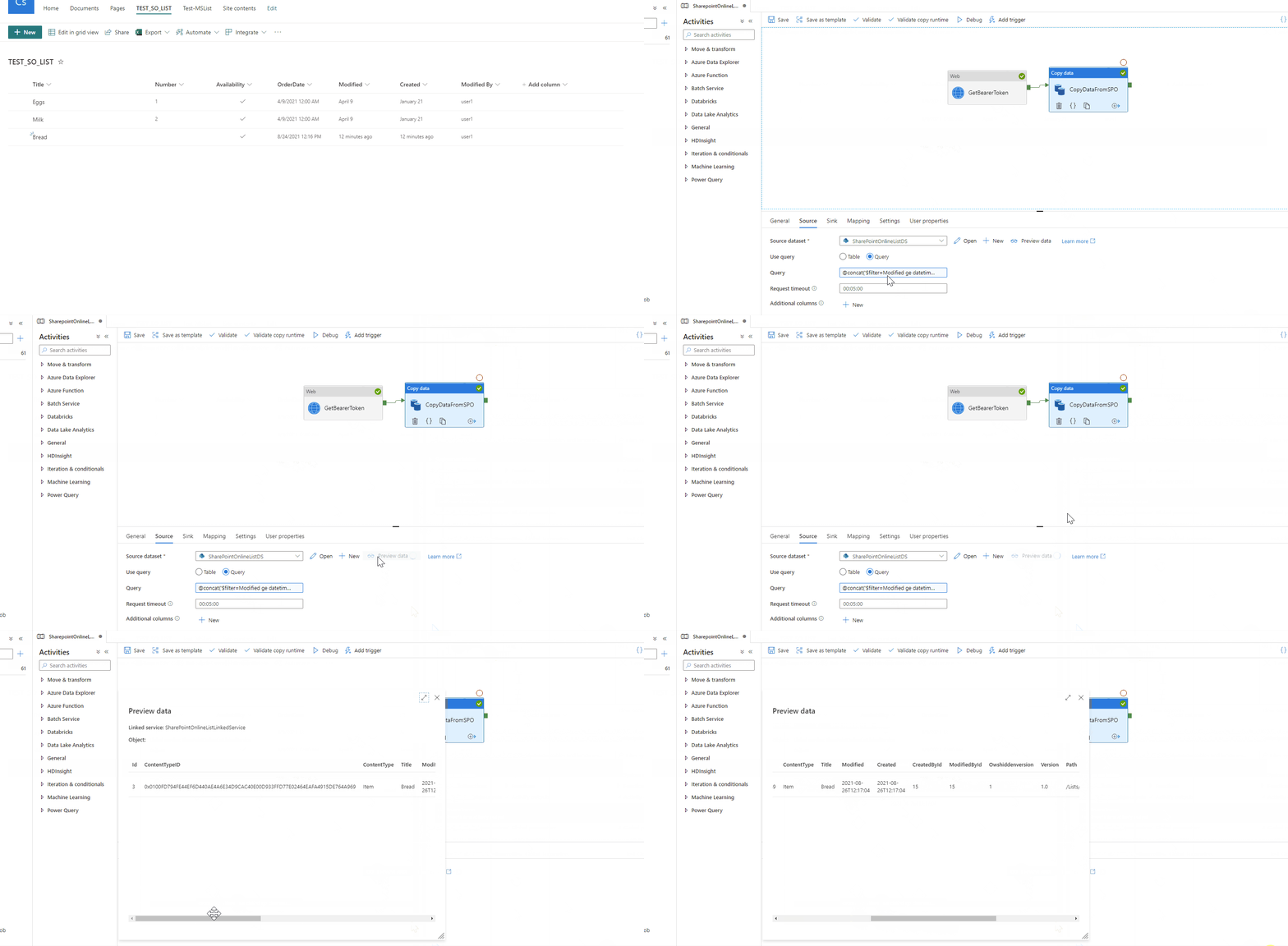
Please let me know if you have any questions.
Thanks
Saurabh
----------
Please do not forget to "Accept the answer" wherever the information provided helps you to help others in the community.
@Filip Lisiecki Great. Thanks for the confirmation.
Thanks
Saurabh
' cx='32' cy='32' r='32' /%3E%3Ctext x='50%25' y='55%25' dominant-baseline='middle' text-anchor='middle' fill='%23FFF' %3EAB%3C/text%3E%3C/svg%3E)
Hi @Saurabh Sharma ,
I am also facing the similar issue. When I apply filter query (as shown in your example) to a SharePoint Online list which has more than 5000 records then it gives internal server error but the same query works for other lists with less than 5000 records. Can you please help?
Query: @markus.bohland@hotmail.de ('$filter=Modified ge datetime''',formatDateTime(addDays(utcNow(),-1),'2021-01-01'),'''')
Error:
Error code
23205
Details
Requesting response from path myListName and query $filter=Modified ge datetime'2021-01-01' failed with status code InternalServerError and message <?xml version="1.0" encoding="utf-8" standalone="yes"?> <error xmlns="http://schemas.microsoft.com/ado/2007/08/dataservices/metadata"> <code></code> <message xml:lang="en-US">An error occurred while processing this request.</message> </error>. Activity ID: c75c2a61-3174-4208-a534-74de1453128a
' cx='32' cy='32' r='32' /%3E%3Ctext x='50%25' y='55%25' dominant-baseline='middle' text-anchor='middle' fill='%23FFF' %3EEF%3C/text%3E%3C/svg%3E)
Hi @Ankit Bafna ,
I am facing the same issue as you. I have a SharePoint Online list with more than 5000 records and got the same error when tried to filter.
Did you find a solution?
' cx='32' cy='32' r='32' /%3E%3Ctext x='50%25' y='55%25' dominant-baseline='middle' text-anchor='middle' fill='%23FFF' %3EAG%3C/text%3E%3C/svg%3E)
am facing the same issue when trying to fetch highest watermark on a list which is more then 5k. Is there any fix for this?
' cx='32' cy='32' r='32' /%3E%3Ctext x='50%25' y='55%25' dominant-baseline='middle' text-anchor='middle' fill='%23FFF' %3EA%3C/text%3E%3C/svg%3E)
The same issue as you all above, let us know if there is a fix for that.
Also having another issue, where there are no rows, meaning nothing changed in the last day or so. The process fails due to the Source schema for column mapping not being available:
ErrorCode=SystemErrorSourceSchemaNotAvailable,'Type=Microsoft.DataTransfer.Common.Shared.HybridDeliveryException,Message=Source schema for column mapping is not available.,Source=Microsoft.DataTransfer.ClientLibrary,'
Let me know if anyone has a solution for either of these issues.
Thank You
' cx='32' cy='32' r='32' /%3E%3Ctext x='50%25' y='55%25' dominant-baseline='middle' text-anchor='middle' fill='%23FFF' %3EVS%3C/text%3E%3C/svg%3E)
for Threshold error >5K, try to run filter on indexed columns.