Share via

Nokia 515 Mobile data connection issue

Anonymous
2020-02-06T13:42:09+00:00

Hi all, 

I would be extremely grateful for any help as this issue has me tearing my hair out. 

I recently bought a Nokia 515 which I understand runs on series 40 OS but I cannot connect to the mobile data network. 

I have signal, can make calls, and next to the signal bar it says 3G. But when I try to use the browser i get the following error message:

'Error establishing secure connection. Check coverage, security and date settings on the phone. (005)'. Similarly if i go on store it says 'unable to open this page. Check your connection or try again later', and none of the existing apps that require internet are working either. 

I have tried following the APN input settings for my provider (EE), 

following the guidelines available here: https://www.teamknowhow.com/discover/discover/ee-apn-settings#Nokia%20feature%20phone%20APN%20settings%20for%20EE and copied below:
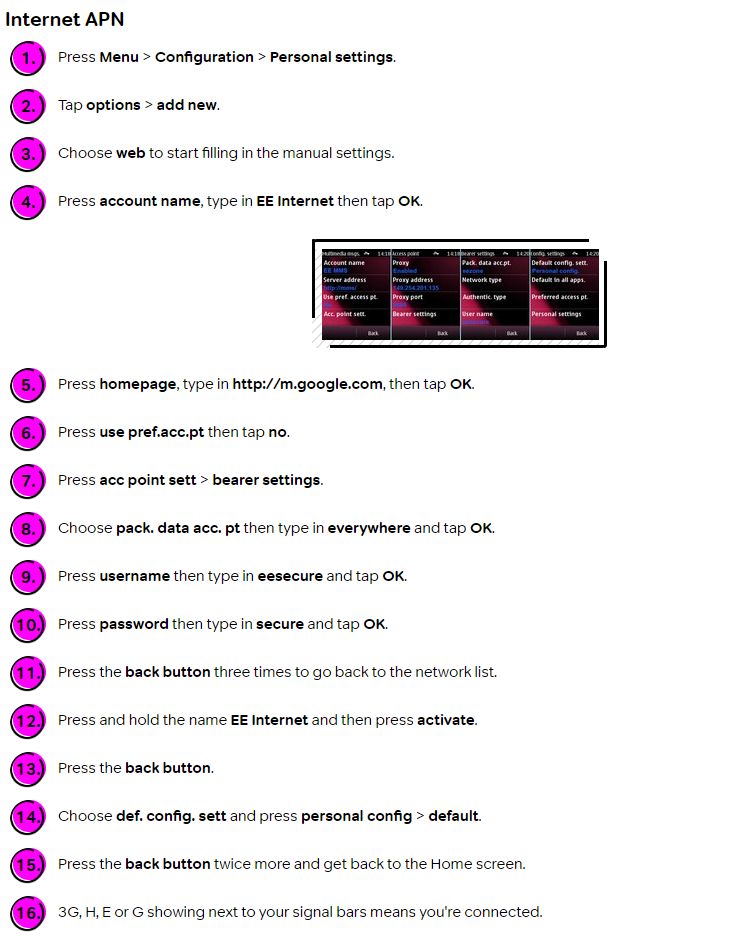
So the last stage of the instructions says '3g showing next to your signal bars means you're connected'... but it is showing and i'm not connected.

What am I doing wrong??

I have spent a long time on the phone to EE and on web chat with BX customer services, but neither has been able to resolve this. I can't believe how difficult this is. 

I only wanted to download a single app to use the camera flash as a torch (can't believe nokia didn't include this already, otherwise I would be completely happy with the phone, but this one small omission is giving me such a headache to fix!).

Any advice MASSIVELY APPRECIATED. 

Many thanks,

Joe

Windows for home | Other | Devices and drivers

Locked Question. This question was migrated from the Microsoft Support Community. You can vote on whether it's helpful, but you can't add comments or replies or follow the question.

0 comments No comments

5 answers

Sort by: Most helpful
  1. Anonymous
    2020-02-07T14:05:01+00:00

    Hi, 

    Yes the phone is SIM free.

    I tried to put the giff gaff SIM in last night but for some reason, even though it was also a nanoSIM, it wouldn't fit in the EE adapter I have... It was slightly too big, so I couldn't get it in the phone. I didn't want to cut the SIM to the right size as it wasn't mine and would need to go back in the owner's phone. 

    I might be able to try it with a different EE SIM, would it be worth trying that to see whether it's a problem with my specific SIM? 

    Many thanks,

    Joe

    2 people found this answer helpful.
    0 comments No comments
  2. Anonymous
    2020-03-30T16:31:39+00:00

    Hi there. The built in browser will not work. You'll need a third party browser like Opera.

    Having said that, i can confidently assure you that there is no way of using the flash for a torch! I have searched for this high and low!! I too was very surprised they didn't include this feature by default.

    1 person found this answer helpful.
    0 comments No comments
  3. RedSpook-9082 4,765 Reputation points Volunteer Moderator
    2020-02-06T16:29:17+00:00

    Hi, 

    Many thanks for your reply,

    I might be able to try with a giff gaff sim card later. Will that mean I need to change all my APN settings again though?

    Best wishes, 

    Joe 

    Yes and no, i.e. the phone should pick up the settings automatically from the SIM card (or giffgaff will send them through to your phone in a series of service messages, not sure how exactly they operate), but the settings will definitely be different from those for EE. I am trying to establish whether it's a problem with the phone, the EE SIM card or with EE per se.

    Is the phone SIM free, i.e. open to all networks ?

    1 person found this answer helpful.
    0 comments No comments
  4. RedSpook-9082 4,765 Reputation points Volunteer Moderator
    2020-02-06T14:03:42+00:00

    Is it possible for you to try with a SIM from a different network ?

    1 person found this answer helpful.
    0 comments No comments
  5. Anonymous
    2020-02-06T15:58:54+00:00

    Hi, 

    Many thanks for your reply,

    I might be able to try with a giff gaff sim card later. Will that mean I need to change all my APN settings again though?

    Best wishes, 

    Joe

    0 comments No comments