Community Center | Not monitored
Tag not monitored by Microsoft.

This browser is no longer supported.
Upgrade to Microsoft Edge to take advantage of the latest features, security updates, and technical support.
' cx='32' cy='32' r='32' /%3E%3Ctext x='50%25' y='55%25' dominant-baseline='middle' text-anchor='middle' fill='%23FFF' %3ELA%3C/text%3E%3C/svg%3E)
Hello-
I just upgraded a TFS 2019 on-prem server to TFS 2020 (Update 1.1). I do not have the menu entry "Overview" / "Analytics views". I've followed the Prerequisites section in this document:
I have Boards enabled. I am not seeing the described "Enable the Analytics Views preview feature either for individual users or for the organization" - is this for hosted Azure DevOps Services only?
I do have "collection", "project", "Boards", "Analytics views" where I can configure Views. I just can't see them under Overview.
Might anyone have advice for what might be going on? Thanks!
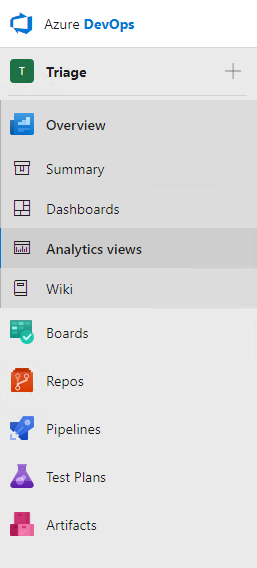 ]1
]1
Tag not monitored by Microsoft.
Answer accepted by question author
' cx='32' cy='32' r='32' /%3E%3Ctext x='50%25' y='55%25' dominant-baseline='middle' text-anchor='middle' fill='%23FFF' %3EA%3C/text%3E%3C/svg%3E)
The product group for Azure DevOps / TFS actively monitors questions over at
https://developercommunity.visualstudio.com/report?space=21&entry=problem
https://developercommunity.visualstudio.com/report?space=22&entry=problem
--please don't forget to upvote and Accept as answer if the reply is helpful--