That link was also tried. There are 7 users listed under the Administrator group. None show up (since switch user isn't an option.)
Fix 2 - via the command prompt. Does not give the same screen result as shown. Myscreen is below with log below that.
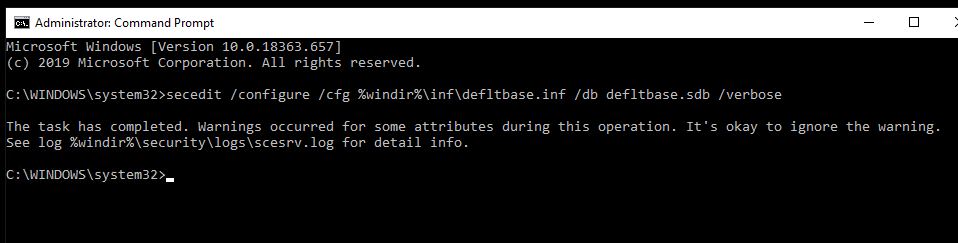
Below is the entire log. There is one section of errors under Configure General Service Settings.
Monday, March 9, 2020 5:58:41 PM
----Configuration engine was initialized successfully.----
----Reading Configuration Template info...
----Configure User Rights...
SeImpersonatePrivilege must be assigned to administrators. This setting is adjusted.
SeImpersonatePrivilege must be assigned to SERVICE. This setting is adjusted.
Configure S-1-5-19.
Configure S-1-5-20.
Configure S-1-5-32-544.
Configure S-1-5-32-551.
Configure S-1-5-32-559.
Configure S-1-5-32-545.
Configure S-1-1-0.
Configure S-1-5-6.
Configure S-1-5-21-168314211-174420009-3680137622-501.
Configure S-1-5-90-0.
Configure S-1-5-32-555.
Configure S-1-5-80-0.
Configure S-1-5-80-3139157870-2983391045-3678747466-658725712-1809340420.
User Rights configuration was completed successfully.
----Configure Group Membership...
Configure Users.
Group Membership configuration was completed successfully.
----Configure 64-bit Registry Keys...
Configuration of Registry Keys was completed successfully.
----Configure 32-bit Registry Keys...
----Configure File Security...
File Security configuration was completed successfully.
----Configure General Service Settings...
Configure sysmonlog.
Error 1060: The specified service does not exist as an installed service.
Error opening sysmonlog.
Configure SamSs.
Configure ntmssvc.
Error 1060: The specified service does not exist as an installed service.
Error opening ntmssvc.
Configure netddedsdm.
Error 1060: The specified service does not exist as an installed service.
Error opening netddedsdm.
Configure netdde.
Error 1060: The specified service does not exist as an installed service.
Error opening netdde.
Configure dmserver.
Error 1060: The specified service does not exist as an installed service.
Error opening dmserver.
Configure clipsrv.
Error 1060: The specified service does not exist as an installed service.
Error opening clipsrv.
Configure Browser.
General Service configuration was completed successfully.
----Configure available attachment engines...
Configuration of attachment engines was completed successfully.
----Configure Security Policy...
Configure password information.
Configure account lockout information.
Administrator account is disabled.
Guest account is disabled.
System Access configuration was completed successfully.
LSA anonymous lookup names setting : existing SD = D:(D;;0x800;;;AN)(A;;0xf1fff;;;BA)(A;;0x20801;;;WD)(A;;0x801;;;AN)(A;;0x1000;;;LS)(A;;0x1000;;;NS)(A;;0x1000;;;S-1-5-17)(A;;0x801;;;AC)(A;;0x801;;;S-1-15-2-2).
Configure LSA anonymous lookup setting.
Configure machine\software\microsoft\windows nt\currentversion\setup\recoveryconsole\securitylevel.
Configure machine\software\microsoft\windows nt\currentversion\setup\recoveryconsole\setcommand.
Configure machine\software\microsoft\windows nt\currentversion\winlogon\scremoveoption.
Configure machine\software\microsoft\windows\currentversion\policies\system\dontdisplaylastusername.
Configure machine\software\microsoft\windows\currentversion\policies\system\legalnoticecaption.
Configure machine\software\microsoft\windows\currentversion\policies\system\legalnoticetext.
Configure machine\software\microsoft\windows\currentversion\policies\system\scforceoption.
Configure machine\software\microsoft\windows\currentversion\policies\system\shutdownwithoutlogon.
Configure machine\software\microsoft\windows\currentversion\policies\system\undockwithoutlogon.
Configure machine\software\policies\microsoft\windows\safer\codeidentifiers\authenticodeenabled.
Configure machine\system\currentcontrolset\control\lsa\auditbaseobjects.
Configure machine\system\currentcontrolset\control\lsa\crashonauditfail.
Configure machine\system\currentcontrolset\control\lsa\disabledomaincreds.
Configure machine\system\currentcontrolset\control\lsa\everyoneincludesanonymous.
Configure machine\system\currentcontrolset\control\lsa\fipsalgorithmpolicy\enabled.
Configure machine\system\currentcontrolset\control\lsa\forceguest.
Configure machine\system\currentcontrolset\control\lsa\fullprivilegeauditing.
Configure machine\system\currentcontrolset\control\lsa\nolmhash.
Configure machine\system\currentcontrolset\control\lsa\restrictanonymous.
Configure machine\system\currentcontrolset\control\lsa\restrictanonymoussam.
Configure machine\system\currentcontrolset\control\print\providers\lanman print services\servers\addprinterdrivers.
Configure machine\system\currentcontrolset\control\session manager\kernel\obcaseinsensitive.
Configure machine\system\currentcontrolset\control\session manager\memory management\clearpagefileatshutdown.
Configure machine\system\currentcontrolset\control\session manager\protectionmode.
Configure machine\system\currentcontrolset\services\lanmanserver\parameters\autodisconnect.
Configure machine\system\currentcontrolset\services\lanmanserver\parameters\enableforcedlogoff.
Configure machine\system\currentcontrolset\services\lanmanserver\parameters\enablesecuritysignature.
Configure machine\system\currentcontrolset\services\lanmanserver\parameters\requiresecuritysignature.
Configure machine\system\currentcontrolset\services\lanmanserver\parameters\restrictnullsessaccess.
Configure machine\system\currentcontrolset\services\lanmanworkstation\parameters\enableplaintextpassword.
Configure machine\system\currentcontrolset\services\lanmanworkstation\parameters\enablesecuritysignature.
Configure machine\system\currentcontrolset\services\lanmanworkstation\parameters\requiresecuritysignature.
Configure machine\system\currentcontrolset\services\ldap\ldapclientintegrity.
Configuration of Registry Values was completed successfully.
Configure log settings.
Audit/Log configuration was completed successfully.
----Configure available attachment engines...
Configuration of attachment engines was completed successfully.
----Un-initialize configuration engine...
' cx='32' cy='32' r='32' /%3E%3Ctext x='50%25' y='55%25' dominant-baseline='middle' text-anchor='middle' fill='%23FFF' %3EA%3C/text%3E%3C/svg%3E)
