Share via

windows vista !! Problems installing SP2,

Anonymous
2020-03-24T12:59:29+00:00

do you still help with Vista problems ?

Windows for home | Previous Windows versions | Install and upgrade

Locked Question. This question was migrated from the Microsoft Support Community. You can vote on whether it's helpful, but you can't add comments or replies or follow the question.

0 comments No comments

12 answers

Sort by: Most helpful
  1. Anonymous
    2020-03-28T13:03:09+00:00

    My situation seems to be an anomaly.

    I fixed the Checking for Updates situation and then did a Windows Update on 15 Mar. It was able to install the rest of the updates available then. Surprisingly, there were another 8 updates that did not show up then.

    Thinking the updates were complete on 15 Mar, I then did some of the updates for Server 2008 from Greenhill's repository which I then interrupted.

    I turned the computer off and it has been off until 27 Mar when these additional updates showed up - they didn't show up before or I would have updated them before I did Greenhill's updates.

    Anyway as reported earlier, all of them installed other than KB4014984 (Security and Quality Rollup for .NET Framework 2.0, 3.0, 4.5.2, 4.6 on Windows Vista SP2 and Server 2008 SP2: April 11, 2017).

    I think i'll leave well alone now and disable updates as you suggested rather than going down a rabbit hole.

    Thanks again

    1 person found this answer helpful.
    0 comments No comments
  2. lmacri 2,500 Reputation points
    2020-03-27T15:22:44+00:00

    ...I am in a similar boat. I did a clean reinstall of Windows Vista Business SP2 from a USB drive and installed the manual updates outlined in your post.

    I was able to update automatically except it would not install KB4014984 which is April, 2017 Security and Quality Rollup for .NET Framework 2.0, 3.0, 4.5.2, 4.6 on Windows Vista SP2 and Server 2008 SP2 (KB4014984) .  The error is: 0x800B0109. I looked it up and it says:

    A certificate chain processed, but terminated in a root certificate which is not trusted by the trust provider...

    Hi mikey8811:

    My Vista SP2 laptop is at a remote location so I don't have access to it while I'm working from home (I'm posting from my Win 10 machine for now) but a Speccy Free snapshot of my Vista SP2 machine I posted online on 12-Jul-2019 athttp://speccy.piriform.com/results/z2qoNAESuxQeYKCK2QGx3or shows that my KB4014984 for the .NET Framework installed successfully in April 2017.  Re-boot and run a manual Windows Update a few times, and if the installation continues to fail with error 0x800B0109 after a few cycles of re-booting and manual Windows Updates then let me know what error or warning you see when you download the standalone .msu installerfrom the Microsoft Update Catalog at http://www.catalog.update.microsoft.com/Search.aspx?q=KB4014984 Vista to your desktop (be sure you download the appropriate 32-bit or 64-bit installer for your OS) and then right-click and choose "Run as Administrator".

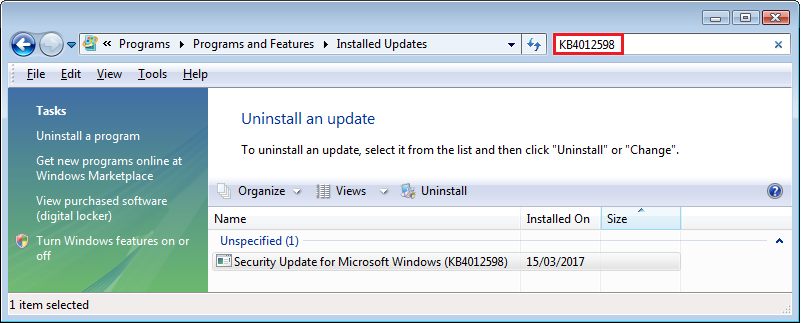
    If the standalone .msu installer still doesn't work when you "Run as Administrator" then go to Control Panel | Programs | Programs and Features | View Installed Updates and search for the full KB number in the search box (e.g., "KB4014984" and not a partial string like "4014984" - see a sample screenshot below) just to confirm this .NET Framework update is not already installed.  I'm guessing that the manual reset of your Windows Update components you performed wiped your Windows Update history at Windows Update | View Update History when the C:\Windows\SoftwareDistribution folders were re-built, and I don't think searching for a phrase like "Framework" at Control Panel | Programs | Programs and Features | View Installed Updates will find anything [.NET Framework updates are generally listed there by KB number and a generic descriptor like "Update for Microsoft Windows (KBxxxxxxx)"] so it's much harder now to determine the KB number of the last .NET Framework that was successfully installed on your computer.
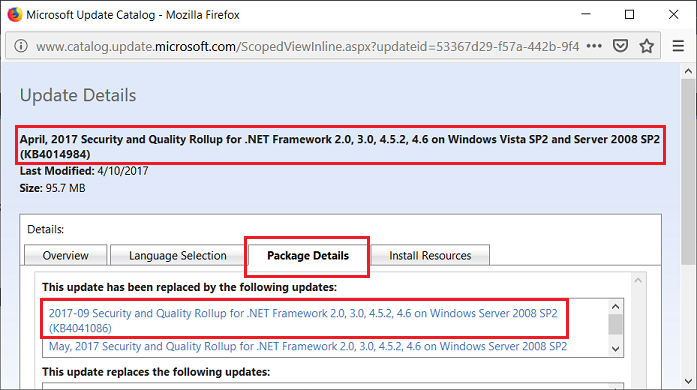
    The good news is that most Vista-compatible applications that actually require the .NET Framework don't need anything higher than .NET Framework v2 (built in to Vista) or v3.5 and should prompt you if a newer .NET Framework version like v4.5.2 is required (see the old Lifehacker article What Is the .NET Framework, and Why Do I Need It?).  That means that not having KB4014984 installed might not really be a serious issue for your in practical terms, especially if the software you run on your Vista machine doesn't even require a .NET Framework. I'll have to do more research, but the Package Details <here> for KB4014984 in the Microsoft Update Catalog show that KB4014984 has been supersceded (replaced) by the Sept 2017 update KB4041086 for Windows Server 2008 SP2 (see image below).  My Speccy profile shows this newer KB4041086 was never delivered to my own Vista SP2 machine in Sept 2017 via Windows Update, but Windows Vista and Windows Server 2008 SP2 share very similar code (both are based on Windows build 6.0.600x) and many Windows Server 2008 SP2 updates released after April 2017 can be manually installed on Vista SP2 machines.  This is just speculation on my part for now, but you might be seeing this error 0x800B0109 if Windows Update is confused about the correct supersedence chain of .NET Framework updates for Vista SP2 vs Windows Server 2008 SP2.

    32-bit Vista Home Premium SP2 * Firefox ESR v52.9.0 * Norton Security v22.15.2.22 * Speccy Free Portable v1.32.740

    HP Pavilion dv6835ca, Intel Core2Duo T5550 @ 1.83 GHz, 3 GB RAM, NVIDIA GeForce 8400M GS

    0 comments No comments
  3. Anonymous
    2020-03-27T08:24:50+00:00

    Hi

    I am in a similar boat. I did a clean reinstall of Windows Vista Business SP2 from a USB drive and installed the manual updates outlined in your post.

    I was able to update automatically except it would not install KB4014984 which is April, 2017 Security and Quality Rollup for .NET Framework 2.0, 3.0, 4.5.2, 4.6 on Windows Vista SP2 and Server 2008 SP2 (KB4014984)

    The error is:

    0x800B0109

    I looked it up and it says:

    A certificate chain processed, but terminated in a root certificate which is not trusted by the trust provider.

    I tried downloading the manual installs for this but it would not install either.

    I tried resetting Windows Update manually

    https://docs.microsoft.com/en-us/windows/deployment/update/windows-update-resources

    But the same error happened too.

    Please assist.

    Thanks and regards

    0 comments No comments
  4. Anonymous
    2020-03-25T20:55:47+00:00

    thank you so much for your help.

    Thats quite a task for me so it may take some time to carry out your procedures but i look forward to possibly finding a solution or at least making some progress I will get back to you accordingly. Thanks again

    0 comments No comments
  5. lmacri 2,500 Reputation points
    2020-03-24T18:19:28+00:00

    Hi zoo10:

    Microsoft agents no longer provide official support in the Windows Vista board of this forum so most replies you'll see are posted by fellow Windows users trying to help other users troubleshoot their problems.

    See my 19-Jun-2019 post in RayPilkington's thread Re-installing Windows Vista for links to 32-bit and 64-bit offline installers for Vista Service Pack 1 and Service Pack 2, as well as comments about a known issue with Windows Update on Vista SP2 machines that first appeared in August 2015 and can prevent Windows Update from patching your system to the end of extended support (11-Apr-2017) if Service Pack 2 is installed.  The instructions on page 1 of m#l's thread Updates not working, it has been searching for updates for hours should solve that problem.

    If you require further assistance let us know your computer make/model, default browser and antivirus, your current Service Pack (SP1 or SP2) and whether you have a 32-bit or 64-bit Vista OS (check at Control Panel | System and Maintenance | System as shown below).  If you have Internet Explorer 9 installed, it would also be helpful to know the current Update Versions of your IE9 browser (see image below) - Vista SP2 users who launch IE9 and go to Help | About Internet Explorer should see they have Update Versions v9.0.60 / KB4014661 if they are patched to 11-Apr-2017.

    If you currently have Service Pack 1 installed (which is a pre-requisite for Service Pack 2), also let us know the exact wording of any errors you see when you download the correct 32-bit or 64-bit Service Pack 2 .exe installer to your desktop, close your browser and other third-party software, and then right click and select Run as Administrator to start the installation.


    32-bit Vista Home Premium SP2 * Firefox ESR v52.9.0 * Norton Security Deluxe v22.15.2.22

    HP Pavilion dv6835ca, Intel Core2Duo T5550 @ 1.83 GHz, 3 GB RAM, NVIDIA GeForce 8400M GS

    0 comments No comments

