Microsoft Edge | Microsoft Edge development
Developing and testing features or extensions for Microsoft Edge

This browser is no longer supported.
Upgrade to Microsoft Edge to take advantage of the latest features, security updates, and technical support.
' cx='32' cy='32' r='32' /%3E%3Ctext x='50%25' y='55%25' dominant-baseline='middle' text-anchor='middle' fill='%23FFF' %3EAT%3C/text%3E%3C/svg%3E)
Hi all,
I've been searching for a while now on how to set the sepicific startupage of Edge through a registry setting.
After alot of searching I stumbled upon a solution that comes close to mine however this works only when I push the Homepage button.
I would like to be able to set the default startup page to something else.
Does anyone have the solution?
It would be much apreciated.
REG ADD "HKEY_CLASSES_ROOT\Local Settings\Software\Microsoft\Windows\CurrentVersion\AppContainer\Storage\microsoft.microsoftedge_8wekyb3d8bbwe\MicrosoftEdge\Main" /v "HomeButtonEnabled" /t REG_DWORD /d 0x00000001 /f
REG ADD "HKEY_CLASSES_ROOT\Local Settings\Software\Microsoft\Windows\CurrentVersion\AppContainer\Storage\microsoft.microsoftedge_8wekyb3d8bbwe\MicrosoftEdge\Main" /v "HomeButtonPage" /t REG_SZ /d http://yourwepage.com /f
Developing and testing features or extensions for Microsoft Edge
' cx='32' cy='32' r='32' /%3E%3Ctext x='50%25' y='55%25' dominant-baseline='middle' text-anchor='middle' fill='%23FFF' %3EA%3C/text%3E%3C/svg%3E)
Hi @AlexandrosTrommelen-7746 , how about the issue? Is the answer below helpful to solve your issue?
' cx='32' cy='32' r='32' /%3E%3Ctext x='50%25' y='55%25' dominant-baseline='middle' text-anchor='middle' fill='%23FFF' %3EF%3C/text%3E%3C/svg%3E)
Hi @Anonymous
could you be so kind and repost your old how-to for the Legacy Edge browser?
I am facing this problem now, too, and it seems there is no SOFTWARE\Policies\Microsoft\Edge entry at all
This solution is for Edge Chromium:
We need to set two settings in Edge Chromium:
First, we need to set RestoreOnStartup: Action to take on startup.
If you want to open Edge Chromium with new page with a url, then you should set this registry like below:
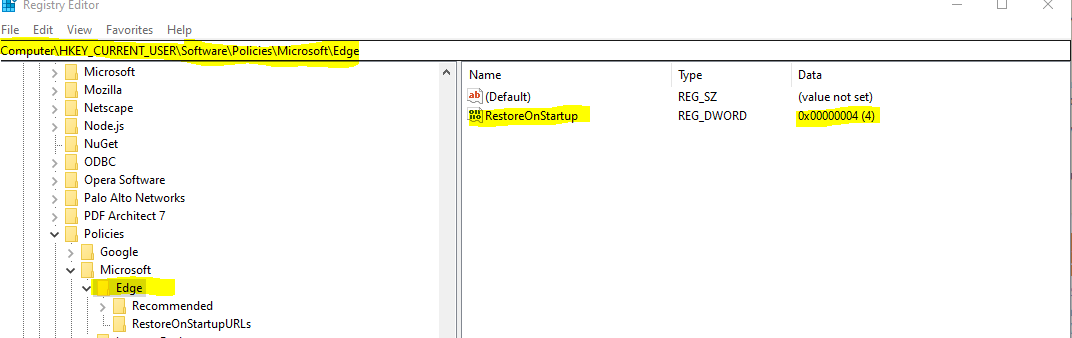
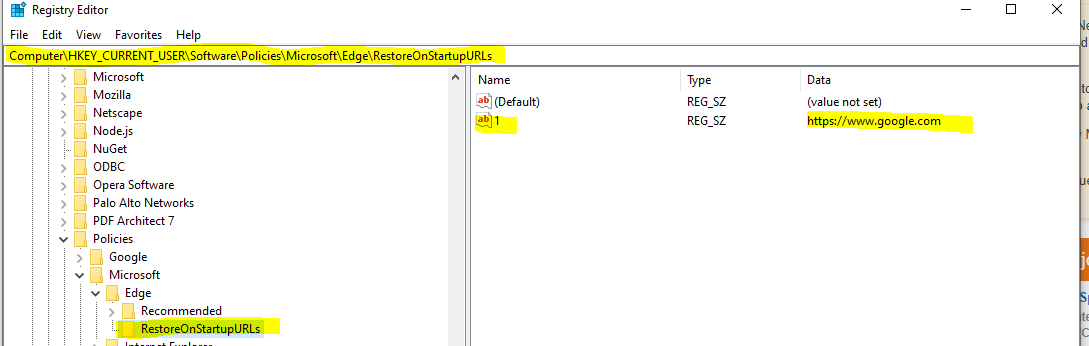
Second, we need to set RestoreOnStartupURLs: Sites to open when the browser starts.
This registry setting is used to set the url of the homepage. You should set it like below:
' cx='32' cy='32' r='32' /%3E%3Ctext x='50%25' y='55%25' dominant-baseline='middle' text-anchor='middle' fill='%23FFF' %3EFF%3C/text%3E%3C/svg%3E)
If you cant find those entries, just add them manually! It works like a charm. Much easier then download admx files, setup central locations and such.
Thanks!
' cx='32' cy='32' r='32' /%3E%3Ctext x='50%25' y='55%25' dominant-baseline='middle' text-anchor='middle' fill='%23FFF' %3ELB%3C/text%3E%3C/svg%3E)
Thank you for this tips. I am using multiple profils, for personal and professional usage. Is it possible to have a specific startup page for each profil, with registry modification ? Because one of my organisation control Edge, it control all profiles, not only the profile connected with the ms account of my organisation. Thank you for your help
' cx='32' cy='32' r='32' /%3E%3Ctext x='50%25' y='55%25' dominant-baseline='middle' text-anchor='middle' fill='%23FFF' %3EJ%3C/text%3E%3C/svg%3E)
This will make life a lot easy for most folks:
Windows Registry Editor Version 5.00
[HKEY_CURRENT_USER\SOFTWARE\Policies\Microsoft\Edge]
"RestoreOnStartup"=dword:00000004
[HKEY_CURRENT_USER\SOFTWARE\Policies\Microsoft\Edge\Recommended\RestoreOnStartupURLs]
"1"="https://www.google.com"
Hi YuZhou and thank you for the reply.
I've tried your solution however this isnt working for me
Instead of getting the page I added in the registry setting i get the standaard opening page:
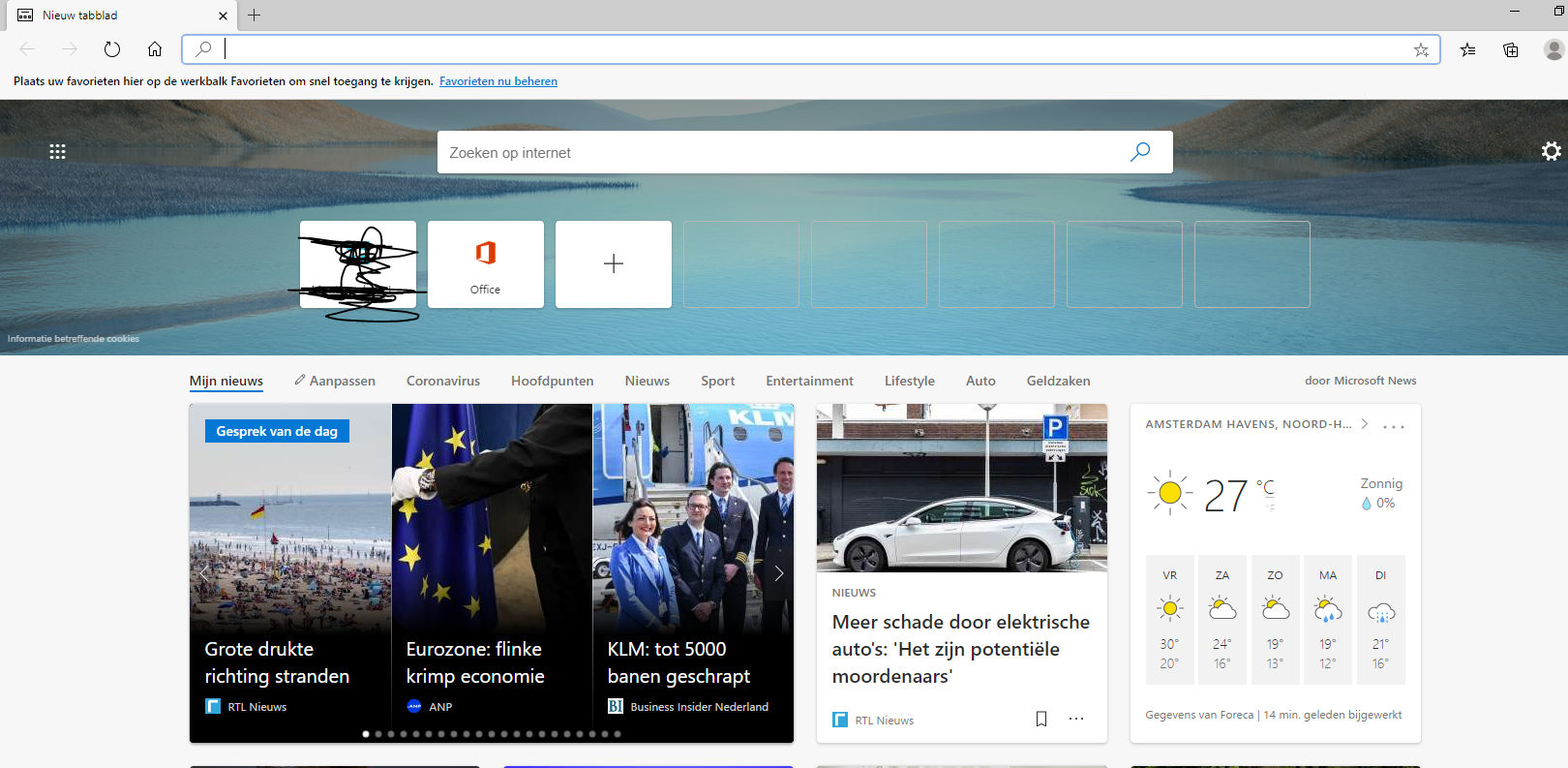
From your screenshot, you're using Edge Chromium. My answer before is for Edge Legacy. I've updated my answer for Edge Chromium, please check it.
' cx='32' cy='32' r='32' /%3E%3Ctext x='50%25' y='55%25' dominant-baseline='middle' text-anchor='middle' fill='%23FFF' %3ESD%3C/text%3E%3C/svg%3E)
Hi, i just found this article recently and have had a chance to try it out because i'm looking desperately for the same answer.
I am getting the same Edge start page as AlexandrosTrommelen-7746,
I am using the latest version of Edge Chromium for Business: "Stable 92" or specifically 92.0.902.62
opening the Registry and completing these changes did nothing for the logged in user, or any other user profile i try with this Windows 10 pc.
i am 100% positive i followed your instructions down by adding the changes to the Registry highlighted above, checking & double-checking to make sure i didn't have a spelling mistake
Has anyone had success ?