Microsoft Security | Intune | Configuration Manager | Other
Other Configuration Manager-related features and issues

This browser is no longer supported.
Upgrade to Microsoft Edge to take advantage of the latest features, security updates, and technical support.
' cx='32' cy='32' r='32' /%3E%3Ctext x='50%25' y='55%25' dominant-baseline='middle' text-anchor='middle' fill='%23FFF' %3EAC%3C/text%3E%3C/svg%3E)
Hi Support,
We have a SCCM server and plan to deploy a image which is Win10 with serval application installed to the client. To do this,
Thanks
Other Configuration Manager-related features and issues
Answer accepted by question author

Hi @Anonymous ,
Both methods are ok. If we use the second way, using the task sequence with different application package.
Here is the screenshot we could refer to:
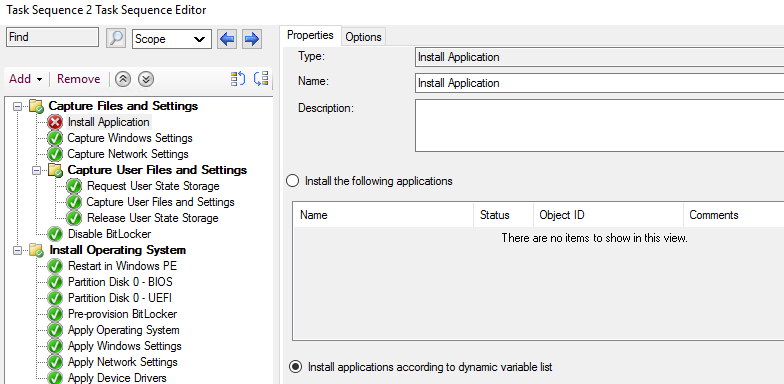
And creating a task sequence to install an OS, refer to this article:
https://learn.microsoft.com/en-us/mem/configmgr/osd/deploy-use/create-a-task-sequence-to-install-an-operating-system
If the response is helpful, please click "Accept Answer" and upvote it.
Note: Please follow the steps in our documentation to enable e-mail notifications if you want to receive the related email notification for this thread.
' cx='32' cy='32' r='32' /%3E%3Ctext x='50%25' y='55%25' dominant-baseline='middle' text-anchor='middle' fill='%23FFF' %3ERJ%3C/text%3E%3C/svg%3E)
You should look at using a TS for your imaging requirements. There is no point in creating a reference image anymore as this does not fit in the WaaS model. I will suggest using a vanilla image and then adding all your customizations, applications, drivers through the means of the TS.
Hi @Rahul Jindal ,
Thanks for your reply.
Do the vanilla image is a new windows OS image that didn't install anything?
And I need to create several application package (well tested) and adding them into the TS?
We cannot do it by MDT?
Thanks
Best Regards
Chong
The vanilla image is the ISO that you are able to download directly from MS. Setup the apps in ConfigMgr and add them in your build TS. If you have MDT integrated with your ConfigMgr server then you can use an MDT based TS. Using a standalone instance of MDT defeats the purpose of having ConfigMgr in the first place.