Hello,
I'm trying to troubleshoot a error/crash effecting my system under Windows 10 x64. Reviewing crash dumps and event viewer points towards the use of directinput8 (specifically dinput8.dll called by the Immersion Direct Input Effect dll) in order to call force
feedback effects under multiple applications. From what i gather this issue appears to effect a number of older devices by a number of manufacturers. This problem did not present in Windows 7 x64.
I did come across this information: https://cookieplmonster.github.io/2019/08/02/win10-dinput8-crash/ indicating a bug exists with dinput8.dll I grabbed my Windows 7 x64 dinput8.dll and ported it to Windows 10 x64 but nothing changes.
I note that 32bit programs which utilise the 32-bit dlls under Windows 10x64 work fine, as does both the 32 and 64 bit sample programs FFconst.exe bundled with the DirectX SDK. So the driver/device does work under Windows 10 x64. This video further confirms
that the driver works/worked with Win 10x64 as of version 1709 https://www.youtube.com/watch?v=cxeaGz3s5aM
So it looks like something has changed in Windows 10 x64 that has broken software compatibility with a number of programs utilising directinput8. This thread https://gamedev.stackexchange.com/questions/68757/is-idirectinput8finddevice-totally-broken-on-windows-7
indicates that there have not been changes to dinput8.
Grateful for any assistance to understand what is going on here.
See below for crash data...
Event viewer crashlog:
Faulting application name: rundll32.exe_shell32.dll, version: 10.0.18362.1, time stamp: 0x8ceb427f
Faulting module name: SaiQFF04.dll, version: 6.0.4.1, time stamp: 0x46372b3b
Exception code: 0xc0000005
Fault offset: 0x0000000000005a80
Faulting process id: 0x10e0
Faulting application start time: 0x01d5d887c89645ee
Faulting application path: C:\Windows\system32\rundll32.exe
Faulting module path: C:\Windows\system32\SaiQFF04.dll
Report Id: d7b2ec6e-6d54-473c-8a17-cbc7d9f9d1eb
Faulting package full name:
Faulting package-relative application ID:
Application Crash log:
CRASH in:
OS-Version: 6.1.7600 () 0x300-0x1
DEBUG TIMER: Sim::Sim:16600.330500
LOADING MODEL content/objects3D/cubemap_model.kn5
VERSION=5
Loading 6 textures
TIME TO INIT: 16714.155600
SplashScreen removed from evOnEndFrame that has 0 listeners
ERROR: NO STAT FOR ks_vallelunga
ERROR: SymGetLineFromAddr64, GetLastError: 487 (Address: 0000000010005A80)
0000000010005A80 (SaiQFF04): (filename not available): DllGetClassObject
ERROR: SymGetSymFromAddr64, GetLastError: 487 (Address: 00000000100013B6)
ERROR: SymGetLineFromAddr64, GetLastError: 487 (Address: 00000000100013B6)
00000000100013B6 (SaiQFF04): (filename not available): (function-name not available)
ERROR: SymGetSymFromAddr64, GetLastError: 487 (Address: 0000000010001697)
ERROR: SymGetLineFromAddr64, GetLastError: 487 (Address: 0000000010001697)
0000000010001697 (SaiQFF04): (filename not available): (function-name not available)
ERROR: SymGetSymFromAddr64, GetLastError: 487 (Address: 0000000010001D1D)
ERROR: SymGetLineFromAddr64, GetLastError: 487 (Address: 0000000010001D1D)
0000000010001D1D (SaiQFF04): (filename not available): (function-name not available)
ERROR: SymGetSymFromAddr64, GetLastError: 487 (Address: 0000000010003118)
ERROR: SymGetLineFromAddr64, GetLastError: 487 (Address: 0000000010003118)
0000000010003118 (SaiQFF04): (filename not available): (function-name not available)
ERROR: SymGetLineFromAddr64, GetLastError: 487 (Address: 00007FFED25C916F)
00007FFED25C916F (DINPUT8): (filename not available): GetdfDIJoystick
ERROR: SymGetLineFromAddr64, GetLastError: 487 (Address: 00007FFED25CDB67)
00007FFED25CDB67 (DINPUT8): (filename not available): DllGetClassObject
ERROR: SymGetLineFromAddr64, GetLastError: 487 (Address: 00007FFED25CD48D)
00007FFED25CD48D (DINPUT8): (filename not available): DllGetClassObject
d:\dev\dev_pc_master_race\ksdi\inputdevice.cpp (248): InputDevice::sendFF
d:\dev\dev_pc_master_race\acs\dicarcontrol.cpp (535): DICarControl::sendFF
d:\dev\dev_pc_master_race\ksphysicsac\car.cpp (1818): Car::onTyresStepCompleted
d:\dev\dev_pc_master_race\ksphysicsac\tyre.cpp (345): Tyre::step
d:\dev\dev_pc_master_race\ksphysicsac\car.cpp (592): Car::stepComponents
d:\dev\dev_pc_master_race\ksphysicsac\car.cpp (564): Car::step
d:\dev\dev_pc_master_race\ksphysicsac\physicsengine.cpp (198): PhysicsEngine::step
d:\dev\dev_pc_master_race\acs\physicsdrivethread.cpp (200): PhysicsDriveThread::step
ERROR: SymGetLineFromAddr64, GetLastError: 487 (Address: 00007FFEF5952851)
00007FFEF5952851 (WINMM): (filename not available): PlaySoundW
ERROR: SymGetLineFromAddr64, GetLastError: 487 (Address: 00007FFEFA657BD4)
00007FFEFA657BD4 (KERNEL32): (filename not available): BaseThreadInitThunk
ERROR: SymGetLineFromAddr64, GetLastError: 487 (Address: 00007FFEFA90CEE1)
00007FFEFA90CEE1 (ntdll): (filename not available): RtlUserThreadStart
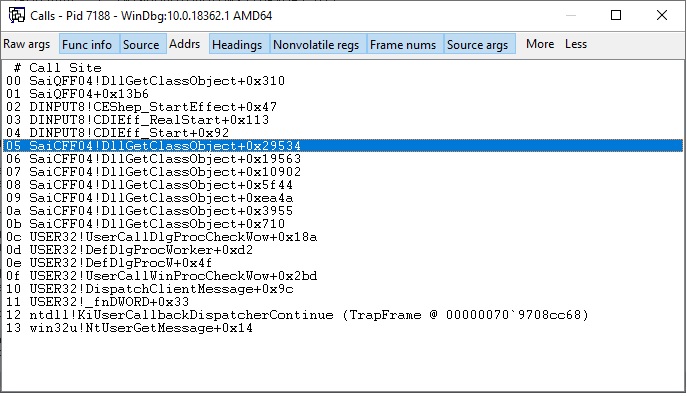
WinDbg x64 stack trace:
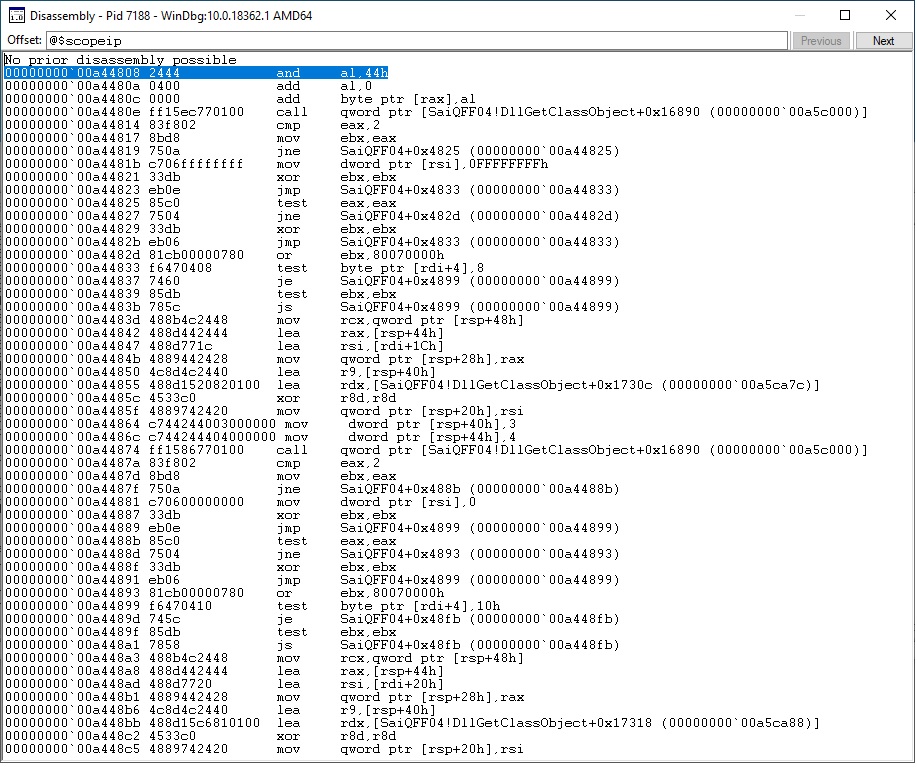
WinDbg x64 dissassembly:
' cx='32' cy='32' r='32' /%3E%3Ctext x='50%25' y='55%25' dominant-baseline='middle' text-anchor='middle' fill='%23FFF' %3EA%3C/text%3E%3C/svg%3E)

