Share via

Option Advanced printing features grey out

Luong Van Do (FHM.FCT) 11 Reputation points
2021-09-07T14:35:22.047+00:00

Hi supporters,

Anyone help me for the issues as the followings.
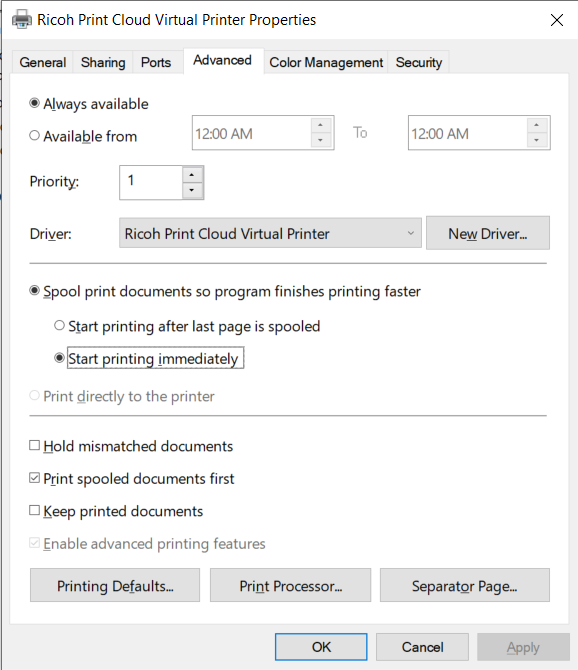
In the red box, how can i make a change for two options.

  1. Enable advanced printing features.
  2. Print directly to the printer.

129916-image.png

Windows for business | Windows Server | User experience | Print jobs

3 answers

Sort by: Most helpful
  1. Limitless Technology 40,101 Reputation points
    2021-09-07T18:40:51.477+00:00

    Hello @Luong Van Do (FHM.FCT)

    Could you try the next? It seems that it doesn't catch your admin rights right way. Once this is not greyed out it should be easy.

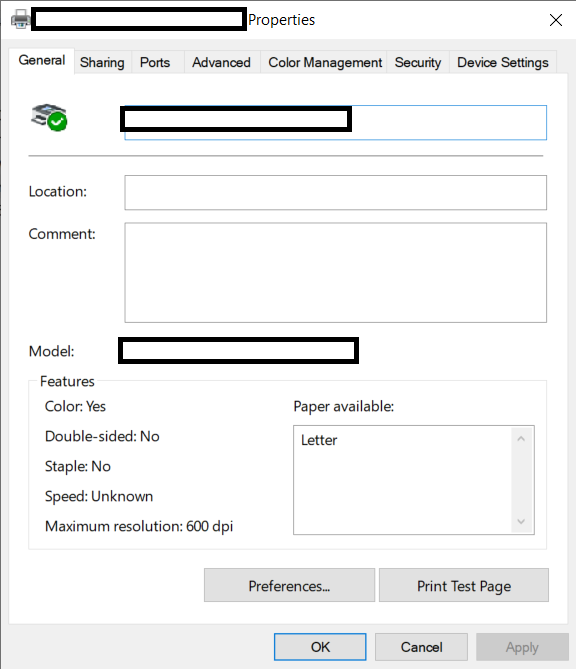
    Try to click "Change Properties" button on General tab, The printer properties box will close and will reopen with administrator privileges. Now click on the advanced tab and check if there is any change.

    Otherwise I would recommend to reinstall updated driver pack for the printer from the manufacturer's website, as this may he grayed out due to a mixed or generic driver.

    Hope it helps in your case!
    Best regards,
    1 person found this answer helpful.

  2. Alan Morris 1,346 Reputation points
    2023-08-16T12:58:12.6766667+00:00

    @Bill Harper you mean back to front rather than front to back? There is usually an output option to change the page delivery. This will be different for most drivers so check Device Settings as well as Printing Defaults on the Advanced tab.

    0 comments No comments

  3. Bill Harper 0 Reputation points
    2023-08-16T08:07:00.8433333+00:00

    What else can I do to turn on the advanced options? I need to reverse print

    0 comments No comments

Your answer

Answers can be marked as 'Accepted' by the question author and 'Recommended' by moderators, which helps users know the answer solved the author's problem.