Microsoft Security | Microsoft Entra | Microsoft Entra ID
A cloud-based identity and access management service for securing user authentication and resource access

This browser is no longer supported.
Upgrade to Microsoft Edge to take advantage of the latest features, security updates, and technical support.
' cx='32' cy='32' r='32' /%3E%3Ctext x='50%25' y='55%25' dominant-baseline='middle' text-anchor='middle' fill='%23FFF' %3EBD%3C/text%3E%3C/svg%3E)
I receive the following error when I attempt to look at App Registrations in my own portal.
You do not have access
Your administrator has disabled the App registrations experience in the Azure portal. You can still register or manage applications using PowerShell or another client such as Visual Studio.
A cloud-based identity and access management service for securing user authentication and resource access
' cx='32' cy='32' r='32' /%3E%3Ctext x='50%25' y='55%25' dominant-baseline='middle' text-anchor='middle' fill='%23FFF' %3ERJ%3C/text%3E%3C/svg%3E)
Hi, if the posted answer resolves your question, please mark it as the answer by clicking the check mark. Doing so helps others find answers to their questions.
' cx='32' cy='32' r='32' /%3E%3Ctext x='50%25' y='55%25' dominant-baseline='middle' text-anchor='middle' fill='%23FFF' %3EVS%3C/text%3E%3C/svg%3E)
@Brandon Duncan The error you received is caused when normal users do not have permission to add/register any Azure AD application by themselves.
The setting which control this behavior is located at : Azure AD-- Users -- Users Settings :
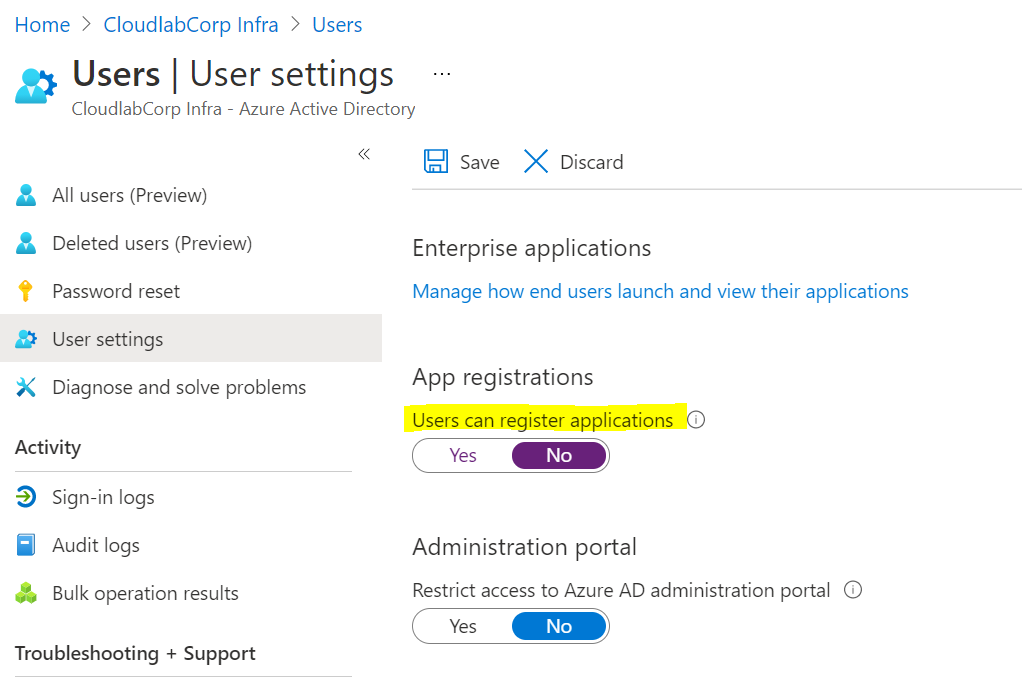
You can ask the admin to set it to yes if this is the requirement for your organization.
-----------------------------------------------------------------------------------------------------------------
Please remember to "Accept Answer" if any answer/reply helped, so that others in the community facing similar issues can easily find the solution.
' cx='32' cy='32' r='32' /%3E%3Ctext x='50%25' y='55%25' dominant-baseline='middle' text-anchor='middle' fill='%23FFF' %3EDB%3C/text%3E%3C/svg%3E)
I am the Admin. It is my Azure portal/account; I created it using my MSDN account.
@Duncan, Brandon What is the status of above setting ? can you share a screenshot ?
' cx='32' cy='32' r='32' /%3E%3Ctext x='50%25' y='55%25' dominant-baseline='middle' text-anchor='middle' fill='%23FFF' %3ETR%3C/text%3E%3C/svg%3E)
Thanks , This ha been helpful ,But is t possible to enable this for a specific user ?
' cx='32' cy='32' r='32' /%3E%3Ctext x='50%25' y='55%25' dominant-baseline='middle' text-anchor='middle' fill='%23FFF' %3EA%3C/text%3E%3C/svg%3E)
Hi, could you also mention where could be find the global admin contact , is it under classic administrators?. How to request access from them ?
@Anonymous You cannot find the global admins name/list if you do no have correct roles. You will need to reach out internally to IT or your management to find it. MS support can also help in this if you provide them proper justification for the requirement.
I don't understand. I thought I was the Admin of my portal. There is a group of Administrators for Portal.Azure.com?
@Brandon Duncan Portal.Azure.com is accessible by everyone, features, services under it have been targeted for certain role holders only. The role with highest privilege's in Azure AD is global administrator. A person who holds the global admin role would be able to access/change the App registration setting page for whole company.
Hi Vipul, Were you able to get access to register apps, Could you let me know how to check for the admin details with whom we can request for access
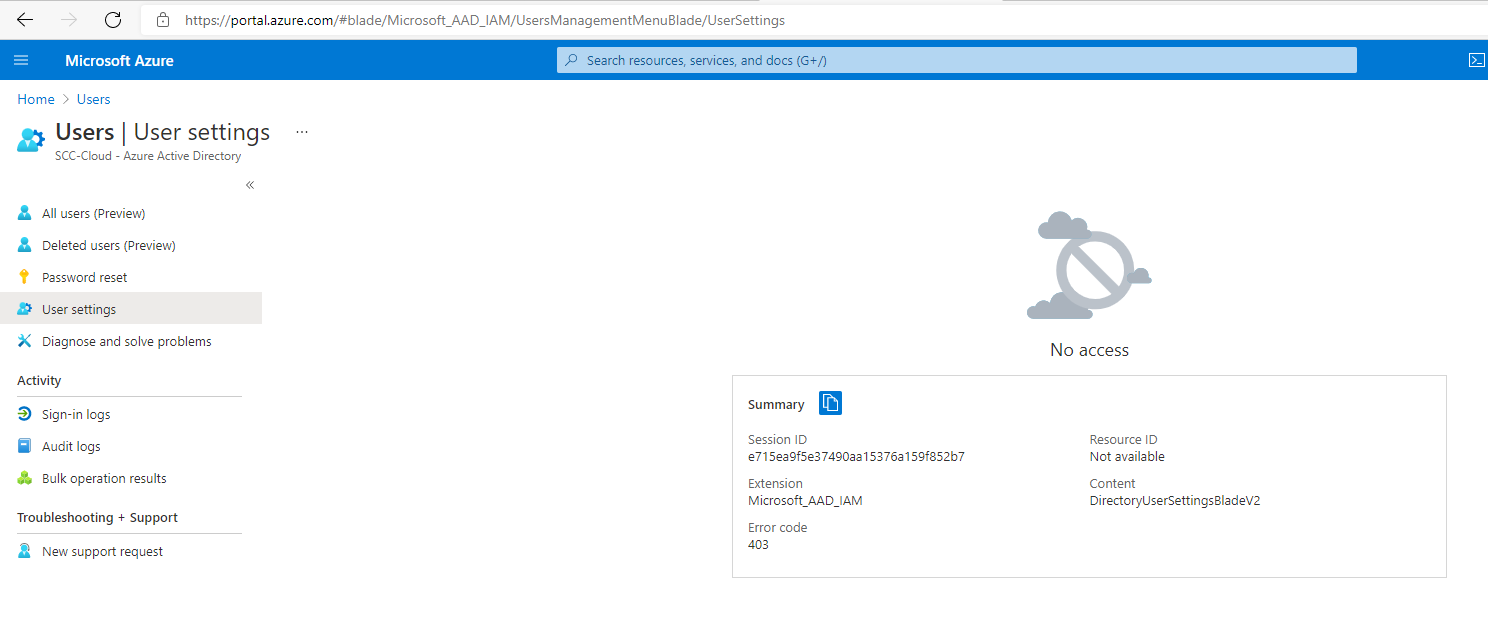
Please see the attached screenshot.
@Brandon Duncan The screenshot says that you do not have permission to access this page, you might not be a global admin to access this page. Check if you are logged with your correct account. Please contact your global admin.
If you are a global admin, you should see this as your assigned role :