I have a 2080s Black. I have been crashing during path of exile during different situations nothing specific in game is crashing me as far as I can figure out. After researching the exemption code error I came
across a lot of possible reasons this was happening.
I have
- Reinstalled windows 10
- Reinstalled PoE
- CCleaner removed all of nvidia files for gpu drivers. Had it correct any issues it found in the registry. Reinstalled fresh version of drivers without geforce experience and it continued to crash.
I repeated this process and I went back one version of the drivers.
- Moved to non steam version of poe
Dxdiag report - https://pastebin.com/wN0jNAtL
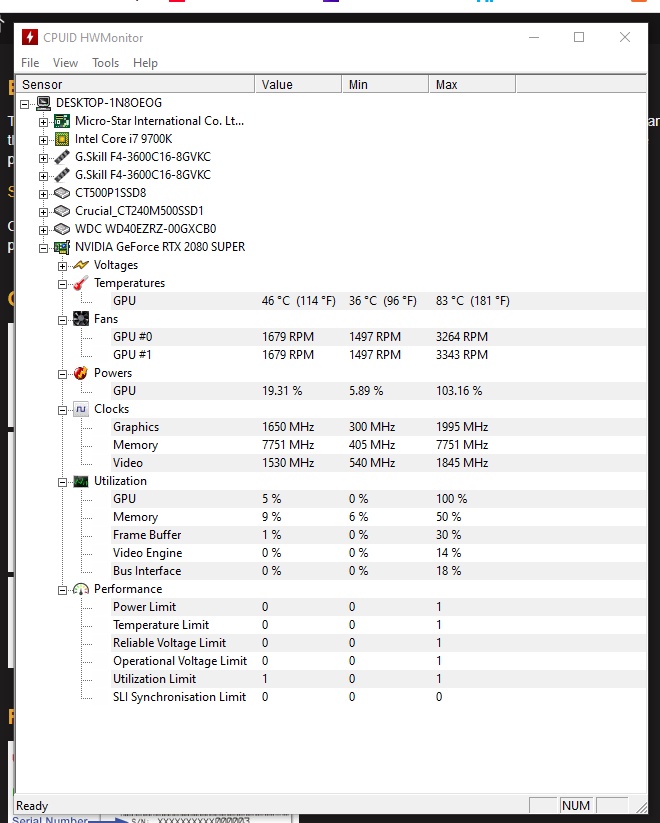
HWMon Temps - The max values occurred while playing the game today 6/22/20. https://i.gyazo.com/thumb/1200/3fa29069082167e9f47bf947b519f472-png.jpg
Here are several errors I received today while trying to play
Faulting application name: PathOfExile_x64.exe, version: 0.0.0.0, time stamp: 0x5eedc5f5
Faulting module name: nvoglv64.dll, version: 26.21.14.4587, time stamp: 0x5e879b16
Exception code: 0xc0000005
Fault offset: 0x0000000000f6f21d
Faulting process id: 0x318
Faulting application start time: 0x01d64847b301b6a3
Faulting application path: C:\Program Files (x86)\Grinding Gear Games\Path of Exile\PathOfExile_x64.exe
Faulting module path: C:\WINDOWS\System32\DriverStore\FileRepository\nv_dispi.inf_amd64_9952681a7bb1dfac\nvoglv64.dll
Report Id: 9b36e085-46a9-4132-b9b8-993e321a8328
Faulting package full name:
Faulting package-relative application ID:
Faulting application name: PathOfExile_x64.exe, version: 0.0.0.0, time stamp: 0x5ef03c5c
Faulting module name: PathOfExile_x64.exe, version: 0.0.0.0, time stamp: 0x5ef03c5c
Exception code: 0xc0000005
Fault offset: 0x0000000000a1c7d3
Faulting process id: 0xc38
Faulting application start time: 0x01d6485da892e259
Faulting application path: C:\Program Files (x86)\Grinding Gear Games\Path of Exile\PathOfExile_x64.exe
Faulting module path: C:\Program Files (x86)\Grinding Gear Games\Path of Exile\PathOfExile_x64.exe
Report Id: a3beab8e-9d82-42e2-aae1-ec41855796a0
Faulting package full name:
Faulting package-relative application ID:
Faulting application name: dwm.exe, version: 10.0.18362.387, time stamp: 0x8e064b77
Faulting module name: nvwgf2umx_cfg.dll, version: 26.21.14.4587, time stamp: 0x5e879b9e
Exception code: 0xc0000005
Fault offset: 0x0000000000cd9320
Faulting process id: 0x4a4
Faulting application start time: 0x01d646b2f07a1b54
Faulting application path: C:\WINDOWS\system32\dwm.exe
Faulting module path: C:\WINDOWS\System32\DriverStore\FileRepository\nv_dispi.inf_amd64_9952681a7bb1dfac\nvwgf2umx_cfg.dll
Report Id: 68d05f3b-28ea-4dab-b8c6-cf3559bef58c
Faulting package full name:
Faulting package-relative application ID:
Faulting application name: PathOfExile_x64.exe, version: 0.0.0.0, time stamp: 0x5ef03c5c
Faulting module name: PathOfExile_x64.exe, version: 0.0.0.0, time stamp: 0x5ef03c5c
Exception code: 0xc0000005
Fault offset: 0x000000000145aae9
Faulting process id: 0x248c
Faulting application start time: 0x01d6485e246c775b
Faulting application path: C:\Program Files (x86)\Grinding Gear Games\Path of Exile\PathOfExile_x64.exe
Faulting module path: C:\Program Files (x86)\Grinding Gear Games\Path of Exile\PathOfExile_x64.exe
Report Id: b588517b-26b0-4dac-b187-2444c0820da2
Faulting package full name:
Faulting package-relative application ID:
' cx='32' cy='32' r='32' /%3E%3Ctext x='50%25' y='55%25' dominant-baseline='middle' text-anchor='middle' fill='%23FFF' %3EA%3C/text%3E%3C/svg%3E)