Share via

USB File transfer speed drops to 0 bytes and goes back up to normal multiple times

Anonymous
2019-12-03T15:53:46+00:00

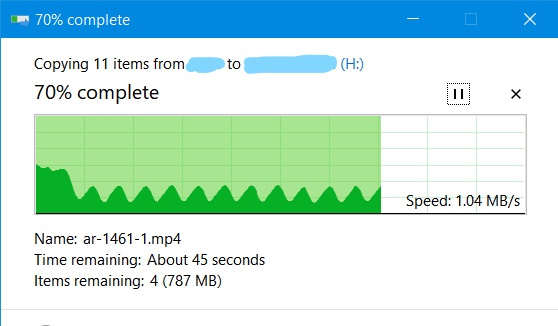
Hi, I just bought a new Kingston USB flash drive and when I tried it I noticed that when copying a file from the laptop to it file transfer speed keeps reducing to zero and freezes then goes back to the normal transfer speed and I tried it on a different laptop and I had the same issue. I searched for a fix to the problem but I came empty-handed and I need to know if the problem is in the flash drive or not so I can return it

The USB is 3.0 and I am connecting it to a 3.0 USB port. I made it on better performance from device manager

I also full formatted the USB and changed its file system but nothing changed the problem remains the same

An image shows the transfer, and when copying large files it makes the transfer take longer time than it should take
Windows for home | Windows 10 | Devices and drivers

Locked Question. This question was migrated from the Microsoft Support Community. You can vote on whether it's helpful, but you can't add comments or replies or follow the question.

0 comments No comments

Answer accepted by question author

Igor Leyko 111K Reputation points Independent Advisor
2019-12-04T18:52:40+00:00

There are spike on the picture once in 5 seconds. As for me this is not normal.

But may be this is normal for this model if it has input cache - fill it in a second and then write this data to main storage during 5 second interval.

High disk queue level speaks for this suggestion.

I recommend to ask clarification from Kingston support.

Was this answer helpful?

9 people found this answer helpful.
0 comments No comments

20 additional answers

Sort by: Most helpful
  1. Anonymous
    2020-07-18T19:51:23+00:00

    I have been having the exact same problem only my transfer speeds drop from 80 mbps to 5 kbps in less than 2 seconds and then, it sometimes drops to 0.  It will stay at 0 for a minute or two, then fly back up to maybe 35 mbps and then down it comes to 0 again in about 2 seconds.  I am trying to transfer a 95 gigabyte file from one of my SSD's to a brand new Adata 128 gig thumb drive.  I have tried 4 different thumb drives all with different capacities and I get the same thing.  This never used to happen on my computer until about 3-4 months ago after a win 10 update.  That update also messed up a few other things on my computer which I had to fix. (It made my back up SSD no longer show up so I could not back up to it until I fixed the windows issue)  These Adata drives are pretty fast and a file like this would usually only take maybe 5 minutes or less but now, I can let it run for 4 hours and it shows "Transfer 2% complete".  I have spent the last 4 hours on Google reading and trying ALL of the "fixes" recommended by M.S. and other users.  (When one did not work, I re-set the setting back and tried another one and so on.)  In my research I have seen hundreds of posts by folks describing EXACTLY what is happening over here and they all were using different computers and different thumb drives, yet we all get the same result.  Does anyone at Microsoft know how to fix this please????   If I knew which update messed up my usb3.0 I might try rolling it back (if it would let me) but I have no idea what part of the update messed it up.

    Was this answer helpful?

    10+ people found this answer helpful.
    0 comments No comments
  2. Anonymous
    2019-12-05T09:32:40+00:00

    I don't think it has something to do with Kingston. I have the same problem with all of my harddrives including 1 Kingston drive. I exactly get the same graphs as the OP.

    When i used these drives on a laptop of my colleague, it uses the full  speed.

    Was this answer helpful?

    10+ people found this answer helpful.
    0 comments No comments
  3. Anonymous
    2020-08-28T21:56:14+00:00

    When I built this computer, I put in USB 3.0 to take advantage of the high and fast transfer speeds.  somehow, windows 10 is stopping this from happening.  I tried all of the earlier mentioned suggestions from M.S. and the results are exactly the same with many different thumb drives and SD cards.  However, I can take those same drives and plug them into my old windows 8 computer (USB 2.0) and the transfer rates are about 100 times faster than on windows 10 with USB 3.0. and they never slow down or go down to 0.  There must be something going on here and M.S. needs to fix this or tell us how to work around it.  All was fine until a windows update a few months back.

    Was this answer helpful?

    7 people found this answer helpful.
    0 comments No comments
  4. Anonymous
    2021-05-12T21:14:13+00:00

    same problem here. windows 10 PC. no problem on other windows using same usb disk. have not found any solution since last year, this is such a pain on a very expensive windows 10 license?

    Was this answer helpful?

    4 people found this answer helpful.
    0 comments No comments
