Microsoft Security | Microsoft Entra | Microsoft Entra ID
A cloud-based identity and access management service for securing user authentication and resource access

This browser is no longer supported.
Upgrade to Microsoft Edge to take advantage of the latest features, security updates, and technical support.
' cx='32' cy='32' r='32' /%3E%3Ctext x='50%25' y='55%25' dominant-baseline='middle' text-anchor='middle' fill='%23FFF' %3EAW%3C/text%3E%3C/svg%3E)
Http : - https://graph.microsoft.com/beta/chats/{id}
sending the request then getting an error:-
{
"error": {
"code": "UnknownError",
"message": "",
"innerError": {
"date": "2020-07-28T07:55:53",
"request-id": "d11640a9-ebf9-4fee-b75d-6f3198cf6db3"
}
}
}
A cloud-based identity and access management service for securing user authentication and resource access
Answer accepted by question author
' cx='32' cy='32' r='32' /%3E%3Ctext x='50%25' y='55%25' dominant-baseline='middle' text-anchor='middle' fill='%23FFF' %3ESM%3C/text%3E%3C/svg%3E)
@Alex Wilber , Thank you for reaching out and sharing more details on this. So the problem lies basically in the grant_type that you have used here. Let's go step by step in details:
You used the client_credential flow (using grant_type as client_credetantials) and you used the token issued by that call to call the /users graph API. This is correct and hence you got the response.
But the point to check here is, you got the token in application's context when you used the client_credentials flow. Which would work for the /users API but not for the chats or conversations or such APIs. To call those APIs, you would need the token to be fetched from AAD using the Authorization-Code Grant flow (using the grant type as authorization_code)
Now the following API: https://graph.microsoft.com/beta/users/{user-id}/chats would work only if the following conditions are met:
Hope this helps.
Do let us know if this helps and if there are any more queries around this, please do let us know so that we can help you further. If there are still some issues in getting the correct results, do drop us an email on azcommunity[at]microsoft[dot]com with the following details, and we would connect with you offline and discuss this in detail.
Tenant ID/Tenant Name:
Subscription ID:
Do not forget to share the thread URL of this issue so that its easier for me to pick this up and help you further.
Also, please do not forget to accept the response as Answer; if the above response helped in answering your query.
Hi @soumi-MSFT ,
Thank you for answer as for Chat API is working fine as I have used Grant type as authorization code.
But I am facing some issue for other API's also such as:-
1) Get Conversation:-
GET /groups/{id}/conversations/{id}:- As I am taking the id as user id of two different users, whether correct or not ?? and also tell how to get id for this API.
Please find the screenshot:-
![14728-get-conversation.png][1]
) Send message to channel/teams:-
https://graph.microsoft.com/beta/teams/{id}/channels/{id}/messages
for this also i have given the team id and channel id but it is not working.
Please find the screenshot:-
![14784-send-msg-to-channel.png][2]
[1]: /answers/storage/temp/14728-get-conversation.png
[2]: /answers/storage/temp/14784-send-msg-to-channel.png
Please help me out on this also.
And for below points I want to know the feasibility whether it is possible through Microsoft Graph API or not: -
As I will drop a mail to Microsoft also from Company site with details.
@AlexWilber-4564, Glad the chat API worked. Do send us the email on azcommunity[at]microsoft[dot]com and we can discuss on that the rest of the API issues also there and would try to help you get the API work.
@Alex Wilber , Thank you for sharing the details. I just tested this api and let me share the screenshot first:
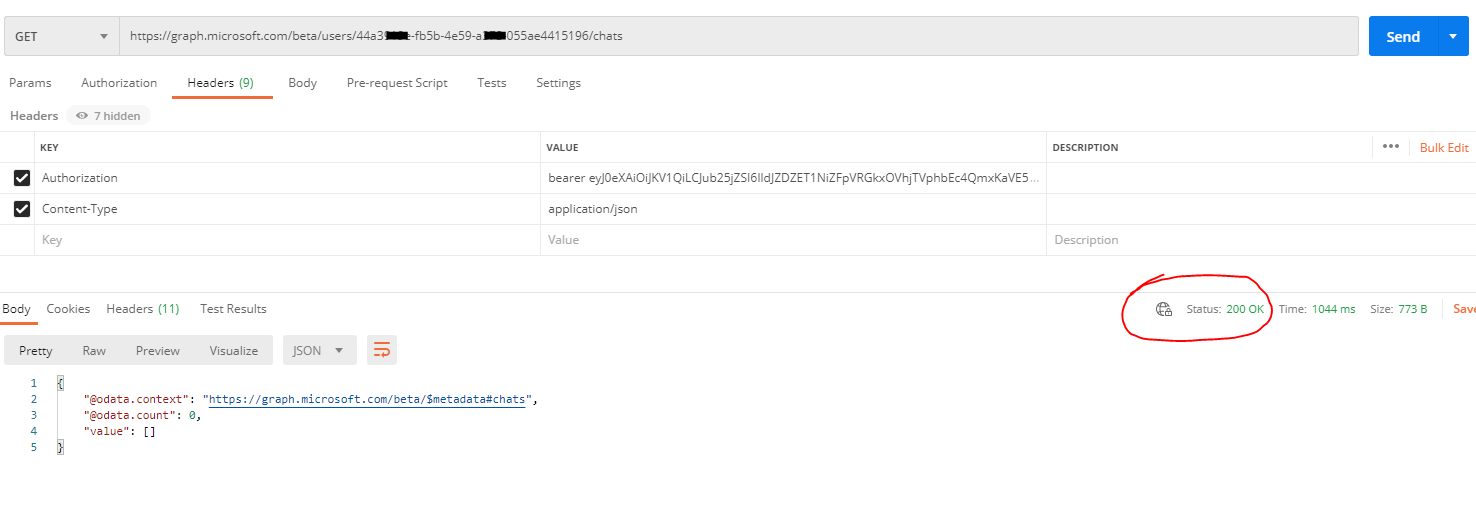
Now a few things that you would want to check are:
Hope this helps.
Do let us know if this helps and if there are any more queries around this, please do let us know so that we can help you further. Also, please do not forget to accept the response as Answer; if the above response helped in answering your query.
Hi, @soumi-MSFT
Thank for you answer. I will tell you what I have First I have created one separate tenant and added Users in it.
Then I tried the below API for getting the User Id of all users :- https://graph.microsoft.com/v1.0/users
In response I got the User Id for all users and I was trying to one User Id in Chats API.
And I am using grant type as Client Credentials and then I am generating token.
Please find the screenshot:-

Can you tell it is grant type as client credentials because get user API is working fine for me.
And more doubt the id is the User id of any user which present in the tenant ??
As I am passing the id of one user in the API only.
And Same issue I am facing for Get Conversation API.
Can You tell how to get id for the below API request: -
GET /groups/{id}/conversations/{id}.
Please help.
@Alex Wilber , Thank you for reaching out and I apologize for the delay in my response. I tried this API myself with Postman, and found that when I am using the scope as "chat.readwrite", I stumbled upon this same exact error. But when I modified the scope to chat.read, it worked fine. Do try with chat.read once and check if that works for you.
Hope this helps.
Do let us know if this helps and if there are any more queries around this, please do let us know so that we can help you further. Also, please do not forget to accept the response as Answer; if the above response helped in answering your query.
Hi, @soumi-MSFT
Thank for your answer.
But I have provided the both API Premissions in Azure, which you told previously only, but again getting some error.
Please find the below screen shot for Premission:-

The below API request I have provided: -
HTTP :- https://graph.microsoft.com/beta/users/9598b1ab-7d61-4fa2-bff8-adce2bab4f29/chats
But again getting some error.
Please help me out.