Share via

Lenovo ImController process

Anonymous
2020-07-11T17:43:11+00:00

Hello there. 

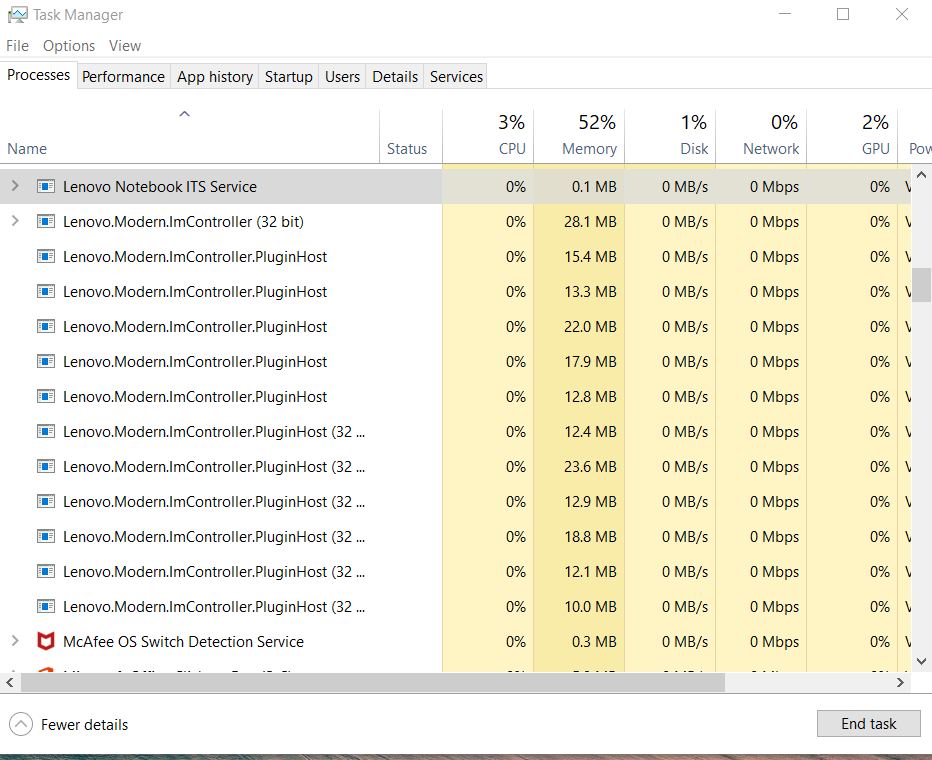
I decided to write here because i can't find solutions in Lenovo Forums for this problem, plus i wrote the same info in their forums but i haven't received an answer (2 months exactly), i don't know maybe they are sleeping. All of a sudden this process called Lenovo ImController started spawning more similar processes and i can't make it stop, i can't delete it, it appears again and again after every windows update and taking up RAM. I have uninstalled Lenovo Vantage, which i thought was the problem but nothing. Someone suggested as i was searching for a solution, to uninstall System Interface Foundation Service from the control panel, but there is no program like that installed on my PC. But it appears on task manager as a service and there is only a stop option.

Can someone help me get rid of this, if it's not necessary? It really does slow my system.

Thanks a lot!

(IdeaPad S340-15IWL with Windows 10 64 bit v.2004)
Windows for home | Windows 10 | Performance and system failures

Locked Question. This question was migrated from the Microsoft Support Community. You can vote on whether it's helpful, but you can't add comments or replies or follow the question.

0 comments No comments

Answer accepted by question author

  1. Anonymous
    2020-07-11T18:28:59+00:00

    Hi and thanks for reaching out. My name is William. I'm a Windows technical expert. I'll be happy to help you out today.

    There is a guide here that tells you how to uninstall Lenovo system interface foundation: https://support.lenovo.com/us/en/solutions/ht50...

    30+ people found this answer helpful.
    0 comments No comments

2 additional answers

Sort by: Most helpful
  1. Anonymous
    2020-07-12T10:04:32+00:00

    Hi. 

    Thanks for the reply. I think i fixed the problem for now, followed every step and everything went fine.

    4 people found this answer helpful.
    0 comments No comments
  2. Deleted

    This answer has been deleted due to a violation of our Code of Conduct. The answer was manually reported or identified through automated detection before action was taken. Please refer to our Code of Conduct for more information.


    Comments have been turned off. Learn more

