Share via

Task bar color option greyed out in settings after update KB4571756 28/9/20

Anonymous
2020-09-28T14:56:50+00:00

After a windows 10 update today 28/9/20, the task bar color has defaulted to white and the settings taskbar colour option is now greyed out. i am now stuck with a white task bar. Thanks microsoft. Any help would be appreciated. Uninstalled the update and its still the same.

Lenovo V110-15ast.

Windows for home | Windows 10 | Settings

Locked Question. This question was migrated from the Microsoft Support Community. You can vote on whether it's helpful, but you can't add comments or replies or follow the question.

0 comments No comments

Answer accepted by question author

  1. Sumit D - IA 166.8K Reputation points Independent Advisor
    2020-09-28T15:03:41+00:00

    Hi John,

    I am Sumit, an Independent Advisor and a 3 year Windows Insider MVP here to help.

    To change Windows color on the taskbar, you must disable light mode.

    In the personalization Settings>Colors>Choose color as custom and Default Windows Mode to custom. Choose Default Windows Mode to Dark and app mode according to your wish.

    Click the link below for an Image from Tenforums.

    https://www.tenforums.com/attachments/tutorials...
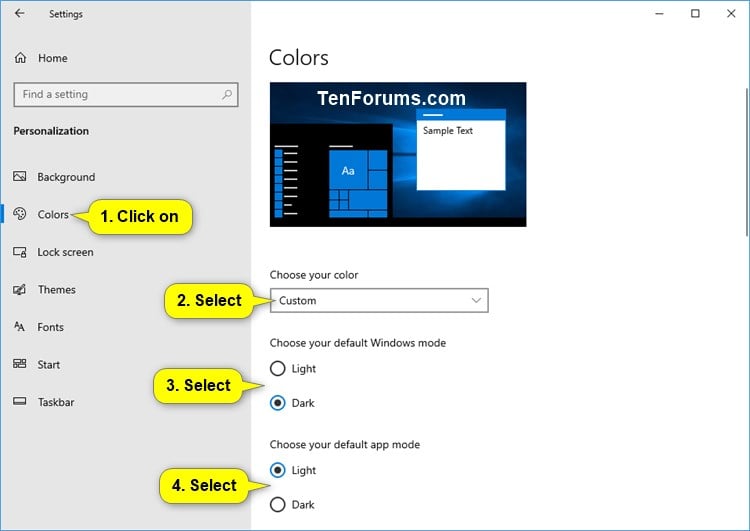
    Hope that helps.

    Content on the above blog is written by a Microsoft MVP so it is safe. However, do watch out for the ads.

    8 people found this answer helpful.
    0 comments No comments

3 additional answers

Sort by: Most helpful
  1. Anonymous
    2020-10-14T19:26:04+00:00

    I do not have 'APP MODE Light or Dark' so I used REG-EDIT to change 'Color Preference from '0' to '2' or from '0' to '1'. All the other REG-EDIT PERSONALIZE values are set to '1'.  The taskbar/system tray backgrounds go to black. Launched applications(like Windows Explorer) remained white. Unfortunately the 'System Tray' icons remained black so it is black-on-black not white-on-black in the system tray. 

    If I  change the COLOR option to DARK under the Personalize options via the desktop, the taskbar/system tray backgrounds go black, the system tray icons go white but the apps(like Windows Explorer) backgrounds go black.

    1 person found this answer helpful.
    0 comments No comments
  2. Sumit D - IA 166.8K Reputation points Independent Advisor
    2020-09-28T16:08:59+00:00

    Haha, you are welcome, and thank you for your feedback. Have a good week!

    0 comments No comments
  3. Anonymous
    2020-09-28T15:44:37+00:00

    Hi John,

    Thank you so much. It worked.

    Now need to reinstall the update that I removed !

    0 comments No comments
