' cx='32' cy='32' r='32' /%3E%3Ctext x='50%25' y='55%25' dominant-baseline='middle' text-anchor='middle' fill='%23FFF' %3EA%3C/text%3E%3C/svg%3E)

Hi,
Welcome to Microsoft Q&A.
My understanding of your issue is the VM cannot boot normally and cannot boot into safe mode caused by CRITICAL_PROCESS_DIED. If any misunderstand, please feel free to correct me.
https://learn.microsoft.com/en-us/windows-hardware/drivers/debugger/bug-check-0xef--critical-process-died
I suggest trying some of the troubleshooting below and check if it makes any difference:
Way 1 : If there is a healthy checkpoint on your VM, you can apply it so that your VM can normal boot from a previous checkpoint.
Way 2 : You can replace the registry HIVE file in WinPE / WinRE using command prompt
- Boot from repair mode (or with WINPE) . Open CMD
- Go to \windows\system32\config (as C:\ or D:\ in WinPE or WinRE)
- Backup the current system/software by :
Ren system system_backup
Ren Software Software_backup

- Replace the system / software hive by :
Copy D:\windows\system32\config\regback\software D:\windows\system32\config\software
Copy D:\windows\system32\config\regback\system D:\windows\system32\config\system

- Restart the server.
Way 3 : Perform a System Restore
- Search for “Create a restore point”.
- Click the top result to open System Properties
- Click the System Restore button in System Properties.
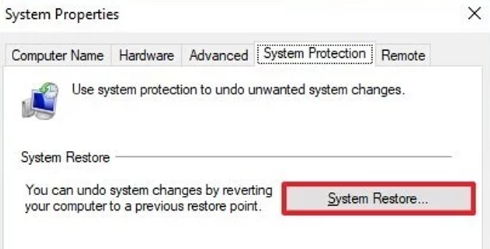
- Select the restore point that you want to use on the VM.
- Click the Next and Finish button.
Please remember to accept the reply as answer if it helps.
Best regards,
Molly
' cx='32' cy='32' r='32' /%3E%3Ctext x='50%25' y='55%25' dominant-baseline='middle' text-anchor='middle' fill='%23FFF' %3EM%3C/text%3E%3C/svg%3E)