Share via

Airpod Pro Mic not working on Windows 10 pc

Anonymous
2020-10-20T20:54:47+00:00

Hi,

I'm hoping someone can help me. Due to the pandemic I am working from home and I have recently purchased a pair of Apple Airpod Pro's for MS teams calls however I can't get the mic to work. I've connected the airpods to my windows 10 pc ok and they play sound fine however I don't have an option to select the the airpods mic. When I go to the sound settings>sound settings>sound control panel there's no option for the Airpods as a recording device:
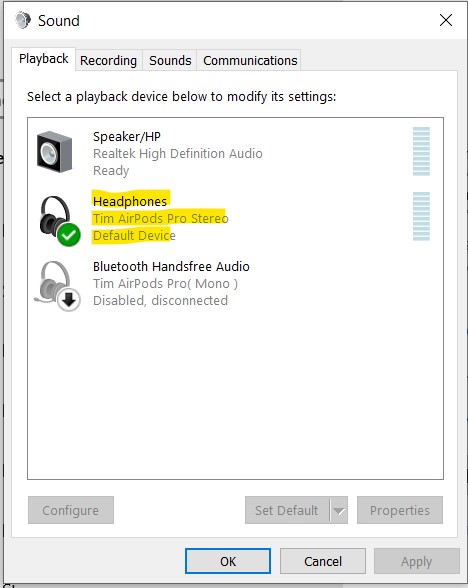
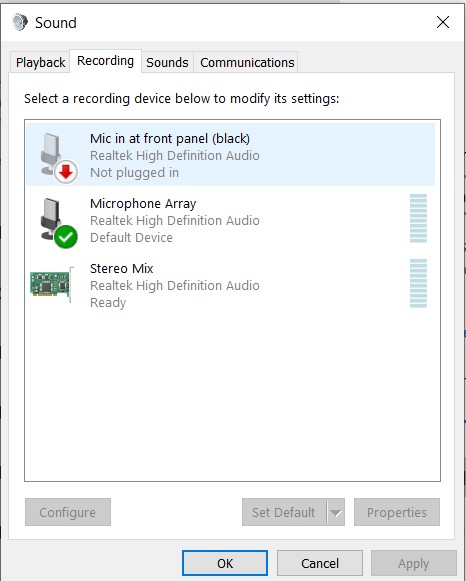
 

This is a bit strange as when I first connected the airpods to my pc they were an recording option but it didn't work.

I've tried everything like installing the latest drivers, updating the latest windows updates etc. Has anyone had the same issue and got airpod pros mic working properly on windows 10? The mic works fine on my ipad and android phone so I know the mic works

If it helps here are some of my PC details:

  • PC: HP Pavillion Gaming Notebook
  • Windows 10 Home version 1909
  • Bluetooth 4.0 (i think)

I'm annoyed that I spent some time reading / watching reviews before deciding to purchase these Airpods and I did not come across anything about issues with the mic. I just thought being a high end, popular bluetooth wireless earphones that they would be 100% compatible

Windows for home | Windows 10 | Devices and drivers

Locked Question. This question was migrated from the Microsoft Support Community. You can vote on whether it's helpful, but you can't add comments or replies or follow the question.

0 comments No comments

19 answers

Sort by: Most helpful
  1. Anonymous
    2020-12-23T17:14:22+00:00

    I fought through this as well. The only way to enable the Airpods mic when using Windows apps (i.e. Teams, Zoom, etc) is to select the Hands-Free AG Audio option:

    Although this will get the mic working, the sound is pretty terrible. I've reverted to using an external mic for speaking and using my Airpods for listening to the meeting audio.

    30+ people found this answer helpful.
    0 comments No comments
  2. Anonymous
    2020-12-10T15:40:33+00:00

    Hi 

    I have the same issue with Airpod.  My airpod pro was connected as music only and therefore cannot use as mic. i am using MAC and install windows on bootcamp. already updated all drivers but still the same issue occurs. this also same as when i use bluetooth headdset such as Beats Solo pro. I have been searching for answer on this but to no avail.

    if anyone can help please need urgently.

    Thank you

    10+ people found this answer helpful.
    0 comments No comments
  3. JosephT71 9,210 Reputation points
    2020-10-20T22:22:07+00:00

    You have to set it as default COMMUNICATIONS device.

    10+ people found this answer helpful.
    0 comments No comments
  4. Anonymous
    2020-12-10T22:10:24+00:00

    Hi,

    I couldn't get them to work and have gave up trying. I called MS and they even connected to my pc to try to get them to work. MS say it's Apple's fault for not releasing the driver but Apple say its MS fault they're not compatible. 

    Just wish this was mentioned on the hundred of online reviews as I wouldn't have wasted money purchasing them. Fingers crossed it gets sorted in the future.

    10+ people found this answer helpful.
    0 comments No comments
  5. Anonymous
    2020-10-20T22:55:13+00:00

    Hi, I'm Bianca, an Independent Advisor for Microsoft, an expert and a Microsoft user like you. I'm happy to assist you.

    I'm not sure if you already have tried this but I do not want to miss important troubleshooting steps. Please follow the steps on this link: https://support.microsoft.com/en-us/windows/fix...

    If this does not work for you, please let me know.

    6 people found this answer helpful.
    0 comments No comments
