Share via

WHAT is eating up all my memory/RAM? Task manager not adding up to 16GB

Anonymous
2020-10-07T20:27:03+00:00

I have 16 GB of RAM installed, but my Windows 10 PC is not acting like it!

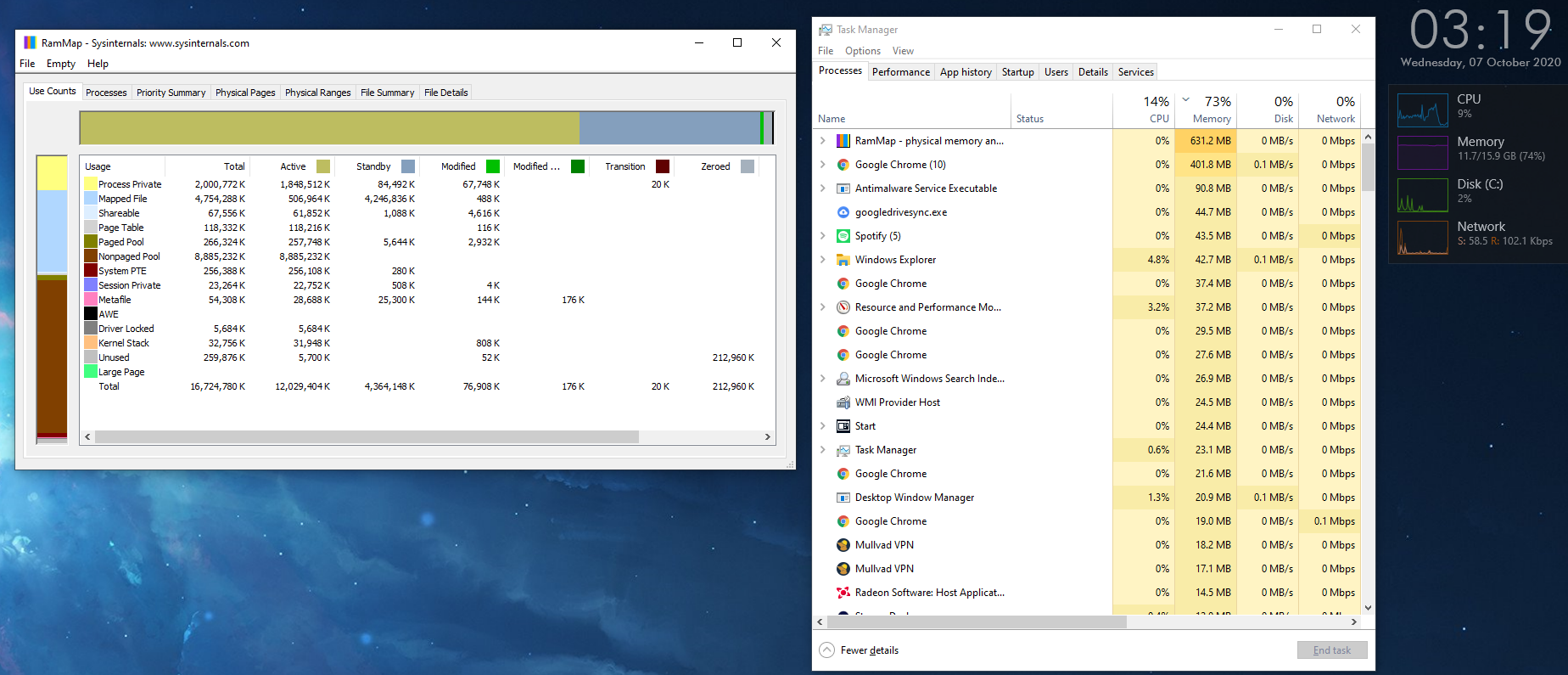
As you can see in my screenshot, it says I am at 75% memory usage even though the biggest programs are taking up ~3GB. So what is happening to the rest of my RAM?

As you can also see from the screenshot, I ran RamMap to see what the issue and clearly "Nonpaged Pool" is taking up a HUGE chunk of it. But I dont know how to get it to stop.

I don't know if this will help, but I installed this game called "Genshin Impact" about a week ago. Day one it ran fine, next day, my PC was constantly at 100% RAM and sometimes 100% Disk and CPU usage too. So I uninstalled the game, and it improved things slightly. This may just be paranoia, but I know the game uses a Kernel-level anti-cheat program, so I'm wondering if maybe something related to that game's Kernel-level anti-cheat was left behind and is causing all this usage. 

Thank you for your help!

Windows for home | Windows 10 | Performance and system failures

Locked Question. This question was migrated from the Microsoft Support Community. You can vote on whether it's helpful, but you can't add comments or replies or follow the question.

0 comments No comments

6 answers

Sort by: Most helpful
  1. Anonymous
    2020-10-29T02:21:49+00:00

    Okay, I went to the motherboard website and got new drivers for the ethernet from there instead of from KillerNetworking's website and that seems to have solved my CPU/RAM usage issue, but now I have another problem:

    Now it seems as if Rainmeter and the performance tab of Task Manager show 100% disk use for the first 15 minutes after a boot, while Processes only shows 32% use. Everything is really slow at boot. What's the issue here?

    8 people found this answer helpful.
    0 comments No comments
  2. Anonymous
    2020-10-13T01:58:27+00:00

    The first and third links are 404ing

    7 people found this answer helpful.
    0 comments No comments
  3. Igor Leyko 110.6K Reputation points Independent Advisor
    2020-10-07T20:30:57+00:00

    Hi,

    I'm Independent Advisor not Microsoft employee or support person. But I'm in contact with Windows developers since 1995 - as a one of the best Windows beta-testers till 2009 when program was closed, as an MVP in 2005-2017 including Windows System & Performance nomination. So I have deep enough Windows knowledge and you may trust me. It's a pleasure for me to help others and I'll do all my best to help you.

    You have a memory leak in some driver. You may use poolmon for diagnosis or just try to install a correct drivers - neither best, nor newest but correct.

    https://support.microsoft.com/en-sg/help/177415...

    https://blogs.msdn.microsoft.com/ntdebugging/20...

    https://blogs.technet.microsoft.com/yongrhee/20...

    5 people found this answer helpful.
    0 comments No comments
  4. Anonymous
    2020-10-22T04:30:46+00:00

    It looks like  - wfpn - relates to a driver used by *Killer Networking.*If your motherboard uses Killer Network interface

    check with the mfg of the motherboard for a new driver version.

    Or, try reinstalling the current driver if there is no newer driver version.

    • If you are able to locate it in Services you could try disabling the Service, and rebooting.

    This should clear the memory, so you can re-enable the Service after rebooting.

    .

    I do have a Killer Network ethernet port on my motherboard.

    I tried (1) uninstalling the driver and reinstalling the newest version from the website (2) stopping the service in Services and rebooting. These work temporarily but if I leave my PC on for too long I am back up to 100%

    1 person found this answer helpful.
    0 comments No comments
  5. Anonymous
    2020-10-13T07:01:21+00:00

    Okay I managed to get this far. My guess is its gotta be the top one for obvious reasons. 

    Now how do I kill it?

    1 person found this answer helpful.
    0 comments No comments
