Outlook | Windows | Classic Outlook for Windows | For business
Using classic Outlook for Windows in business environments

This browser is no longer supported.
Upgrade to Microsoft Edge to take advantage of the latest features, security updates, and technical support.

Folks, we want "all" our employees Calendars to be "readable with details" between each other. I pushed out a power shell script that changed all the Default Calendar permissions to Reviewer. The problem we're still having is when I open another person's Calendar and I click on any of their meetings I get a message saying I don't have permission to view "person's name" Calendar, would you like to ask for permission. I don't want to have to ask for permission and I don't want the users to be able to change this using Outlook Calendar Permissions. Is this doable or does Outlook Calendar Permissions override Reviewer permissions set by the server?
Using classic Outlook for Windows in business environments
The administration and maintenance of Microsoft Exchange Server to ensure secure, reliable, and efficient email and collaboration services across an organization.
' cx='32' cy='32' r='32' /%3E%3Ctext x='50%25' y='55%25' dominant-baseline='middle' text-anchor='middle' fill='%23FFF' %3EJL%3C/text%3E%3C/svg%3E)
Hi @Bigwil4555 ,
I am writing to see how everything is going on with this thread. Please let us know if the provided suggestion is helpful or if you need any further assistance.
Hi @Bigwil4555 ,
does Outlook Calendar Permissions override Reviewer permissions set by the server?
Yes, the calendar owner could re-change the calendar permission in Outlook client even if we changed the default permission via "Set-MailboxFolderPermission" cmdlet.
If you don't want the users to change permission in Outlook, as a workaround, we could try to disable the permission option in Outlook by GPO like below, please note : after deploy this setting, users couldn't grant any permission of all folders manually in Outlook client, but they still could change permission in owa:
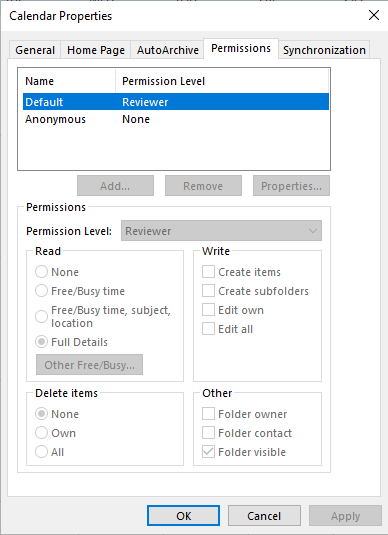
If it could meet your need, please try to add this registry value on your client for testing and then deploy it in your organization for your need(Note: Serious problems can occur if you modify the registry incorrectly. Before making changes, back up the registry to restore it in case something goes wrong.):
Registry Path: HKEY_CURRENT_USER\software\policies\microsoft\office\16.0\outlook\options\folders
Value Name: disableeditpermissions
Value Type: REG_DWORD
Enabled Value: 1
If the response is helpful, please click "Accept Answer" and upvote it.
Note: Please follow the steps in our documentation to enable e-mail notifications if you want to receive the related email notification for this thread.
Hi @Bigwil4555 ,
Have you tried this register value? And does your issue has any update now?
If you have any questions or need further assistance, please feel free to post back. Thanks!