Hi A-KingMS
I am Dave, an Independent Advisor, I will help you with this . . .
You can download the installer for all the Windows 7 games from the safe link below, that will install the full set of Windows 7 games in Windows 10
https://winaero.com/blog/get-windows-7-games-fo...
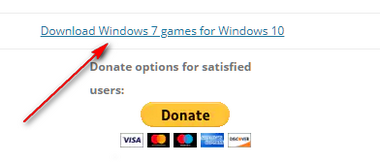
There is a lot of links for other stuff on the second page, the link to click is the one indicated below
Note: when you install those games, keep the installer somewhere safe for future use, because it may not always be available
________________________________________________________
Standard Disclaimer: This is a non-Microsoft website. The page appears to be providing accurate, safe information. Watch out for ads on the site that may advertise products frequently classified as a PUP (Potentially Unwanted Products). Thoroughly research any product advertised on the site before you decide to download and install it.
.
' cx='32' cy='32' r='32' /%3E%3Ctext x='50%25' y='55%25' dominant-baseline='middle' text-anchor='middle' fill='%23FFF' %3EA%3C/text%3E%3C/svg%3E)
