... It shows up in device manager with a yellow exclamation mark. Details are as follows
Atheros AR5007EG Wireless Network Adapter
Driver Provider Atheros Communications Inc
Driver Date 1.25.2008
Driver Version 7.4.2.40
... I installed or tried to install Speccy and it brought up a bunch of error messages during installation about lang/(differentnumbers).dll and it showed me some weird language after i finished installation. ...
Hi PeterReinold:
I've asked before if you have a 32-bit or 64-bit OS, the brand and model of your 10/100 Mbps Ethernet/NIC network card shown in Device Manager (which is likely a different device than your Atheros AR5007EG Wireless LAN adapter) and whether you can connect
to the internet using a wired Ethernet connection between your router and this NIC (Network Interface Card) adapter. You still haven't answered those questions so it's difficult to suggest the best way forward.
You also mentioned you recently reinstalled your Vista OS from scratch but didn't answer my questions about whether you've installed Service Pack 2 and/or
if your OS is patched to end extended support on 11-Apr-2017. An unpatched OS might be contributing to some of the problems you've encountered since your Vista reinstall. It's still possible to manually patch a clean reinstall of Vista SP2
back to April 2017 without a working Windows Update service (see my FAQ What To Do if Windows Update Hangs or Throws an Error [UPDATED August 2020] in the VistaForums), but while you're troubleshooting your internet connection keep in mind that older Internet Explorer browsers (this includes the outdated IE7 browser bundled
with Service Pack 2 as well as IE8 and IE9) only support the insecure TLS 1.0 connection protocol and will often throw an error message while browsing to different websites, even if you manage to create a working wired or wireless connection to the internet.
See my 14-Nov-2020 post in tharpdevenport's "Internet Explorer Cannot Display the Webpage" in the BleepingComputer Vista board for more information about using the
Firefox ESR v52.9.0 browser. If necessary, you can download the Firefox ESR installer to a USB thumb drive on a different computer with a working internet connection and then transfer the installer to the desktop of your Vista machine.
The Microsoft Update Catalog (https://www.catalog.update.microsoft.com/Search.aspx?q=AR5007EG Vista) shows a newer Atheros AR5007EG Wireless
LAN driver v7.7.0.449 was likely pushed out to Vista computers with this Atheros adapter via Windows Update in January 2010. Here are download links on the Softpedia site (with instructions for installing the .cab file) that might match your
system specs, but you would be using them at your own risk. Always make sure you create a system restore point before installing any driver so that you can recover your system if you apply an incorrect or mismatched driver.
32-bit: Atheros AR5007EG WLAN Driver 7.7.0.449 for Vista
64-bit: Atheros AR5007EG WLAN Driver 7.7.0.449 for Vista64
I'm not a hardware specialist so if you continue having problems with your Atheros WLAN driver and wireless internet connection I'd suggest you post in the
BleepingComputer Internal Hardware board at https://www.bleepingcomputer.com/forums/f/7/internal-hardware/ and ask for assistance there.
__________________
ASIDE Regarding Diagnostic Utilities (Speccy, Belarc Advisor)
Did you try the portable version of Speccy as previously suggested? If not, download the speccy132.zip file from the Softpedia site at
https://www.softpedia.com/get/PORTABLE-SOFTWARE/System/System-Info/Speccy-Portable.shtml, save it to a USB thumb drive [you can create a new folder (e.g., D:\Speccy) and save the .zip file there if you wish], unzip the file, and then double click the appropriate
executable (Speccy.exe for 32-bit OS; Speccy64.exe for 64-bit OS) to run. If you can connect to the internet via a wired Ethernet connection you should be able to post a Speccy snapshot of your system on the Piriform server (File | Publish) as instructed
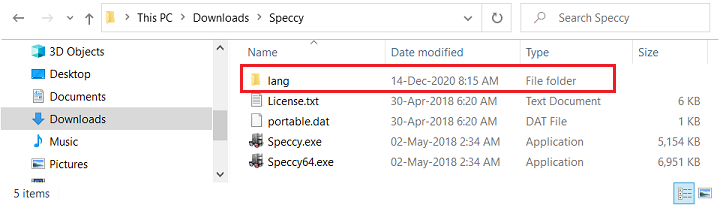
in my 16-Nov-2020 post. If you have any issues with the language files just delete the optional \lang folder (shown below) and the interface should default to English.
If you can't get Speccy to work then Belarc Advisor (https://www.belarc.com/products_belarc_advisor) is another good choice. The diagnostic log
might contain detailed information you don't want to share publicly (e.g., product keys for Windows, MS Office, etc.) but the
Communications section might contain useful information about the status of your network adapters.
32-bit Vista Home Premium SP2 * Firefox ESR v52.9.0 * Malwarebytes Premium v3.5.1-1.0.365 * Speccy Portable v1.32
HP Pavilion dv6835ca, Intel Core2Duo T5550 @ 1.83 GHz, 3 GB RAM, NVIDIA GeForce 8400M GS
' cx='32' cy='32' r='32' /%3E%3Ctext x='50%25' y='55%25' dominant-baseline='middle' text-anchor='middle' fill='%23FFF' %3EA%3C/text%3E%3C/svg%3E)

