Hello,
I'm using Miracast to connect my laptop Lenovo W540 to my Philips TV 43PUS6554/12 and I use it as a second monitor.
The thing is that I'm experiencing numerous connection interruptions and after digging a lot of information I found out that Miracast events are logged to WLAN-AutoConfig in the Event viewer. So I checked them and saw:
Event ID: 11004
Wireless security stopped.
Network Adapter: Microsoft Wi-Fi Direct Virtual Adapter #5
Interface GUID: {72298b0b-5018-4929-9caa-a0aa3c4b4807}
Local MAC Address: EA:2A:EA:76:CF:E1
Network SSID: DIRECT-I1IVOHEAx
BSS Type: Infrastructure
Security Hint: The operation was successful.
Event ID: 8008
AutoConfig service has begun to stop the hosted network.
Interface GUID: {72298b0b-5018-4929-9caa-a0aa3c4b4807}
SSID: DIRECT-I1IVOHEAx
Event ID: 8003
WLAN AutoConfig service has successfully disconnected from a wireless network.
Network Adapter: Microsoft Wi-Fi Direct Virtual Adapter #5
Interface GUID: {72298b0b-5018-4929-9caa-a0aa3c4b4807}
Connection Mode: Manual connection with a profile
Profile Name: WFD_GROUP_OWNER_PROFILE
SSID: DIRECT-I1IVOHEAx
BSS Type: Infrastructure
Reason: The network is disconnected by the user.
The events before that are:
8000 - WLAN AutoConfig service started a connection to a wireless network.
8001 - WLAN AutoConfig service has successfully connected to a wireless network.
8006 - WLAN AutoConfig service has finished starting the hosted network.
20019 - A client has associated with the hosted network.
11010 - Wireless security started.
20020 - A client has successfully authenticated with the hosted network.
11005 - Wireless security succeeded.
Link to the events - wlan-autoconfig.evtx https://we.tl/t-iKnhmphdKO
I don't understand what's causing it. There is no error event, only information.
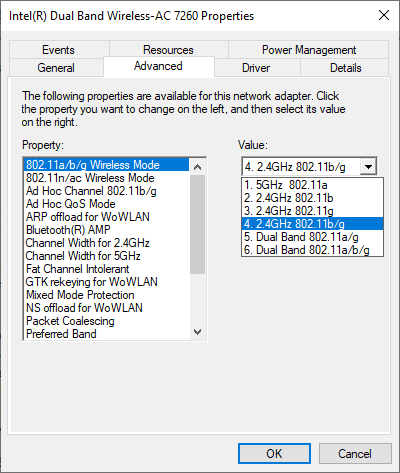
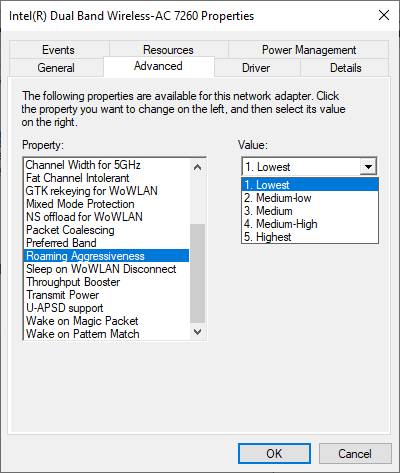
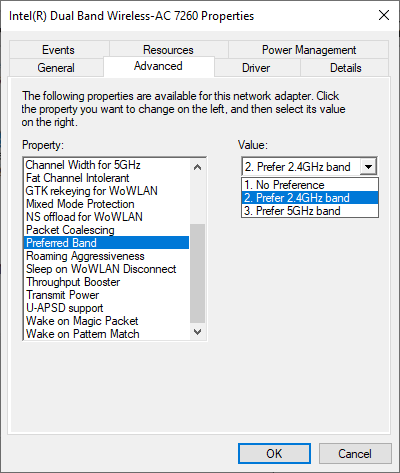
My Wi-Fi card is Intel(R) Dual Band Wireless-AC 7260, Bluetooth is OFF. My connection at home is 2.4GHz so I changed a few things in the Wi-Fi Card settings:
802.11a/b/g Wireless mode: from 6 to 4
Roaming Aggressiveness: from 3 to 1
Preferred Band: from 1 to 2
I reinstalled the Wi-Fi drivers today(downloaded from Lenovo's website), but the problem persists.
' cx='32' cy='32' r='32' /%3E%3Ctext x='50%25' y='55%25' dominant-baseline='middle' text-anchor='middle' fill='%23FFF' %3EA%3C/text%3E%3C/svg%3E)
