' cx='32' cy='32' r='32' /%3E%3Ctext x='50%25' y='55%25' dominant-baseline='middle' text-anchor='middle' fill='%23FFF' %3EMH%3C/text%3E%3C/svg%3E)

' cx='32' cy='32' r='32' /%3E%3Ctext x='50%25' y='55%25' dominant-baseline='middle' text-anchor='middle' fill='%23FFF' %3EA%3C/text%3E%3C/svg%3E)
Hi ,
What's the OS version of your windows 10? 1909 or 2004?
Based on my understanding, you want to turn your windows PC into a Wi-Fi Hotspot. Is that right? Please feel free to let me know if my understanding is wrong.
If yes, Windows now has a single switch for turning any PC with Wi-Fi into a hotspot, and it doesn’t matter whether the Internet connection you want to share is wired or wireless.
You can refer to the following steps:
1.Select the Start button, then select Settings > Network & Internet > Mobile hotspot.

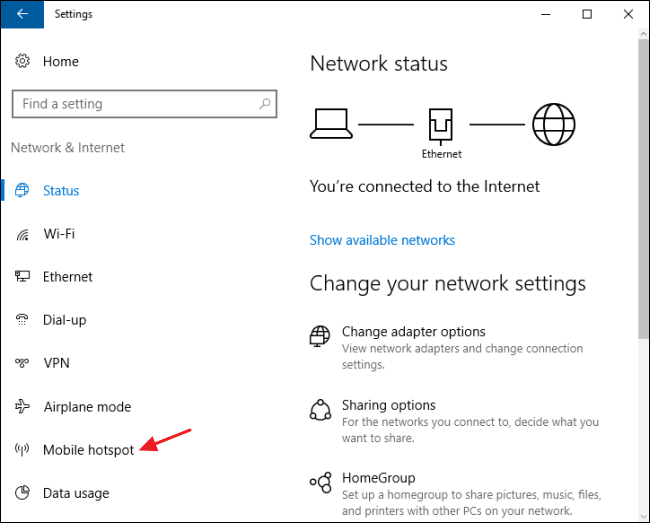

2.If you want something other than the default network name and password, click the “Edit” button. In the Edit window, type whatever network name and password you want to use and then click “OK.”
For more details, please refer to the following link:
https://support.microsoft.com/en-us/help/4027762/windows-use-your-pc-as-a-mobile-hotspot
https://www.howtogeek.com/214080/how-to-turn-your-windows-pc-into-a-wi-fi-hotspot/
Please Note: Since the web site is not hosted by Microsoft, the link may change without notice. Microsoft does not guarantee the accuracy of this information.
---Please Accept as answer if the reply is helpful---
Best Regards,
Candy
' cx='32' cy='32' r='32' /%3E%3Ctext x='50%25' y='55%25' dominant-baseline='middle' text-anchor='middle' fill='%23FFF' %3EYZ%3C/text%3E%3C/svg%3E)