Share via

System using Integrated Graphics instead of NVIDIA Card

Anonymous
2020-12-14T03:45:22+00:00

Hello,

When I check Task Manager while running many programs (Chrome, Discord, Spotify etc.)and connecting to a wireless display. It shows that my Intel integrated graphics (Intel Core i5 9th gen) is being tasked with handling everything. while my NVIDIA graphics card (NVIDIA GTX 1050) Is running 0%.

I have gone into Nvidia Control Panel and changed everything I could manually to use the High-performance cards however there were several Microsoft system setting that I could not physically change. 

Is there a way to reduce the load put on my integrated graphics (because my computer wasn't running the best) and actually give my Graphics card something to do outside of videogames. 

I have an HP-Pavillion laptop (HP 15-dk0068wn) which I understand that laptops are not at all the most customizable computers, but I would like to know if there's a way to override, or fix, how Microsoft will only use integrated graphics for windows and all of windows services.

Windows for home | Windows 10 | Devices and drivers

Locked Question. This question was migrated from the Microsoft Support Community. You can vote on whether it's helpful, but you can't add comments or replies or follow the question.

0 comments No comments

8 answers

Sort by: Most helpful
  1. Anonymous
    2020-12-14T08:01:09+00:00

    On HP PC's Nvidia switchable graphics is called Optimus, and is explained here:

    https://support.hp.com/us-en/document/c03519217

    https://support.hp.com/us-en/document/c02731962

    I found more on this here:

    https://www.howtogeek.com/245592/how-to-improve...

    https://forums.tomsguide.com/threads/how-to-swi...

    https://www.microcenter.com/tech_center/article...

    This guy is the real Guru on this having published Youtube videos helping thousands. You can ask him question in comments:

    https://www.youtube.com/watch?v=pOl6iMtm_sk&amp...

    6 people found this answer helpful.
    0 comments No comments
  2. Anonymous
    2020-12-14T04:59:37+00:00

    Yes, 

    The first link showed me how to change with NVIDIA control panel which I have done (except for the programs which won't allow it)

    The second told me to check with the manufacturer for 1. whether my computer could switch graphics(which it can) and 2. check the manufacturer on how to switch the switchable graphics (which HP only shows how to switch using AMDcatalyst)

    the third I didn't understand because I am under the impression that it is a setting that comes with the graphics card and I don't know how to work it.

    idk if you need this info but here it is

    *GTX1050

    *Intel core i5 9th gen

    3 people found this answer helpful.
    0 comments No comments
  3. Anonymous
    2020-12-14T04:49:31+00:00

    Unfortunately, I am going to try a few more software solutions before I try a hardware solution (because it is a Pavillion laptop and It was expensive and I don't trust myself that much to take it apart to check the connection. The second reason is that I have used it before for playing games and it has worked very well, I just have the problem of it not picking up slack from my integrated graphics when I am not playing a game.

    3 people found this answer helpful.
    0 comments No comments
  4. Anonymous
    2020-12-14T03:49:45+00:00

    Hi Jeremiah. I'm Greg, an eleven years awarded MVP, Volunteer Moderator, and Independent Advisor here to help you until this is resolved.

    if you have switchable graphics that are supposed to kick in the card when the graphics load increases, see possible fixes here:

    https://www.microcenter.com/tech_center/article...

    https://www.intel.com/content/www/us/en/support...

    http://www.geforce.com/hardware/technology/opti...

    One of those will usually work.

    I hope this helps. Based on what you report back I can answer any questions and may have other steps to perform. If you'll wait to rate whether my post was helpful, I will keep working with you until it's resolved.

    ______________________________________________

    Standard Disclaimer: There are links to non-Microsoft websites. The pages appear to be providing accurate, safe information. Watch out for ads on the sites that may advertise products frequently classified as a PUP (Potentially Unwanted Products). Thoroughly research any product advertised on the sites before you decide to download and install it.

    3 people found this answer helpful.
    0 comments No comments
  5. Anonymous
    2020-12-14T04:38:03+00:00

    Hello, thank you for the speedy reply, I have not quite figured it out I don't think. 

    My problem is that integrated graphics are being used when my graphics card is not being used,(as stated above)
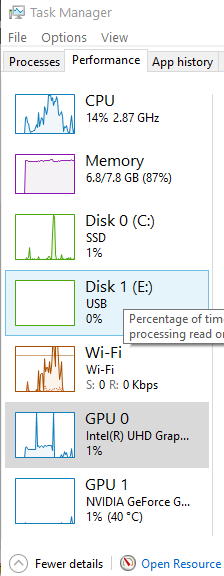
    Image

    this picture shows what I mean (although while I was running it earlier today the IGP was maxed out at 100%

    I have switched everything I can in the NVIDIA control panel to use the high-performance card. 
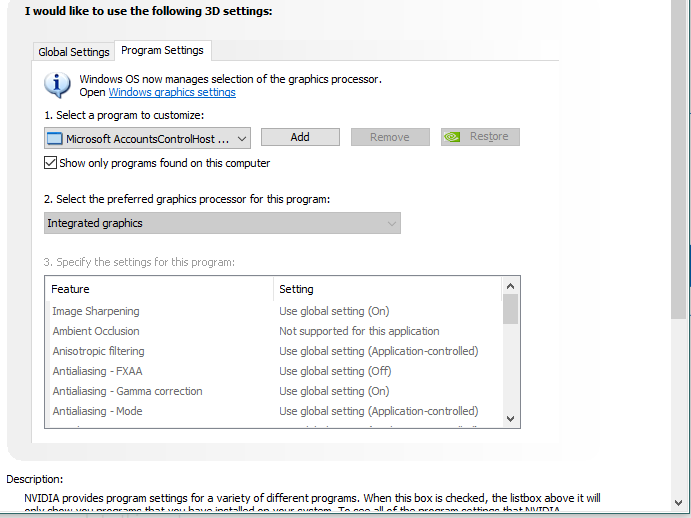
    Image

    The picture above shows what I mean when I say I cannot switch some programs to high-performance. (the #2 step drop-down menu is locked)

    So my question is "Is there a way that I have not thought of the reduce the burden of the windows system on my integrated graphics(especially when using a second wireless display)" and if the only way to do that is to switch the NVIDIA control panel settings to High-performance settings, my second question is "how (if possible) do I switch the certain programs that are locked (as seen with above pic) to use the High-performance Graphics.

    *also to note)--I have set the global settings in NVIDIA control panel to High-Performance.

    *I do have switchable graphics (bc both my IGP and NVIDIA are listed in my device manager)

    2 people found this answer helpful.
    0 comments No comments
