Share via

Windows update breaks Realtek audio on gigabyte motherboard

Anonymous
2021-01-15T15:17:23+00:00

So this is more of a "to let you know" than a question....

[Edit 1: I've inadvertantly told a lie The security update wasn't alone as there was also a cumulative update: KB4598242 which improves security for external devices and when windows does basic operations]

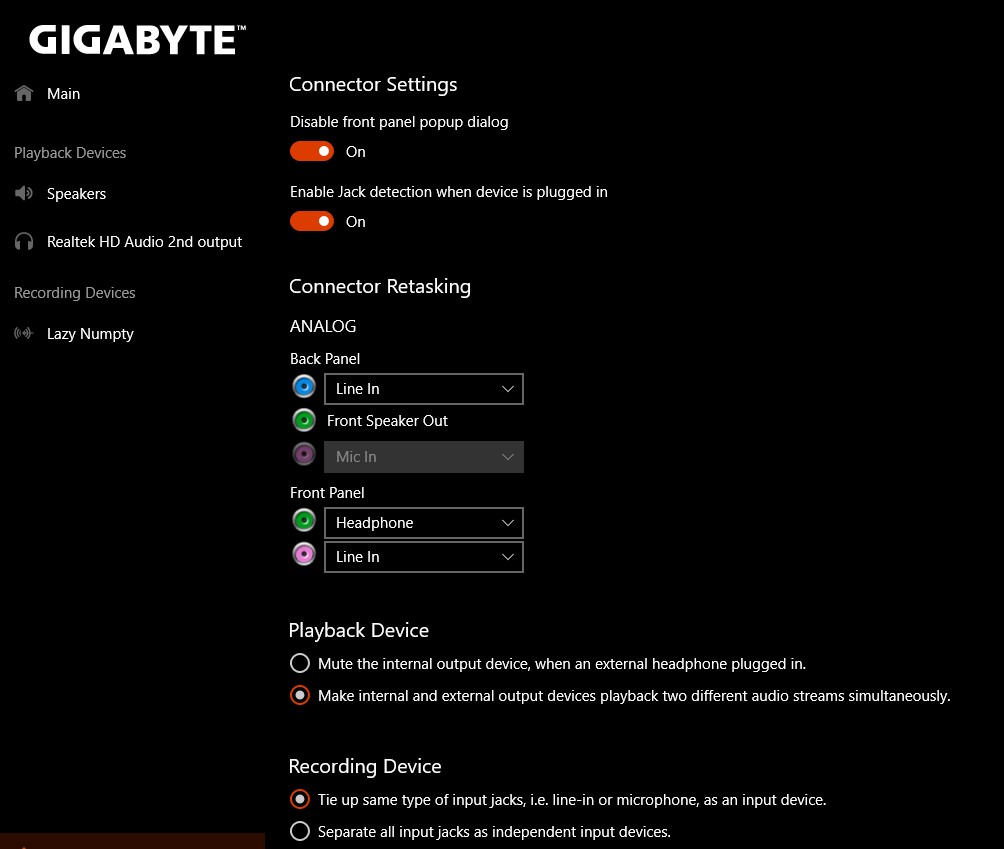
So a security update has broken a function within the gigabyte realtek audio settings where one could have separate audio for speakers to your headphones. The issue is that this update has screwed up jack detection meaning nothing will play out of the rear audio jack (the front headphone jack is fine) due to a dialogue box box not appearing asking you to specify what was plugged in.

Simple solution go into realtek settings and turn off front panel popup dialogue. This means, as far as I can tell, windows won't prevent audio from a source until it's identified and will instead just let things play immediately.

A very specific problem I know but often it's the specific ones you don't get an answer to...

Sorry for rambling. 
Windows for home | Windows 10 | Devices and drivers

Locked Question. This question was migrated from the Microsoft Support Community. You can vote on whether it's helpful, but you can't add comments or replies or follow the question.

0 comments No comments

8 answers

Sort by: Most helpful
  1. JosephT71 9,210 Reputation points
    2021-01-15T16:11:36+00:00

    All DCH driver updates can be individually updated by downloading them from Microsoft Update Catalog.

    Go to MUC, search for realtek vibranium media to get 6.0.9071.1 driver. Search realtek vibranium audio effects to get the 3 realtek software components.

    Download, unzip, copy/paste into new empty folder, and use device manager to update both the driver and software components.

    Then run Microsoft Store to update the realtek audio console. Basically you should end up with this:

    2 people found this answer helpful.
    0 comments No comments
  2. Anonymous
    2021-05-04T10:37:43+00:00

    Hi.

    I'm encountering the same issue, as of May 4th 2021. Using Gigabyte Z590i MB.

    Were you able to solve it with drivers? or is it still the same workaround?

    1 person found this answer helpful.
    0 comments No comments
  3. Anonymous
    2021-03-26T08:06:50+00:00

    Currently experiencing trouble with 20H2 as well. I try downloading drivers directly from Gigabyte's page to no avail.

    1 person found this answer helpful.
    0 comments No comments
  4. Anonymous
    2021-01-15T16:00:19+00:00

    latest update was on the 8th of May 2020 It's purely the dialogue box not appearing that causes the issue, which I think is windows side rather than realtek driver side (I think. I'm no engineer) given the update was purely a security update I'll have a gander round to see if I can find info stating otherwise but for now that's all I've got. It's just a computer being a little funny with audio not the end of the world admittedly but there's a fix so I thought it's worth sharing :-D

    1 person found this answer helpful.
    0 comments No comments
  5. Neil D 32,835 Reputation points Volunteer Moderator
    2021-01-15T15:34:01+00:00

    I guess you have checked with Gigabyte to be sure there isn't a driver update.

    1 person found this answer helpful.
    0 comments No comments
