' cx='32' cy='32' r='32' /%3E%3Ctext x='50%25' y='55%25' dominant-baseline='middle' text-anchor='middle' fill='%23FFF' %3EGK%3C/text%3E%3C/svg%3E)


Hello GabrielKelley
First I would check if the Firewall is opened on the remote computer:
Open Windows Firewall with Advanced Security
Click Inbound Rules
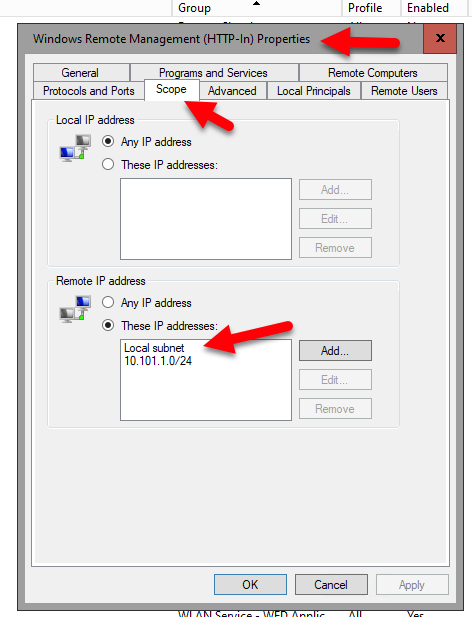
Double-click Windows Remote Management (HTTP-In) for the Public profile
Click the Scope tab
Under Remote IP address, add any IPs you need
Then use the Quickconfig to "fix" WinRM connectivity, example output:
C:\Windows\system32>WinRM quickconfig
WinRM service is already running on this machine.
WinRM is not set up to allow remote access to this machine for management.
The following changes must be made:
Create a WinRM listener on HTTP://* to accept WS-Man requests to any IP on this
machine.
Make these changes [y/n]? y
WinRM has been updated for remote management.
Created a WinRM listener on HTTP://* to accept WS-Man requests to any IP on this
machine.
--If the reply is helpful, please Upvote and Accept as answer--