Windows 10 home 64-bit
Version 20H2 (OS Build 19042.985)
Installed RAM = 16 Gb
Storage = 1 Tb SSD
System = HP ENVY m7 Notebook
All recommended updates from HP applied
All available updates from MS applied
Almost all of the things I run are browser based (Chrome Version 90.0.4430.212 (Official Build) (64-bit)).
That said, to the best of my knowledge absolutely everything on this notebook works without issue. (Except the following.)
The issue:
I run .........
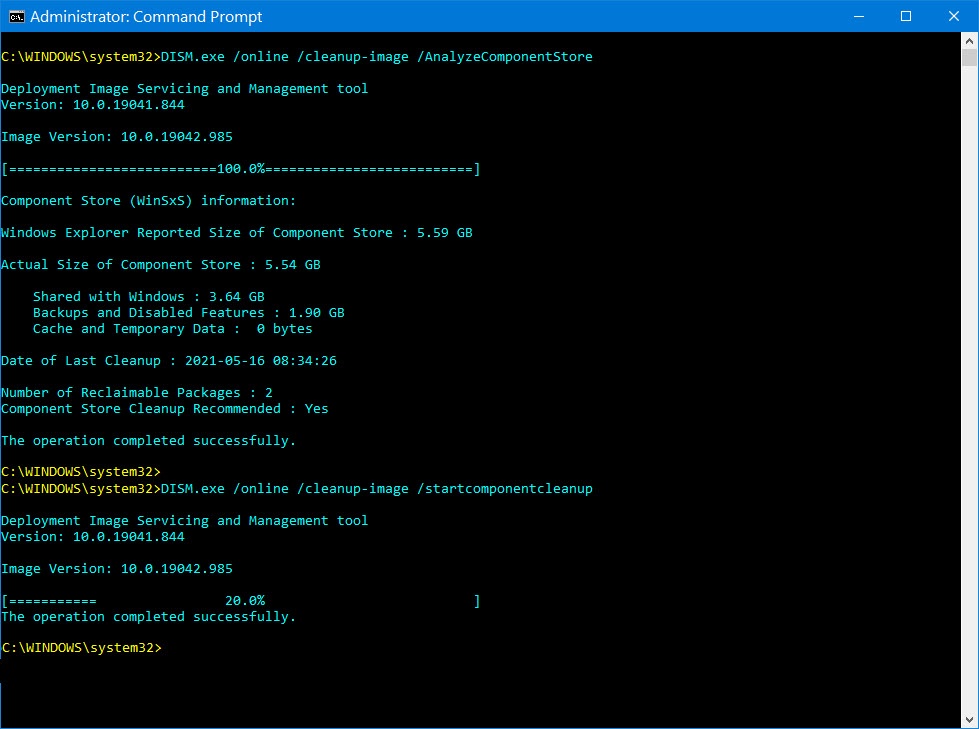
DISM.exe /online /cleanup-image /AnalyzeComponentStore and it says there are 2 reclaimable packages and that cleanup is recommended
DISM.exe /online /cleanup-image /startcomponentcleanup and it gets to 20% and then says the operation completed successfully
But if I run DISM.exe /online /cleanup-image /AnalyzeComponentStore again, it continues to display that there are 2 reclaimable packages and that cleanup is recommended
Please check out the attachment to see the exact verbiage generated from the commands (below)
Of note:
In the past year or so, DISM.exe /online /cleanup-image /AnalyzeComponentStore has shown (when I ran it) that I had 3,4 or even more reclaimable packages.
And DISM.exe /online /cleanup-image /startcomponentcleanup was always able to clean up all of them EXCEPT for 2.
I always seem to have 2 reclaimable packages but don't know what they are or what I might do to help them get cleaned up.
I have been encountering this issue for well over a year now so I'm fairly certain the issue is not related to any recent updates.
I ran the following commands, in this order, as the System Admin inside of an admin command prompt
I even tried restarting the machine between commands but the results were the same.
sfc/scannow
chkdsk /r /f
Dism /Online /Cleanup-Image /CheckHealth
Dism /Online /Cleanup-Image /ScanHealth
Dism /Online /Cleanup-Image /RestoreHealth
DISM.exe /online /cleanup-image /AnalyzeComponentStore (This command says there are 2 reclaimable packages and component store cleanup is recommended)
DISM.exe /online /cleanup-image /startcomponentcleanup (This command gets to 20% and then reads "The operation completed successfully".)
' cx='32' cy='32' r='32' /%3E%3Ctext x='50%25' y='55%25' dominant-baseline='middle' text-anchor='middle' fill='%23FFF' %3EA%3C/text%3E%3C/svg%3E)
