I tried the saves before the last one and the same thing is happening. I do not have Cloud Save enabled. This is the Steam version of the game, not the MS Store. The save loads just fine, it's just when I try to fast travel, manual save, quicksave, transition areas, etc., where it fails. The games are not installed in the default location, I have them on a separate drive specifically to avoid the protected status of the Program Files folders. The game was running fine for a few hours, then just stopped working. I will try a save from farther back, but I do not have much hope. If it was just the one save file, then why would it happen on other Bethesda games? I tried loading Fallout 4 and had the same issue. I haven't played that in months, and the last save file was definitely not corrupted.
- If your games are not saving it's not because the the folder is marked Read Only. However, I don't know why the games are not saving.
One possibility may be if you have cloud save enabled in your settings for the game (I've never enabled this, so it's a guess).
- I hope you can tell me you didn't get the game from the MS Store, but if you did I reckon this will likely be one more thing MS have
managed to stuff up in their effort to change PC gaming into a pseudo XBOX 'experience'.
- Bethesda games are notorious for save corruption, but I've never had a corrupt save prevent me from making another corrupted save
after loading the first one (an experiment from FO3 when a corrupted save caused huge lag leading up to the game crashing).
Note that manual saves should not be a problem, but all of the auto save options are prone to save corruption or crashing
(which obviously can cause save corruption).
It's a long shot, but if you still have the few saves that were created before the problem began you might also want to try running
the game from the save prior to the last save and see if you can save the game again from there.
- Another old trick that applies to games that can be modded in particular is to never install them in the default loaction - Program Files (x86)
The three Program folders created by Windows in C:\ are system protected, and this can cause permissions issues with games.
If you don't have another Partition or HDD\SSD to install games on, creating a new folder in C:\ is the next best option.
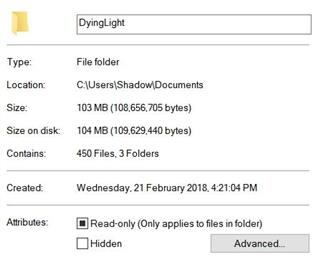
Re - Read Only...
- Win10 marks most (all ?) folders with a fully blacked out tic box next to Read Only.
I don't know why this is, but it does not prevent files within the folder from being written to or changed.
This blacked out box next to Read Only has been confusing Win10 users for years.
The only time Read Only is actually invoked is if the User (or developer of the file) puts a tic in the box next to Read Only.
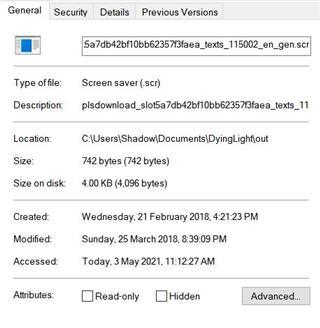
Folder and game save file....
btw - Be very careful about changing permissions for anything. While often recommended (often by people parroting what they've read)
it is rarely effective at solving theoretical access issues and can leave your system open to attack.
.
' cx='32' cy='32' r='32' /%3E%3Ctext x='50%25' y='55%25' dominant-baseline='middle' text-anchor='middle' fill='%23FFF' %3EA%3C/text%3E%3C/svg%3E)

' cx='32' cy='32' r='32' /%3E%3Ctext x='50%25' y='55%25' dominant-baseline='middle' text-anchor='middle' fill='%23FFF' %3EIL%3C/text%3E%3C/svg%3E)