Microsoft Security | Microsoft Entra | Other
Additional Microsoft Entra services and features related to identity, access, and network security

This browser is no longer supported.
Upgrade to Microsoft Edge to take advantage of the latest features, security updates, and technical support.
' cx='32' cy='32' r='32' /%3E%3Ctext x='50%25' y='55%25' dominant-baseline='middle' text-anchor='middle' fill='%23FFF' %3EAO%3C/text%3E%3C/svg%3E)
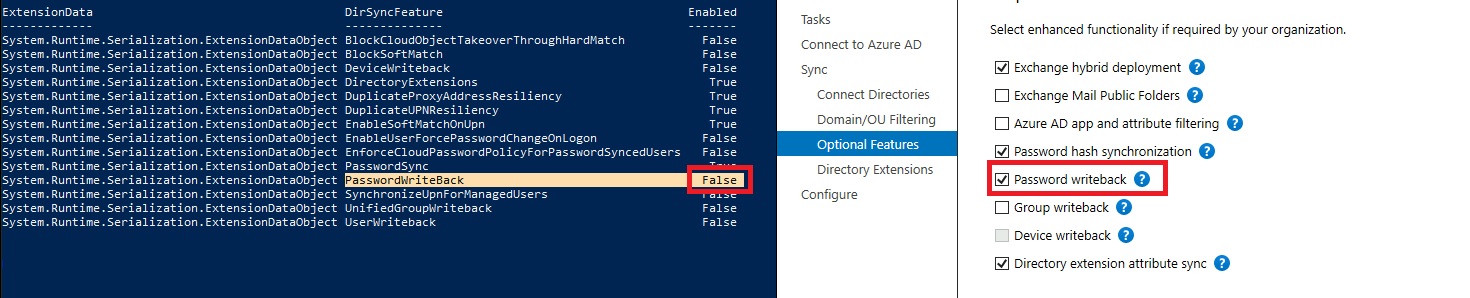
The value for the PasswordWriteBack from Get-MsolDirSyncFeatures shows a different value from within Azure AD connect, or am I mistaken here?
Note the marked settings in the attached screenshot and correct me if I have misunderstood or explain/advise if correct.
Additional Microsoft Entra services and features related to identity, access, and network security
Answer accepted by question author
No possible answer on the horizon, I recommend that this question is taken out of circulation since password write back does work.
It just seems like conflicting information from a technical point of view.
' cx='32' cy='32' r='32' /%3E%3Ctext x='50%25' y='55%25' dominant-baseline='middle' text-anchor='middle' fill='%23FFF' %3EMT%3C/text%3E%3C/svg%3E)
I have seen this happen before where password writeback is working, but the Powershell shows that it is set to false. I have taken this up with the product team and will let you know their response!
We have reported this as a bug.
' cx='32' cy='32' r='32' /%3E%3Ctext x='50%25' y='55%25' dominant-baseline='middle' text-anchor='middle' fill='%23FFF' %3ER3%3C/text%3E%3C/svg%3E)

I don't know, seems to be that since its enabled in AADConnect , its just ignored by the MsolDirSyncFeatures command.
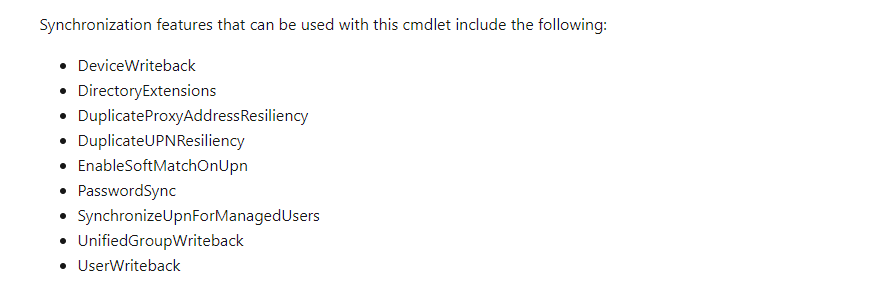
It states here that which commands apply:
https://learn.microsoft.com/en-us/powershell/module/msonline/get-msoldirsyncfeatures?view=azureadps-1.0
' cx='32' cy='32' r='32' /%3E%3Ctext x='50%25' y='55%25' dominant-baseline='middle' text-anchor='middle' fill='%23FFF' %3ERS%3C/text%3E%3C/svg%3E)
hi,
can it be the case that there are two places for passwordwriteback and so, different cenarios?
Scenario 1) SSPR password writeback managed by the setting on the SSPR blade
Scenario 2) PasswordWriteBack from Get-MsolDirSyncFeatures is related to password change when the password is expired in M365 and not related to when you change the password on SSPR?
I see the same settings as you and we have password writeback enabled and its working.
Thank you for your comment, we can conclude that we have the same experience, but is it supposed to be like that?
I will wait a bit longer in hope that someone sheds a little more light on the matter.
If it does not happen I will eventually withdraw this question.
Hi @Akr ofly ,
Could you please confirm that the password writeback connectivity in the Azure portal is showing up and running? If it is, then please toggle the password writeback service on and off and re-run the Powershell commands to see if it is reflecting.
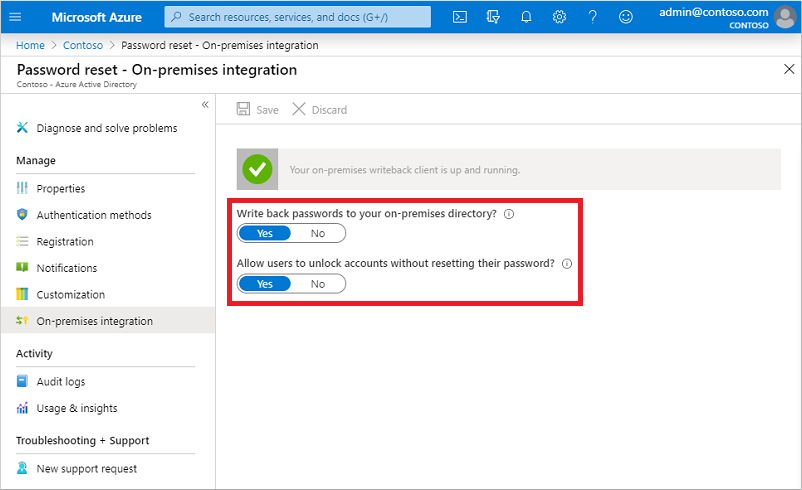
If you see a connectivity failure, then it might be one of the following issues:
1) There might be a network connectivity problem.
Double check that firewall isn't blocking anything and that outbound HTTPS access is required to the following addresses:
*.passwordreset.microsoftonline.com
*.servicebus.windows.net
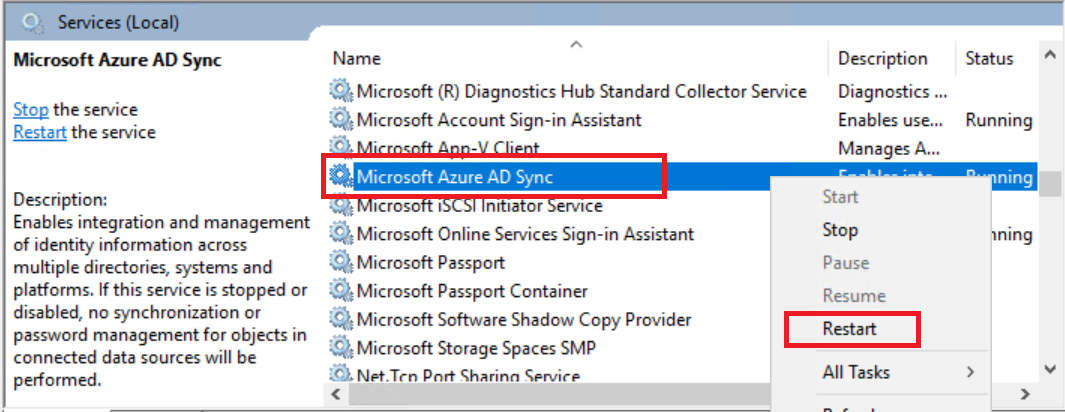
2) You may need to restart the Azure AD Connect Sync service, as shown in the screenshot:
3) Disable and re-enable the password writeback feature. (Disable the feature and configure it. Then re-enable it and and reconfigure it.)
4) It might not be enabled in Azure, or you could be missing some licensing. If this is the case, make sure you have the writeback enabled in Azure itself and you have the correct licensing applied.
For full troubleshooting steps, see the Troubleshoot Password Writeback article.
Thank you for your response, but to no avail.
The password write back has been toggled, the service has been restarted and network is OK with connectivity in place.
Our licensing meets the requirements.
The service account is running with the necessary permissions in the on-premises AD.
The setting from on-premises integration portal page shows the password write back is activated, the settings in the AADC client shows that it is activated, only the value from within the get-msoldirsyncfeatures is still nonidentical to the reality set up via the AADC.
ExtensionData : System.Runtime.Serialization.ExtensionDataObject
DirSyncFeature : PasswordWriteBack
Enabled : False
It is essential to add that the actual password write back when changed from within SSPR and to on-premises AD is working.
It is merely this inconsistency with the settings across the interfaces that is awkward.
So that question that asks itself here, is "Get-MsolDirSyncFeatures" still applicable to view the sync features?