Share via

Unable to activate or uninstall/reinstall IE 11

Anonymous
2021-08-28T19:23:39+00:00

efore anyone tells me I should be using Edge, it is not for my own use.

Quick books Pro 2021 (and previous versions) requires Internet Explorer to work. Don't ask me why, don't ask me to go back to them and ask. It just is. And I am not buying their monthly cloud subscription service which comes out way more expensive than their perpetual license.

I recently got a brand new Dell Precision Workstation 3550 laptop which works magnificently well. I am very happy with it. It has Windows 10 Pro, version 20H2, installed on 8/8/21, OS build 19042.1165, Windows Feature Experience Pack 120.2212.3530.0.

After I installed Quick books Pro 2021 I tried to run it and that's when a message popped up saying that Internet Explorer was turned off and I needed to enable it. 

I tried going to the "Turn Windows Features On and Off" option and clicked on Internet Explorer 11 to enable it. I clicked OK, it said it was making the changes but then I checked (both before and after re-starting) and it was unchecked again.

I also downloaded IE 11 and ran the install (again rebooting). No sight of IE 11.

When I tried finding it under Control Panel/Programs, it was also nowhere to be seen.

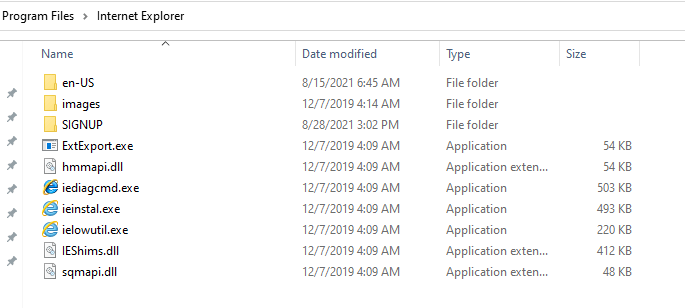
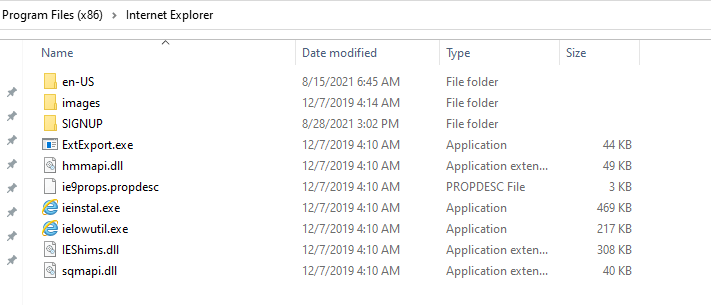
Finally I went and looked for IE under the Program Files and Program Files(x86) folders. This is what I found (see the two images below). I even tried running the apps from those directories to see what they would do and nothing happened. 

I am fully updated on Windows, Dell drivers, BIOS, etc. I also ran a chkdsk and everything is fine.

I will be talking to Dell of course but I wanted to see if anyone has had this problem.

This is VERY annoying because I use Quickbooks to run my business as a consultant.

Thanks for any advice!
Windows for home | Windows 10 | Settings

Locked Question. This question was migrated from the Microsoft Support Community. You can vote on whether it's helpful, but you can't add comments or replies or follow the question.

0 comments No comments

20 answers

Sort by: Most helpful
  1. Anonymous
    2021-08-31T19:16:35+00:00

    The best way to run the Repair Install is to download the latest ISO installation file or create the bootable installation media Follow the steps toward the bottom of the download page here in the section "Using the tool to create installation media:"

    https://www.microsoft.com/en-US/software-downlo...

    Then follow these steps: https://www.tomshardware.com/how-to/fix-windows...

    1 person found this answer helpful.
    0 comments No comments
  2. Anonymous
    2021-08-28T20:25:24+00:00

    Hi Jose. I'm Greg, a Volunteer Moderator and 10 years Windows MVP here to help you.

    Yes, they are keeping IE around due to various business uses that still require it.

    When you cannot find IE in Settings > Optional Features > Installed Features, then use the button at the top to Add a Feature and select it there.

    Once added search for IE and right click to Pin to TaskBar or Start.

    Let me know how this works for you, as it has for others lately when it appears to have been more deeply hidden. I guess they expect IT managers of companies to handle this since it is being kept mostly for legacy business use.

    You might also ask Quickbooks Premium Support how long they plan to use IE when it's being phased out and harder to find. They are a pricey premium program who should respond to paid users with some priority and not leave you hanging like this.

    Keep me posted on your progress as I will be here to help until the case is resolved.

    1 person found this answer helpful.
    0 comments No comments
  3. Anonymous
    2021-08-28T20:58:17+00:00

    Greg, as I mentioned above, I got an error when I tried to install it that way. So it didn't work. There was an error code associated with it. The number was 0x80070490.

    0 comments No comments
  4. Anonymous
    2021-08-28T20:43:26+00:00

    I am glad to help you today, Jose. Let me know if there's anything else. I'll stay subscribed to this thread in case you need anything else, until the system locks it in a few months.

    Also when ready please mark the post which helped most as the Answer (or Resolved), to help others. A rating is also appreciated.

    0 comments No comments
  5. Anonymous
    2021-08-28T20:41:22+00:00

    Thanks for your quick reply, Greg.

    I surely am going to contact Intuit on Monday because that is just ridiculous!

    As far as the Add a Feature, it took some work to find it but I finally did. However, when I finally found IE 11 as an option and clicked "Install" it said it failed (see image below).

    Dell is also going to get an earful from me on Monday.

    0 comments No comments