Share via

Windows saying that im in a organization when im not.

Anonymous
2021-07-04T17:26:22+00:00

Ok, so i booted up my computer today, like an hour ago, and saw a message that i had to activate my windows.

And i tought my windows was activated already, so i contacted to the person that made my computer and told me that it was already activated,

then i saw that, all of the sudden, im in a organization for windows.

Now, i don't have a job, nor have a Office 365 account with premium, not even a school account.

And thats why im seeking help, i already got my activation key from the first time on my computer, but now im facing that, I have to connect to my "ORGANIZATION" activation server, now im sure this is about my ethernet connection, BUT my ethernet connection is for my house, is private and im the only one who uses that connection with ethernet, but with 2 other more, which is my family, BUT, they dont use ethernet cables, nor im not connected to any one else.
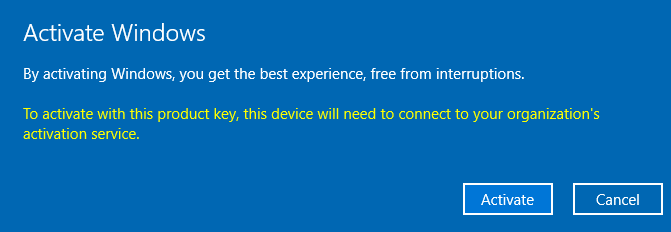
After i put my REAL, AND FIRST ACTIVATION KEY, WHICH WAS IN DIGITAL PRODUCT ID, WHICH I HAD TO TRANSLATE TO TEXT, didnt work either
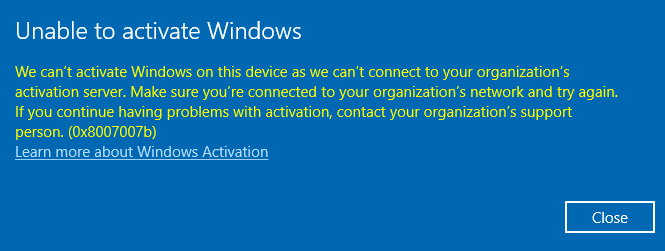
I ALREADY TRIED MULTIPLE KEYS BUT STILL, NOTHING

Again, im not into any organization, im not a job, i dont have ANY school or work accounts on my domain, OF MY computer.

Please reply if you know how to fix this.

Windows for home | Windows 10 | Licensing and activation

Locked Question. This question was migrated from the Microsoft Support Community. You can vote on whether it's helpful, but you can't add comments or replies or follow the question.

0 comments No comments

6 answers

Sort by: Most helpful
  1. Anonymous
    2021-07-09T16:22:47+00:00

    alright, sorry for the late reply, but i finally got my license key again, and now it seems to work, my pc manufacturer told me to write some commands in cmd, to disconnect to an organization that didnt exist, then put the license key.

    thanks for your help.

    Was this answer helpful?

    1 person found this answer helpful.
    0 comments No comments
  2. DaveM121 880.3K Reputation points Independent Advisor
    2021-07-05T17:31:49+00:00

    Hi SRRB,

    Than you for the screenshot, however that indicates you have a volume licence version of Windows 10 Pro is installed on your PC, that is not a consumer licence.

    Volume licenses will initially activate, but after some time they will expire, because they cannot connect to a company activation server, you should contact the person who built your PC and tell them you need a genuine Windows 10lcience installed on your PC, you paid good money for the PC and you are entitled to a correct Windows 10 licence.

    Was this answer helpful?

    1 person found this answer helpful.
    0 comments No comments
  3. DaveM121 880.3K Reputation points Independent Advisor
    2021-07-04T17:59:34+00:00

    Hi SRRB

    I am Dave, an Independent Advisor, I will help you with this.

    That error generally indicates a problem with the Windows 10 licence and how that was activated, most likely you have the volume licence version of Windows 10 Pro installed, not a consumer licence.

    1

    Where did you get your Windows 10 licence, was that from the person who made your PC?

    2

    Click your Start Button, type cmd then right click Command Prompt and choose 'Run as Administrator'

    Run or paste this command and hit Enter:

    slmgr.vbs /dlv

    Please post a screenshot of the resulting dialog.

    Was this answer helpful?

    1 person found this answer helpful.
    0 comments No comments
  4. Anonymous
    2021-07-06T17:47:48+00:00

    Alright, thanks for the reply, im going to contact them now, by the way, what happens when your W10 license expires? because this is the first time that happened to me/

    Oh and also, i already checked that Activation tab before, it said "Windows is activated" but not "Windows is activated using your organization activation service" but still, i dont have any accounts for any company.

    Maybe i have to check that later, anyway thanks for the reply.

    Ill see what i can do.

    Was this answer helpful?

    0 comments No comments
  5. Anonymous
    2021-07-05T17:28:18+00:00

    thanks for replying.

    1

    I got my Windows 10 license when my PC was being manufactured, or being built, and they installed windows with an USB

    2

    This was the result when i ran the command in CMD

    Was this answer helpful?

    0 comments No comments
