Share via

Drive Space Full on PC, but files only appearing in OneDrive as 'Online Only'

Anonymous
2021-09-07T21:31:49+00:00

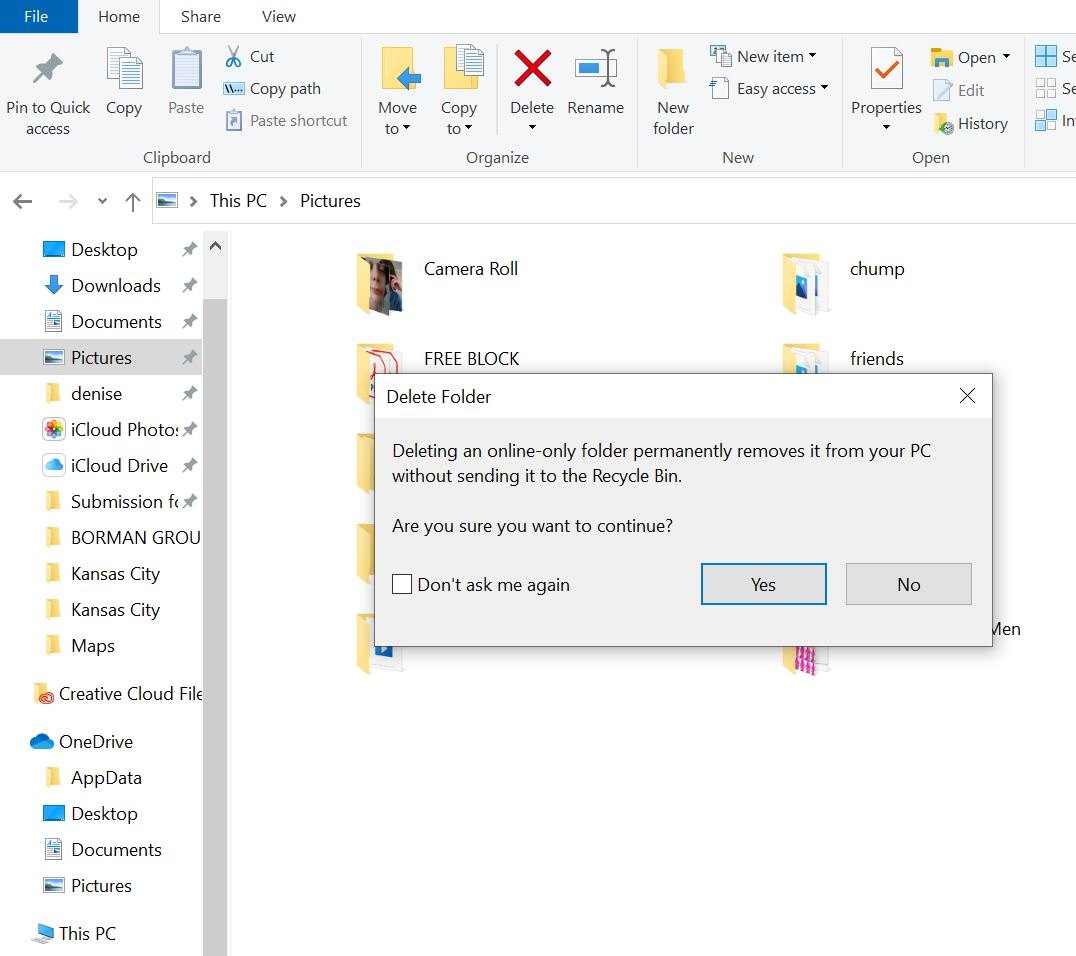
Hi there! I'm trying to free up space on my computer drive. However, when I try to delete a folder, it says that the folder is online only and that if I delete it I will not be able to recover it. I'm also confused because the files seem to be saved on my PC, but when I open their location they say they are in OneDrive. My attempts at changing their location does not change this. If the files online only, why are they taking up drive space?

I really want to clean up my PC's drive, but I'm hesitant to delete files if I wont be able to recover them, particularly because (to my understanding) OneDrive only saves files that are on your PC. How can I free up space on my drive while making sure files are still backed up in OneDrive?

This is the message I get when attempting to delete files:
Windows for home | Windows 10 | Devices and drivers

Locked Question. This question was migrated from the Microsoft Support Community. You can vote on whether it's helpful, but you can't add comments or replies or follow the question.

0 comments No comments

4 answers

Sort by: Most helpful
  1. Anonymous
    2021-09-08T16:42:59+00:00

    You may do better using a small utility called TreeSize to check what is using up space on your drive. You can download the app from the Windows 10 Store or go to https://www.jam-software.com/treesize_free you can post back a screenshot of the result but be sure to run it as administrator to see all files.

    Expand the top folders to see the contents of the biggest folders.

    1 person found this answer helpful.
    0 comments No comments
  2. Anonymous
    2021-09-08T16:36:27+00:00

    Hi Elise, thank you for your response!

    I have tried the Windows clean-up tool and it hasn't cleared more than a few MBs. Here's a picture of what my storage looks like; I think based on the size of the red bars and GBs, things are actually taking up space?

    With the exception of one folder, all appear as being online only (or all list their locations as 'OneDrive' and give me the same 'deleting online-only folder...' message. While the one folder (a photos folder) that appears as on my computer is fairly large, it's nowhere near 119GB. I'm also including a picture of what the file locations look like in case that's where the issue is.

    1 person found this answer helpful.
    0 comments No comments
  3. Anonymous
    2021-09-08T21:54:40+00:00

    That is quite odd, if you go to file explorer and find the Pictures icon in the left menu bar, there should be an arrow at the left side of the icon, if you click this is will show you all the locations that relate to the Pictures library. It is possible you have images stored somewhere else taking up space, which this will reveal.

    Kind Regards,

    Elise

    0 comments No comments
  4. Anonymous
    2021-09-07T23:17:22+00:00

    Hi, I'm Elise, and I'd be happy to help with your issue.

    It sounds like you are using the file on demand feature of OneDrive, these files are not actually taking up space on your PC, rather these are placeholders for the files which will be downloaded when you try to access them.

    If you are looking to free up space I would suggest using the disk clean up app, you can find this by using the Windows search tool.

    Please let me know if you need any further assistance.

    Kind Regards,

    Elise

    0 comments No comments
