Share via

Headphone bluetooth - AptX-LL code in windows 10 supported ?

Anonymous
2021-11-17T14:22:42+00:00

System info:

  • PC desktop : Windows 10 pro - 64bit - 21H1 OS Build: 19043.1348
  • Card: Intel(R) Wi-Fi 6 AX200 160MHz - bluetooh 5.1
  • Driver bluetooh verision: 22.80.0.4
  • Headphone : Sennheiser HD 350BT (AptX-LL)
  • With deafult driver AptX-LL not working in Headphone properties , channel only working at 44100Hz (CD quaily)

but i have installed driver Intel 8260 Bluetooth Audio Application (WBS/APTX) :

https://www.dell.com/support/home/en-us/drivers/DriversDetails?driverId=100J9&fileId=3546946146&lwp=rt

  • AptX-LL code is working in Headphone properties ,
  • working at 48000Hz (DVD quaily),
  • mode "hands-free" not working, micro not working

Please check and fix this feature in windows 10

Windows for home | Windows 10 | Devices and drivers

Locked Question. This question was migrated from the Microsoft Support Community. You can vote on whether it's helpful, but you can't add comments or replies or follow the question.

0 comments No comments

6 answers

Sort by: Most helpful
  1. Anonymous
    2021-11-22T14:15:32+00:00

    Hello abcloc009998,

    We are glad to know that it is working now.

    I will share this with the fellow community member to help us if we encounter this type of issue in the future.

    Thanks again for choosing Microsoft! We’re here when you need us.

    Sincerely,

    Carlo O.

    Microsoft Community

    Was this answer helpful?

    1 person found this answer helpful.
    0 comments No comments
  2. Anonymous
    2021-11-20T15:24:04+00:00

    wao!!!

    i just update last driver

    uninstall driver hands-free in Sound Properties and reconect

    it's working perffect

    Thanks you ! Carlo O. my problem solved.

    Was this answer helpful?

    1 person found this answer helpful.
    0 comments No comments
  3. Anonymous
    2021-11-19T15:25:43+00:00

    Hello Carlo O.

    Thanks for answer,

    I think the Service is still running,

    When I switch to mode with Bluetooth Handsfree feature,

    I can not hear any sound from headphone and microphone recording is no signal

    And Carlo O. let me knows about this:

    AptX-LL code in windows 10 official supported ?

    I would like to send you some relevant information:

    Image

    Image

    permission turn on for Recording

    Image

    Panel sound Setting when switch mode Hands-Free , there is an audio signal playing but I can't hear the sound

    Image

    Services: ( automatic Startup type still not working, Bluetooth service Hands-Free not show

    )

    Image

    Control Panel\Hardware and Sound\Devices and Printers

    Image

    Image

    Was this answer helpful?

    1 person found this answer helpful.
    0 comments No comments
  4. Anonymous
    2021-11-19T17:38:09+00:00

    Hello abcloc009998,

    Thank you for your reply.

    In regards with the compatibility question. Your device hardware would be a factor as well. Can you please share to us what is your device Make and Model?

    Meanwhile, we can try to perform this additional troubleshooting steps to try and fix the issue.

    Please perform a clean boot. Some background applications could be affecting your blue-tooth functions.

    If some partitions of your Current Windows Profile are corrupted this could also affect your device performance. Create a New User Profile would help and test if this will fix the issue.

    Sincerely,

    Carlo O.

    Microsoft Community

    Was this answer helpful?

    0 comments No comments
  5. Anonymous
    2021-11-17T22:13:15+00:00

    Hello abcloc009998,

    Welcome to Microsoft Office Community Forum. Thank you for sharing your concern with us today and we hope that all is well.

    We understand that you are having issues with your Bluetooth Handsfree feature, Let’s us check on this together and sort this out. Rest assured, we will do anything in our capability to assist you with your concern.

    Sometimes, this issues occurs due to System Service getting disabled or not set to start automatically.

    Here is a method that we can perform that can possibly fix the issue.

    Press on Windows + R , to open run

    Type services.msc and click on OK

    On the Services screen, make sure Bluetooth Support, Bluetooth Handsfree and other Bluetooth related Services are running.
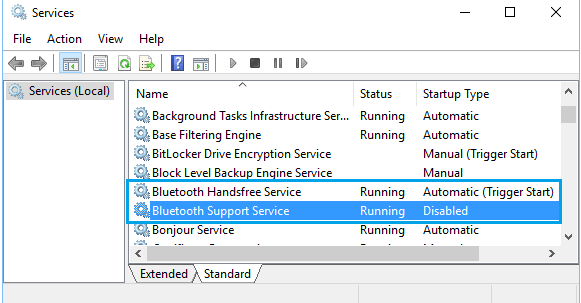
    If it is disabled, double-click on the disabled service. On the next screen, set the Startup type to Automaticand click on the Start button.
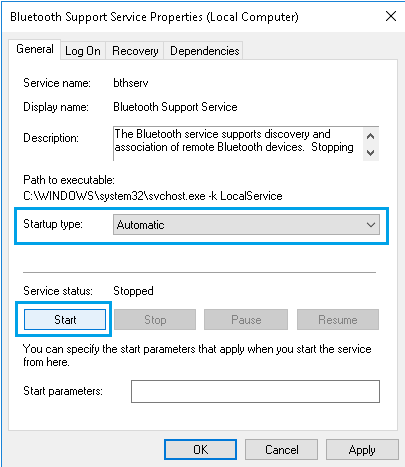
    Once applied test you headphones handsfree feature.

    We look forward to your response. If you have other clarifications about this matter, you can get back to us by replying to this post.

    Sincerely,

    Carlo O.

    Microsoft Community

    Was this answer helpful?

    0 comments No comments
