Share via

Laptop using built-in mic instead of headset mic

Anonymous
2021-12-28T01:02:18+00:00

Why hello!

I've recently received a headset with a 3.5mm 4 pin TRRS headphone jack. The output works fine, as in I can hear audio when wearing them, however my laptop is still using its own in-built mic instead of the headset mic. As an aside, I've tested using the headset with my phone and in this case the mic worked fine, just not with my laptop. Yes, my laptop does have a combined headphone and microphone jack so this is not the problem.

Here's a list of specifications:

  • JBL Quantum 200 headset
  • Dell Inspiron 5482 2-in-1 laptop
  • Windows 11 Pro

And here's a list of 'solutions' that I've already tried and haven't worked for me:

  • Ensuring all apps are allowed access to the microphone through the privacy settings
  • Updating and rolling back the correct Realtek audio drivers
  • Attempting to change the input device to the headset microphone in Waves MaxxAudio Pro
  • Making sure the mic isn't muted ... yes, I'm sure
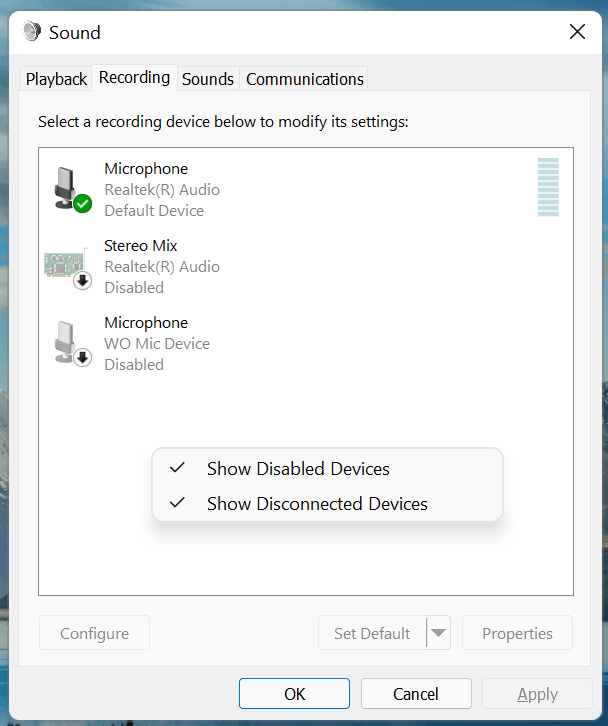
  • Looking for my headset mic in the control panel sound settings under recording devices (see screenshot below). The only available option is the Realtek microphone which is the default recording device. Apparently Realtek should automatically switch over from the laptop's in-built microphone to the headset microphone when it's plugged in and therefore a separate entry for my headset microphone doesn't need to pop up in this window when it's plugged in. However upon testing that the Realtek mic here is using my headset, it isn't. It's still using my laptop mic. Oh and yes, 'show disabled devices' is ticked so there's nothing hidden.

Hopefully that's all and I didn't miss anything, I'd be really grateful for your help!
Windows for home | Windows 11 | Devices and drivers

Locked Question. This question was migrated from the Microsoft Support Community. You can vote on whether it's helpful, but you can't add comments or replies or follow the question.

0 comments No comments

10 answers

Sort by: Most helpful
  1. Anonymous
    2022-01-03T21:40:26+00:00

    UPDATE:

    Further tests have revealed that this is not a Windows 11 problem, as I tested my headset on a different laptop with Windows 11 installed and the microphone worked fine. Therefore this led me to believe that it was a problem with my own laptop. So I went through the Dell support process where the agent tried all the options I've already tried, none of which worked. In the end the support agent basically said that short of completely factory resetting the operating system there is no way to fix the issue.

    First I will try using a USB adapter for my headset jack and see if this helps at all, and if not then result to the last resort of an OS reset.

    Thank you Joseph for your help, just thought I'd leave an update here since now I know the issue is not a Windows-caused problem.

    6 people found this answer helpful.
    0 comments No comments
  2. Anonymous
    2022-01-10T02:56:57+00:00

    UPDATE:

    Using a USB adapter solved the problem. Still not sure what was causing the issue as the headset should work fine without the USB (and does on other laptops). But oh well.

    5 people found this answer helpful.
    0 comments No comments
  3. Anonymous
    2021-12-28T22:25:28+00:00

    As I said, there remains no option to "select headset" when opening the app, and therefore tapping on the headset mic results in no signal jumps.

    1 person found this answer helpful.
    0 comments No comments
  4. Anonymous
    2021-12-28T09:57:13+00:00

    Thank you for your reply!

    I didn't know about the Waves MaxxAudio Pro app, but it's pretty useless to be honest. Just gives a signal meter as you say but it doesn't help the problem as the in-built laptop microphone is still being used instead of the headset microphone.

    The latest Dell audio driver is the Realtek one, so I installed that but again it made no difference.

    Upon further tests, I can only find one option for why this problem is occurring and it's because of Windows 11. Just tested my headset on another laptop still with Windows 10 and the headset mic worked fine. This is the only solution which so far appears to make sense, so I guess I'll get searching on how to revert back to Windows 10...

    1 person found this answer helpful.
    0 comments No comments
  5. JosephT71 9,210 Reputation points
    2021-12-28T04:07:16+00:00

    Dell computers have Dell Audio app or Waves MaxxAudio Pro app to configure the audio.

    Install the Dell audio driver, run Microsoft Store to pull the configure the app.

    Afterward, plug in your headset, select headset --- lightly tap your headset mic, the signal meter should jump.

    0 comments No comments
