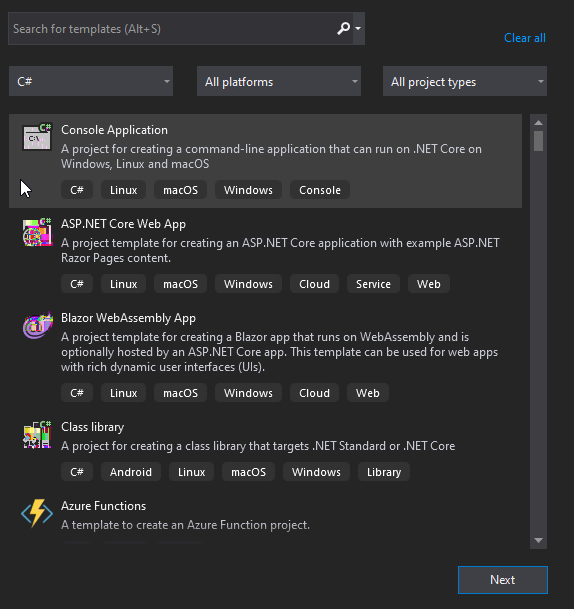
On some windows apps, some of the UI elements are rendering poorly, while many others render just fine. I've updated and replaced my nvidia GPU drivers many times, as well as completely removed my GPU and replaced with a different one, yet the problem persists. This problem also occurs regardless of the specific monitor or hdmi cable I am using.
See attached screenshots for examples.
Example 1. Visual Studio Project Icons covered in pink/green/purple/random colors.
Example 2. Spotify playlist image renders with green matrix like pixels throughout, even though the majority of the spotify album icons render just fine.

* Moved from Virus & Malware
' cx='32' cy='32' r='32' /%3E%3Ctext x='50%25' y='55%25' dominant-baseline='middle' text-anchor='middle' fill='%23FFF' %3EA%3C/text%3E%3C/svg%3E)

' cx='32' cy='32' r='32' /%3E%3Ctext x='50%25' y='55%25' dominant-baseline='middle' text-anchor='middle' fill='%23FFF' %3ERA%3C/text%3E%3C/svg%3E)