I just bought an Xbox Elite Series 2 Controller, trying to connect it wirelessly to my Windows 10 computer for use with PC games.
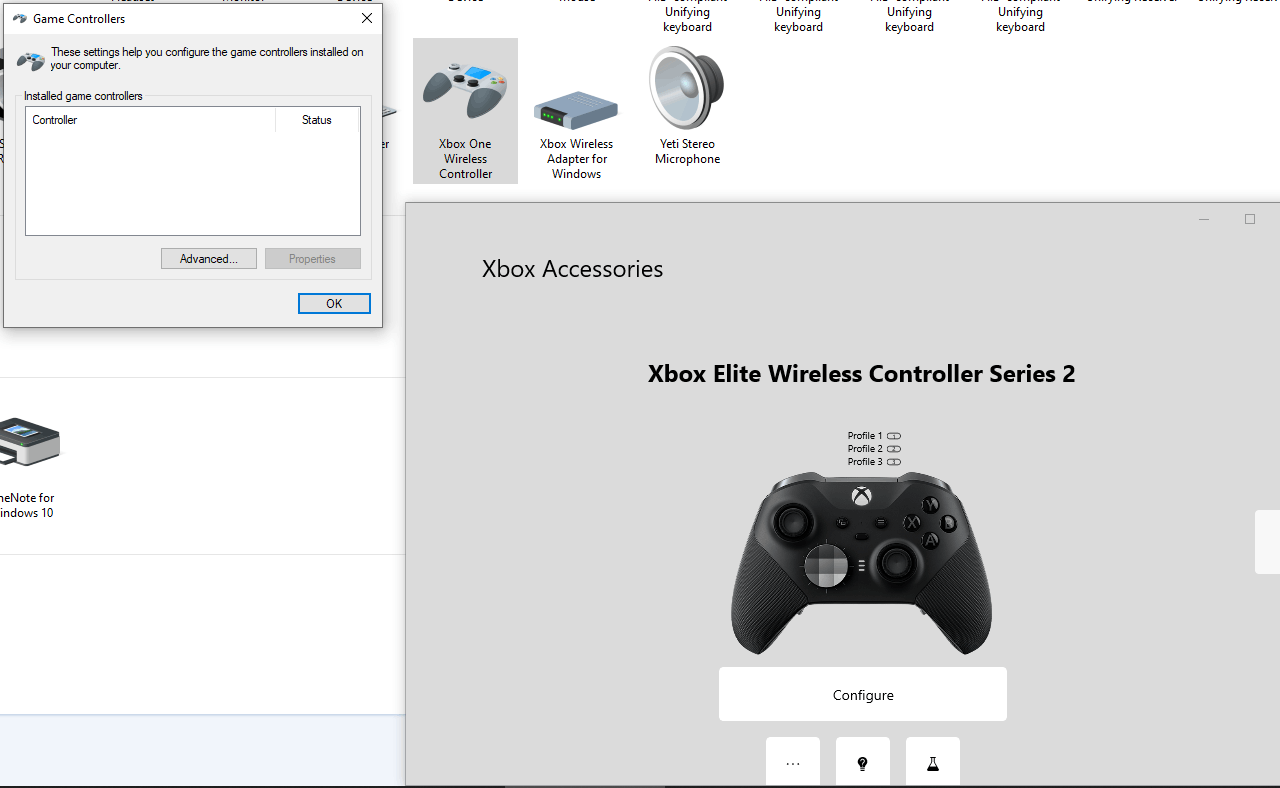
I'm able to pair it to the PC, both via Bluetooth and Xbox USB Dongle so that it is recognized in the Xbox Accessories app (and does work with some games such as Forza 4). But it is not recognized in the Windows "Game Controllers" panel (found via Windows key, type "Set up USB game controllers") when connected wirelessly (preventing it from working with some games such as Battlefield 3).
The controller is recognized in the "Game Controllers" panel only when connected via USB cable (and works with Battlefield 3), but the reason I bought it was to use it wirelessly (I already had a wired Xbox 360 controller).
I've tried uninstalling/removing/reinstalling the controller drivers etc, but no luck.
Any ideas are appreciated!
***Move from Gaming and Xbox / Devices and networking / Controllers and accessories ***
' cx='32' cy='32' r='32' /%3E%3Ctext x='50%25' y='55%25' dominant-baseline='middle' text-anchor='middle' fill='%23FFF' %3EA%3C/text%3E%3C/svg%3E)
