Microsoft Teams | Microsoft Teams for business | Other
Additional features, settings, or issues not covered by specific Microsoft Teams categories

This browser is no longer supported.
Upgrade to Microsoft Edge to take advantage of the latest features, security updates, and technical support.
' cx='32' cy='32' r='32' /%3E%3Ctext x='50%25' y='55%25' dominant-baseline='middle' text-anchor='middle' fill='%23FFF' %3ENS%3C/text%3E%3C/svg%3E)
Hi All ,
Teams not letting me drag files in to one-on-one chat. Please let me know how to enable the option to drag and drop files between one-on-one teams chat.
Additional features, settings, or issues not covered by specific Microsoft Teams categories

Do you have any update now?
Please feel free to drop us a note if there is any update.
Have a nice day!
Any updates now?
' cx='32' cy='32' r='32' /%3E%3Ctext x='50%25' y='55%25' dominant-baseline='middle' text-anchor='middle' fill='%23FFF' %3EJW%3C/text%3E%3C/svg%3E)
I have been seeing this issue too and it started after one of the last updates, not sure when exactly. I have Teams Version 1.3.00.28778 which was apparently last updated on 11/23/20.
I get no error, just nothing dropped into the new message area when I try to drag-n-drop on my Mac. This is SUPER annoying
' cx='32' cy='32' r='32' /%3E%3Ctext x='50%25' y='55%25' dominant-baseline='middle' text-anchor='middle' fill='%23FFF' %3EAV%3C/text%3E%3C/svg%3E)
I am having the same issue with one on one chats. This used to work with no issues.
You have Microsoft Teams Version 1.3.00.30866 (64-bit). It was last updated on 11/17/20.
' cx='32' cy='32' r='32' /%3E%3Ctext x='50%25' y='55%25' dominant-baseline='middle' text-anchor='middle' fill='%23FFF' %3ERM%3C/text%3E%3C/svg%3E)
I'm having the same issue as well. No error message, just the little circle with a slash through it telling me that it won't allow the picture, file, etc to be dropped into the box. I've tried logging out, closing program, and restarting, and even a reboot of the computer. Nothing has worked thus far. No available updates either.
' cx='32' cy='32' r='32' /%3E%3Ctext x='50%25' y='55%25' dominant-baseline='middle' text-anchor='middle' fill='%23FFF' %3EA%3C/text%3E%3C/svg%3E)
Same issue. My error message states "Some files couldn't be uploaded because they're missing necessary data". Used to work fine. 
Same here. No error message.
I am on a mac and this is extremely disruptive to my UX workflow.
' cx='32' cy='32' r='32' /%3E%3Ctext x='50%25' y='55%25' dominant-baseline='middle' text-anchor='middle' fill='%23FFF' %3EJ%3C/text%3E%3C/svg%3E)
I am having the same issue. I was able to drag and drop this morning, and now I am getting an error message. 
I tried updating Teams there was no update. I cannot attach any files either. I keep getting it failed.
I was able to fix my issue by logging out of Teams and logging back into Teams.
Hi Nithyanandhamsingaravadivelu-2745,
Could you provide us the error message if it exists?
Does anyone else have the same issue?
You could try to go to Files and click the OneDrive area to see if this issue can be resolved. If no luck, check if any information shows on the OneDrive panel.
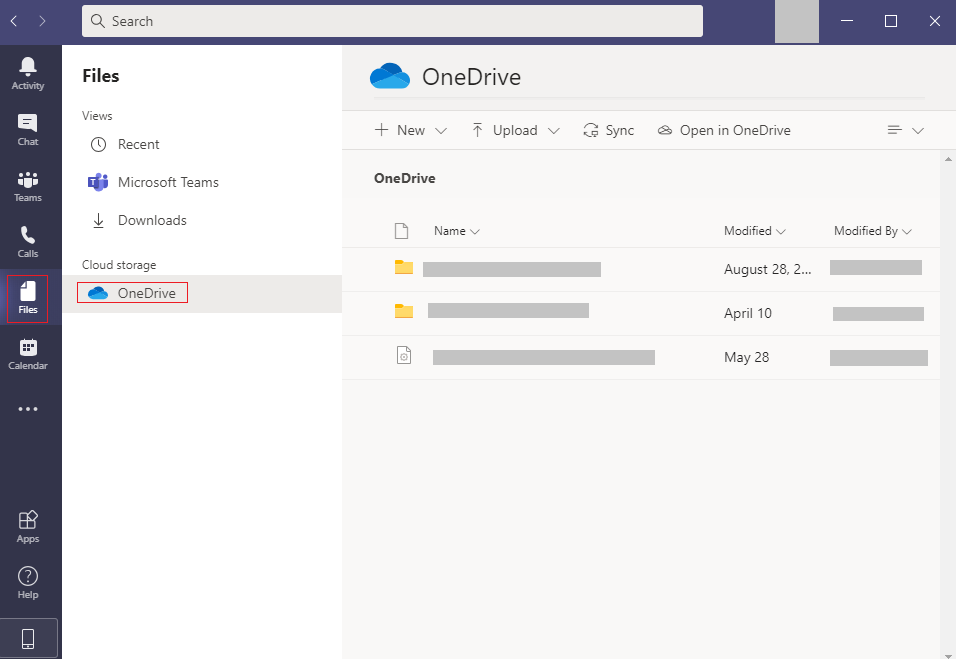
Please note that if your chat is between an external user, it does not support to share files now.
Moreover, contact the IT admin to check the settings in OneDrive for Business Admin Portal.
' cx='32' cy='32' r='32' /%3E%3Ctext x='50%25' y='55%25' dominant-baseline='middle' text-anchor='middle' fill='%23FFF' %3ERL%3C/text%3E%3C/svg%3E)
and how come an externa
l user is able to send images to me ?
' cx='32' cy='32' r='32' /%3E%3Ctext x='50%25' y='55%25' dominant-baseline='middle' text-anchor='middle' fill='%23FFF' %3EI%3C/text%3E%3C/svg%3E)
I have the same issue, do we have a solution yet??
' cx='32' cy='32' r='32' /%3E%3Ctext x='50%25' y='55%25' dominant-baseline='middle' text-anchor='middle' fill='%23FFF' %3EDL%3C/text%3E%3C/svg%3E)
I am also having the same issue
' cx='32' cy='32' r='32' /%3E%3Ctext x='50%25' y='55%25' dominant-baseline='middle' text-anchor='middle' fill='%23FFF' %3EST%3C/text%3E%3C/svg%3E)
Hi. I have the same problem. It has worked until 2 days ago. Is there any fix to this?

I almost have the same problem here. But it is not only chats, it is the same with channel conversations.
What I can add is that it works great on the web app. The problem for me is only with the desktop app.
' cx='32' cy='32' r='32' /%3E%3Ctext x='50%25' y='55%25' dominant-baseline='middle' text-anchor='middle' fill='%23FFF' %3EHA%3C/text%3E%3C/svg%3E)