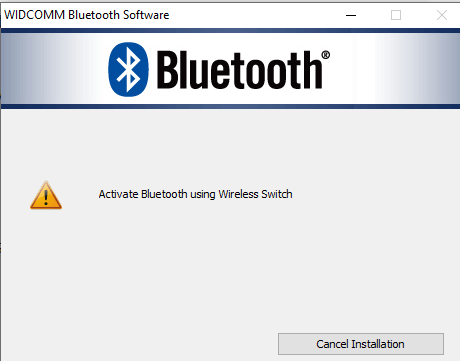
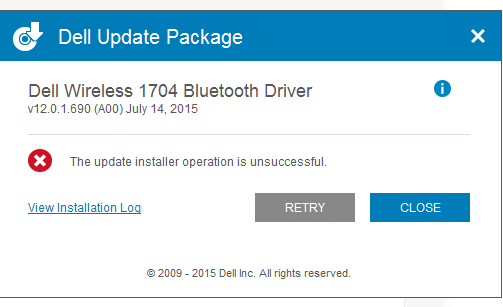
that's not working, at last, it says to activate Bluetooth using wireless switch and I don't have any Bluetooth switch on my laptop, the only button I have is a tower type network switch which is F2 in mine but that doesn't work,please help me here
I am also attaching screenshots of it, please help me I don't know why it's not working
this was installation log
[02/08/22 00:50:03] Update Package Execution Started
[02/08/22 00:50:03] Original command line: "C:\Users\Rameez C H\Downloads\Programs\Network_Driver_0DMHW_WN32_12.0.1.690_A00_4.exe"
[02/08/22 00:50:03] DUP Framework EXE Version: 3.3.1.70
[02/08/22 00:50:03] DUP Release: 0DMHWA00
[02/08/22 00:50:03] Intializing framework...
[02/08/22 00:50:03] logo.png
[02/08/22 00:50:07] User Command: attended
[02/08/22 00:50:07] DUP Capabilities Value: 39845887 (0x25FFFFF)
[02/08/22 00:50:07] DUP Vendor Software Version: 12.0.1.690
[02/08/22 00:50:07] Local System/Model Compatible with this Package? Yes
[02/08/22 00:50:07] Local System OS Version: 10.0.0.0
[02/08/22 00:50:07] OS Compatible with this Package? Yes
[02/08/22 00:50:07] Local System OS Language: EN
[02/08/22 00:50:07] Language Compatible with this Package? Yes
[02/08/22 00:50:07] Extraction-miniunz path: C:\PROGRA~3\dell\drivers\NETWOR~3.690\miniunz.exe
[02/08/22 00:50:07] Extraction-arguments: -x C:\Users\RAMEEZ~1\DOWNLO~1\Programs\NECF15~1.EXE -o -d C:\PROGRA~3\dell\drivers\NETWOR~3.690
[02/08/22 00:50:14] Extraction-GetExitCode: 0
[02/08/22 00:50:14] Identified Behavior : attended
[02/08/22 00:50:14] Temporary payload log file name: C:\ProgramData\dell\drivers\Network_Driver_0DMHW_WN32_12.0.1.690_A00_4\DUPA192.tmp
[02/08/22 00:50:14] Translated Command Line : Setup.exe "/vLOGFILE="C:\ProgramData\dell\drivers\Network_Driver_0DMHW_WN32_12.0.1.690_A00_4\DUPA192.tmp""
[02/08/22 00:50:14] Path : C:\ProgramData\dell\drivers\Network_Driver_0DMHW_WN32_12.0.1.690_A00_4
[02/08/22 00:50:14] Identified Behavior : attended
[02/08/22 00:51:17] Append Vendor Software Log: C:\ProgramData\dell\drivers\Network_Driver_0DMHW_WN32_12.0.1.690_A00_4\DUPA192.tmp
[02/08/22 00:51:17]
--- Start of Vendor Software Log ---
[02/08/22 00:51:17] ASCII payload log file detected.
[02/08/22 00:51:17] [00:50:50] <INFO> ************** Setup.exe - Begin Install 12.0.1.690 - Tuesday, February 08, 2022 ****************
[00:50:50] <INFO>
[00:50:51] <INFO> Run exe C:\Users\RAMEEZ~1\AppData\Local\Temp\BTW_TuesdayFebruary0820221250AM\Win64\setup.exe sub64 /f2"c:\programdata\dell\drivers\network_driver_0dmhw_wn32_12.0.1.690_a00_4\dupa192.tmp" "/vLOGFILE="C:\ProgramData\dell\drivers\Network_Driver_0DMHW_WN32_12.0.1
[00:50:52] <INFO> ************** Setup.exe - Begin Install 12.0.1.690 - Tuesday, February 08, 2022 ****************
[00:50:52] <INFO>
[00:50:53] <INFO> 64 bit OS = 1, Language id 1033, user UI lang 1033, system lang 1033
[00:50:54] <INFO> Setup dir C:\Users\RAMEEZ~1\AppData\Local\Temp\BTW_TuesdayFebruary0820221250AM, Media dir C:\Users\RAMEEZ~1\AppData\Local\Temp\BTW_TuesdayFebruary0820221250AM\Win64\
[00:50:54] <INFO> InstallWithoutDevice=0
[00:51:00] <ERROR> EnableRadio - failed to load BtwRSupport.dll
[00:51:00] <INFO> Check 1
[00:51:00] <INFO> DPInst not present C:\Users\RAMEEZ~1\AppData\Local\Temp\BTW_TuesdayFebruary0820221250AM\Custom\util\Win64\DPInst.exe
[00:51:00] <INFO> InstallBrcmDeviceInf, Signed 1
[00:51:11] <ERROR> device not plugged in, UI 0, SilentInstallWithoutDevice 1
[00:51:11] <INFO> InstallBrcmDeviceInf returned 3
[00:51:11] <INFO> InstallBrcmDeviceInf failed 3
[00:51:11] <INFO> InstallBrcmDeviceInf (2) failed 3, web 0
[00:51:11] <INFO> ************** Setup.exe - End Install 12, WLAN 0********************
[00:51:11] <INFO> [ResponseResult]
[00:51:11] <INFO> ResultCode=12
[00:51:11] <INFO> Close Setup Event
[00:51:11] <INFO> ************** Setup.exe - End Install 12********************
[00:51:11] <INFO> ************** Setup.exe - End Install 12, WLAN 0********************
[00:51:11] <INFO> [ResponseResult]
[00:51:11] <INFO> ResultCode=12
[00:51:11] <INFO> ************** Setup.exe - End Install 12********************
[02/08/22 00:51:17]
--- End of Vendor Software Log ---
[02/08/22 00:51:17] Vendor Software Return Code: 1603
[02/08/22 00:51:17] logo.png
[02/08/22 00:51:17] Name of Exit Code: ERROR
[02/08/22 00:51:17] Exit Code set to: 1 (0x1)
[02/08/22 00:51:17] Result: FAILURE
[02/08/22 00:51:20] Name of Exit Code: ERROR
[02/08/22 00:51:20] Execution terminated at date-time 02/08/22 00:51:20
[02/08/22 00:51:20] ######
[02/12/22 10:43:40] Update Package Execution Started
[02/12/22 10:43:40] Original command line: "C:\Users\Rameez C H\Downloads\Programs\Network_Driver_0DMHW_WN32_12.0.1.690_A00_4.exe"
[02/12/22 10:43:40] DUP Framework EXE Version: 3.3.1.70
[02/12/22 10:43:40] DUP Release: 0DMHWA00
[02/12/22 10:43:40] Intializing framework...
[02/12/22 10:43:40] logo.png
[02/12/22 10:43:42] User Command: attended
[02/12/22 10:43:42] DUP Capabilities Value: 39845887 (0x25FFFFF)
[02/12/22 10:43:42] DUP Vendor Software Version: 12.0.1.690
[02/12/22 10:43:42] Local System/Model Compatible with this Package? Yes
[02/12/22 10:43:42] Local System OS Version: 10.0.0.0
[02/12/22 10:43:42] OS Compatible with this Package? Yes
[02/12/22 10:43:42] Local System OS Language: EN
[02/12/22 10:43:42] Language Compatible with this Package? Yes
[02/12/22 10:43:42] Extraction-miniunz path: C:\PROGRA~3\dell\drivers\NETWOR~2.690\miniunz.exe
[02/12/22 10:43:42] Extraction-arguments: -x C:\Users\RAMEEZ~1\DOWNLO~1\Programs\NECF15~1.EXE -o -d C:\PROGRA~3\dell\drivers\NETWOR~2.690
[02/12/22 10:43:48] Extraction-GetExitCode: 0
[02/12/22 10:43:48] Identified Behavior : attended
[02/12/22 10:43:48] Temporary payload log file name: C:\ProgramData\dell\drivers\Network_Driver_0DMHW_WN32_12.0.1.690_A00_4\DUP7D0B.tmp
[02/12/22 10:43:48] Translated Command Line : Setup.exe "/vLOGFILE="C:\ProgramData\dell\drivers\Network_Driver_0DMHW_WN32_12.0.1.690_A00_4\DUP7D0B.tmp""
[02/12/22 10:43:48] Path : C:\ProgramData\dell\drivers\Network_Driver_0DMHW_WN32_12.0.1.690_A00_4
[02/12/22 10:43:48] Identified Behavior : attended
[02/12/22 10:44:30] Append Vendor Software Log: C:\ProgramData\dell\drivers\Network_Driver_0DMHW_WN32_12.0.1.690_A00_4\DUP7D0B.tmp
[02/12/22 10:44:30]
--- Start of Vendor Software Log ---
[02/12/22 10:44:30] ASCII payload log file detected.
[02/12/22 10:44:30] [10:44:06] <INFO> ************** Setup.exe - Begin Install 12.0.1.690 - Saturday, February 12, 2022 ****************
[10:44:07] <INFO>
[10:44:07] <INFO> Run exe C:\Users\RAMEEZ~1\AppData\Local\Temp\BTW_SaturdayFebruary1220221043AM\Win64\setup.exe sub64 /f2"c:\programdata\dell\drivers\network_driver_0dmhw_wn32_12.0.1.690_a00_4\dup7d0b.tmp" "/vLOGFILE="C:\ProgramData\dell\drivers\Network_Driver_0DMHW_WN32_12.0.
[10:44:12] <INFO> ************** Setup.exe - Begin Install 12.0.1.690 - Saturday, February 12, 2022 ****************
[10:44:13] <INFO>
[10:44:13] <INFO> 64 bit OS = 1, Language id 1033, user UI lang 1033, system lang 1033
[10:44:14] <INFO> Setup dir C:\Users\RAMEEZ~1\AppData\Local\Temp\BTW_SaturdayFebruary1220221043AM, Media dir C:\Users\RAMEEZ~1\AppData\Local\Temp\BTW_SaturdayFebruary1220221043AM\Win64\
[10:44:15] <INFO> InstallWithoutDevice=0
[10:44:18] <ERROR> EnableRadio - failed to load BtwRSupport.dll
[10:44:18] <INFO> Check 1
[10:44:18] <INFO> DPInst not present C:\Users\RAMEEZ~1\AppData\Local\Temp\BTW_SaturdayFebruary1220221043AM\Custom\util\Win64\DPInst.exe
[10:44:18] <INFO> InstallBrcmDeviceInf, Signed 1
[10:44:28] <ERROR> device not plugged in, UI 0, SilentInstallWithoutDevice 1
[10:44:28] <INFO> InstallBrcmDeviceInf returned 3
[10:44:28] <INFO> InstallBrcmDeviceInf failed 3
[10:44:28] <INFO> InstallBrcmDeviceInf (2) failed 3, web 0
[10:44:28] <INFO> ************** Setup.exe - End Install 12, WLAN 0********************
[10:44:28] <INFO> [ResponseResult]
[10:44:28] <INFO> ResultCode=12
[10:44:28] <INFO> Close Setup Event
[10:44:28] <INFO> ************** Setup.exe - End Install 12********************
[10:44:28] <INFO> ************** Setup.exe - End Install 12, WLAN 0********************
[10:44:28] <INFO> [ResponseResult]
[10:44:28] <INFO> ResultCode=12
[10:44:28] <INFO> ************** Setup.exe - End Install 12********************
[02/12/22 10:44:30]
--- End of Vendor Software Log ---
[02/12/22 10:44:30] Vendor Software Return Code: 1603
[02/12/22 10:44:31] logo.png
[02/12/22 10:44:31] Name of Exit Code: ERROR
[02/12/22 10:44:31] Exit Code set to: 1 (0x1)
[02/12/22 10:44:31] Result: FAILURE
[02/12/22 10:44:38] Name of Exit Code: ERROR
[02/12/22 10:44:38] Execution terminated at date-time 02/12/22 10:44:38
[02/12/22 10:44:38] ######
[02/13/22 18:17:43] Update Package Execution Started
[02/13/22 18:17:43] Original command line: "C:\Users\Rameez C H\Downloads\Programs\Network_Driver_0DMHW_WN32_12.0.1.690_A00_4.exe"
[02/13/22 18:17:43] DUP Framework EXE Version: 3.3.1.70
[02/13/22 18:17:43] DUP Release: 0DMHWA00
[02/13/22 18:17:43] Intializing framework...
[02/13/22 18:17:43] logo.png
[02/13/22 18:17:45] User Command: attended
[02/13/22 18:17:45] DUP Capabilities Value: 39845887 (0x25FFFFF)
[02/13/22 18:17:45] DUP Vendor Software Version: 12.0.1.690
[02/13/22 18:17:45] Local System/Model Compatible with this Package? Yes
[02/13/22 18:17:45] Local System OS Version: 10.0.0.0
[02/13/22 18:17:45] OS Compatible with this Package? Yes
[02/13/22 18:17:45] Local System OS Language: EN
[02/13/22 18:17:45] Language Compatible with this Package? Yes
[02/13/22 18:17:45] Extraction-miniunz path: C:\PROGRA~3\dell\drivers\NETWOR~2.690\miniunz.exe
[02/13/22 18:17:45] Extraction-arguments: -x C:\Users\RAMEEZ~1\DOWNLO~1\Programs\NECF15~1.EXE -o -d C:\PROGRA~3\dell\drivers\NETWOR~2.690
[02/13/22 18:17:48] Extraction-GetExitCode: 0
[02/13/22 18:17:48] Identified Behavior : attended
[02/13/22 18:17:48] Temporary payload log file name: C:\ProgramData\dell\drivers\Network_Driver_0DMHW_WN32_12.0.1.690_A00_4\DUP5DF2.tmp
[02/13/22 18:17:48] Translated Command Line : Setup.exe "/vLOGFILE="C:\ProgramData\dell\drivers\Network_Driver_0DMHW_WN32_12.0.1.690_A00_4\DUP5DF2.tmp""
[02/13/22 18:17:48] Path : C:\ProgramData\dell\drivers\Network_Driver_0DMHW_WN32_12.0.1.690_A00_4
[02/13/22 18:17:48] Identified Behavior : attended
[02/13/22 18:20:03] Append Vendor Software Log: C:\ProgramData\dell\drivers\Network_Driver_0DMHW_WN32_12.0.1.690_A00_4\DUP5DF2.tmp
[02/13/22 18:20:03]
--- Start of Vendor Software Log ---
[02/13/22 18:20:03] ASCII payload log file detected.
[02/13/22 18:20:03] [18:18:16] <INFO> ************** Setup.exe - Begin Install 12.0.1.690 - Sunday, February 13, 2022 ****************
[18:18:17] <INFO>
[18:18:17] <INFO> Run exe C:\Users\RAMEEZ~1\AppData\Local\Temp\BTW_SundayFebruary1320220618PM\Win64\setup.exe sub64 /f2"c:\programdata\dell\drivers\network_driver_0dmhw_wn32_12.0.1.690_a00_4\dup5df2.tmp" "/vLOGFILE="C:\ProgramData\dell\drivers\Network_Driver_0DMHW_WN32_12.0.1.
[18:18:19] <INFO> ************** Setup.exe - Begin Install 12.0.1.690 - Sunday, February 13, 2022 ****************
[18:18:19] <INFO>
[18:18:19] <INFO> 64 bit OS = 1, Language id 1033, user UI lang 1033, system lang 1033
[18:18:19] <INFO> Setup dir C:\Users\RAMEEZ~1\AppData\Local\Temp\BTW_SundayFebruary1320220618PM, Media dir C:\Users\RAMEEZ~1\AppData\Local\Temp\BTW_SundayFebruary1320220618PM\Win64\
[18:18:19] <INFO> InstallWithoutDevice=0
[18:18:23] <ERROR> EnableRadio - failed to load BtwRSupport.dll
[18:18:24] <INFO> Check 1
[18:18:24] <INFO> DPInst not present C:\Users\RAMEEZ~1\AppData\Local\Temp\BTW_SundayFebruary1320220618PM\Custom\util\Win64\DPInst.exe
[18:18:24] <INFO> InstallBrcmDeviceInf, Signed 1
[18:19:56] <ERROR> device not plugged in, UI 0, SilentInstallWithoutDevice 1
[18:19:56] <INFO> InstallBrcmDeviceInf returned 3
[18:19:56] <INFO> InstallBrcmDeviceInf failed 3
[18:19:56] <INFO> InstallBrcmDeviceInf (2) failed 3, web 0
[18:19:56] <INFO> ************** Setup.exe - End Install 12, WLAN 0********************
[18:19:56] <INFO> [ResponseResult]
[18:19:57] <INFO> ResultCode=12
[18:19:57] <INFO> Close Setup Event
[18:19:57] <INFO> ************** Setup.exe - End Install 12********************
[18:19:57] <INFO> ************** Setup.exe - End Install 12, WLAN 0********************
[18:19:57] <INFO> [ResponseResult]
[18:19:57] <INFO> ResultCode=12
[18:19:57] <INFO> ************** Setup.exe - End Install 12********************
[02/13/22 18:20:03]
--- End of Vendor Software Log ---
[02/13/22 18:20:03] Vendor Software Return Code: 1603
[02/13/22 18:20:04] logo.png
[02/13/22 18:20:04] Name of Exit Code: ERROR
[02/13/22 18:20:04] Exit Code set to: 1 (0x1)
[02/13/22 18:20:04] Result: FAILURE
[02/13/22 18:20:09] Open file: C:\ProgramData\Dell\UpdatePackage\Log\Network_Driver_0DMHW_WN32_12.0.1.690_A00_4.txt
[02/13/22 18:20:27] Name of Exit Code: ERROR
[02/13/22 18:20:27] Execution terminated at date-time 02/13/22 18:20:27
[02/13/22 18:20:27] ######
[02/13/22 18:27:48] Update Package Execution Started
[02/13/22 18:27:48] Original command line: "C:\Users\Rameez C H\Downloads\Programs\Network_Driver_0DMHW_WN32_12.0.1.690_A00_4.exe"
[02/13/22 18:27:48] DUP Framework EXE Version: 3.3.1.70
[02/13/22 18:27:48] DUP Release: 0DMHWA00
[02/13/22 18:27:48] Intializing framework...
[02/13/22 18:27:48] logo.png
[02/13/22 18:27:50] User Command: attended
[02/13/22 18:27:50] DUP Capabilities Value: 39845887 (0x25FFFFF)
[02/13/22 18:27:50] DUP Vendor Software Version: 12.0.1.690
[02/13/22 18:27:50] Local System/Model Compatible with this Package? Yes
[02/13/22 18:27:50] Local System OS Version: 10.0.0.0
[02/13/22 18:27:50] OS Compatible with this Package? Yes
[02/13/22 18:27:50] Local System OS Language: EN
[02/13/22 18:27:50] Language Compatible with this Package? Yes
[02/13/22 18:27:50] Extraction-miniunz path: C:\PROGRA~3\dell\drivers\NETWOR~2.690\miniunz.exe
[02/13/22 18:27:50] Extraction-arguments: -x C:\Users\RAMEEZ~1\DOWNLO~1\Programs\NECF15~1.EXE -o -d C:\PROGRA~3\dell\drivers\NETWOR~2.690
[02/13/22 18:27:51] Extraction-GetExitCode: 0
[02/13/22 18:27:51] Identified Behavior : attended
[02/13/22 18:27:51] Temporary payload log file name: C:\ProgramData\dell\drivers\Network_Driver_0DMHW_WN32_12.0.1.690_A00_4\DUP9179.tmp
[02/13/22 18:27:51] Translated Command Line : Setup.exe "/vLOGFILE="C:\ProgramData\dell\drivers\Network_Driver_0DMHW_WN32_12.0.1.690_A00_4\DUP9179.tmp""
[02/13/22 18:27:51] Path : C:\ProgramData\dell\drivers\Network_Driver_0DMHW_WN32_12.0.1.690_A00_4
[02/13/22 18:27:51] Identified Behavior : attended
[02/13/22 18:28:35] Append Vendor Software Log: C:\ProgramData\dell\drivers\Network_Driver_0DMHW_WN32_12.0.1.690_A00_4\DUP9179.tmp
[02/13/22 18:28:35]
--- Start of Vendor Software Log ---
[02/13/22 18:28:35] ASCII payload log file detected.
[02/13/22 18:28:35] [18:28:11] <INFO> ************** Setup.exe - Begin Install 12.0.1.690 - Sunday, February 13, 2022 ****************
[18:28:12] <INFO>
[18:28:12] <INFO> Run exe C:\Users\RAMEEZ~1\AppData\Local\Temp\BTW_SundayFebruary1320220628PM\Win64\setup.exe sub64 /f2"c:\programdata\dell\drivers\network_driver_0dmhw_wn32_12.0.1.690_a00_4\dup9179.tmp" "/vLOGFILE="C:\ProgramData\dell\drivers\Network_Driver_0DMHW_WN32_12.0.1.
[18:28:13] <INFO> ************** Setup.exe - Begin Install 12.0.1.690 - Sunday, February 13, 2022 ****************
[18:28:14] <INFO>
[18:28:14] <INFO> 64 bit OS = 1, Language id 1033, user UI lang 1033, system lang 1033
[18:28:15] <INFO> Setup dir C:\Users\RAMEEZ~1\AppData\Local\Temp\BTW_SundayFebruary1320220628PM, Media dir C:\Users\RAMEEZ~1\AppData\Local\Temp\BTW_SundayFebruary1320220628PM\Win64\
[18:28:15] <INFO> InstallWithoutDevice=0
[18:28:18] <ERROR> EnableRadio - failed to load BtwRSupport.dll
[18:28:18] <INFO> Check 1
[18:28:19] <INFO> DPInst not present C:\Users\RAMEEZ~1\AppData\Local\Temp\BTW_SundayFebruary1320220628PM\Custom\util\Win64\DPInst.exe
[18:28:19] <INFO> InstallBrcmDeviceInf, Signed 1
[18:28:30] <ERROR> device not plugged in, UI 0, SilentInstallWithoutDevice 1
[18:28:30] <INFO> InstallBrcmDeviceInf returned 3
[18:28:30] <INFO> InstallBrcmDeviceInf failed 3
[18:28:30] <INFO> InstallBrcmDeviceInf (2) failed 3, web 0
[18:28:30] <INFO> ************** Setup.exe - End Install 12, WLAN 0********************
[18:28:30] <INFO> [ResponseResult]
[18:28:30] <INFO> ResultCode=12
[18:28:30] <INFO> Close Setup Event
[18:28:31] <INFO> ************** Setup.exe - End Install 12********************
[18:28:31] <INFO> ************** Setup.exe - End Install 12, WLAN 0********************
[18:28:31] <INFO> [ResponseResult]
[18:28:31] <INFO> ResultCode=12
[18:28:31] <INFO> ************** Setup.exe - End Install 12********************
[02/13/22 18:28:35]
--- End of Vendor Software Log ---
[02/13/22 18:28:35] Vendor Software Return Code: 1603
[02/13/22 18:28:35] logo.png
[02/13/22 18:28:35] Name of Exit Code: ERROR
[02/13/22 18:28:35] Exit Code set to: 1 (0x1)
[02/13/22 18:28:35] Result: FAILURE
[02/13/22 18:28:37] Open file: C:\ProgramData\Dell\UpdatePackage\Log\Network_Driver_0DMHW_WN32_12.0.1.690_A00_4.txt
' cx='32' cy='32' r='32' /%3E%3Ctext x='50%25' y='55%25' dominant-baseline='middle' text-anchor='middle' fill='%23FFF' %3EA%3C/text%3E%3C/svg%3E)
