Share via

Problem with Fresco Logic IDDCX Adapter (hdmi to usb) Screen Flashing black

Anonymous
2022-03-13T19:21:45+00:00

Hello, So I recently bought a screen adapter Fresco Logic and it doesn't work properly, whenever I try putting the resolution higher than 800 x 600 it starts to flash black, I would really appreciate help

thank you

Windows for home | Windows 10 | Devices and drivers

Locked Question. This question was migrated from the Microsoft Support Community. You can vote on whether it's helpful, but you can't add comments or replies or follow the question.

0 comments No comments

16 answers

Sort by: Most helpful
  1. Rodrigo Queiroz 77,500 Reputation points Independent Advisor
    2022-03-13T20:55:47+00:00

    Hi Nicolaslafo,

    I'm Rodrigo and I will help you.

    The adapter needs to be connected to a USB 3.0 port to work correctly, if it is connected to a USB 2.0 port it will work on a maximum resolution of 800x600.

    If it is already connected to a USB 3.0 port, try another available port

    30+ people found this answer helpful.
    0 comments No comments
  2. Rodrigo Queiroz 77,500 Reputation points Independent Advisor
    2022-03-14T01:33:22+00:00

    With a little research, I found that it is a common issue with this adapter, here is a possible fix that I've found:

    Go to the Fresco Logic driver installation folder (default path: C:\Program Files\Fresco Logic\Fresco Logic USB Display Driver\FL2000\x64) and open fresco_monitor_tool.exe . Set the resolution and refresh rate but slowly increase from 800x600 until you find a suitable working resolution. Set the refresh rate to 60HZ, and if needed, reduce it. Select Set EDID to apply the changes, Clear EDID will clear the changes you did.

    20+ people found this answer helpful.
    0 comments No comments
  3. Rodrigo Queiroz 77,500 Reputation points Independent Advisor
    2022-03-13T23:30:20+00:00

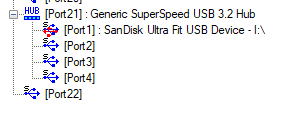
    Nice, the device is running with the best speed possible, install this driver from Fresco Logic (obtained on their website) restart the computer and try again.

    https://support.frescologic.com/portal/api/kbAr...

    Standard Disclaimer: This is a non-Microsoft website. The page appears to be providing accurate, safe information. Watch out for ads on the site that may advertise products frequently classified as a PUP (Potentially Unwanted Products). Thoroughly research any product advertised on the site before you decide to download and install it.
    20+ people found this answer helpful.
    0 comments No comments
  4. Rodrigo Queiroz 77,500 Reputation points Independent Advisor
    2022-03-13T22:57:48+00:00

    First of all, make sure that the device is running at the USB 3.0 speed, you can use the software on the link below to do it, just open it and it will show all your USB devices and their speeds. The device should have S next to it, if it shows F or H, it is running at lower speeds. (see example below)

    https://www.uwe-sieber.de/files/UsbTreeView_x64...

    Standard Disclaimer: This is a non-Microsoft website. The page appears to be providing accurate, safe information. Watch out for ads on the site that may advertise products frequently classified as a PUP (Potentially Unwanted Products). Thoroughly research any product advertised on the site before you decide to download and install it.

    10+ people found this answer helpful.
    0 comments No comments
  5. Anonymous
    2022-03-14T09:41:50+00:00

    When I open fresco monitor tool, none of the resolutions works and when I try putting it to the maximum resolution , my pc crashes

    4 people found this answer helpful.
    0 comments No comments

